
This is the universal build of SingleID Authenticator 1.1.22510291. It contains native libraries for every CPU architecture (arm64-v8a, armeabi-v7a, x86, x86_64), so it installs on any Android device. The trade-off is size — it's larger than per-architecture variants. Pick this one if you're unsure which CPU your phone has, or if you plan to share the APK with multiple devices.
File size: 61.6 MB • Min Android: 24 • Target Android: 35 • Version code: 22510291 • Framework: Native (Java/Kotlin) • Permissions: 21
Screenshots

File Information
| Package Name | com.samsungsds.nexsign.client.singleid.pub |
|---|---|
| Version Name | 1.1.22510291 |
| Version Code | 22510291 |
| Architecture | Universal |
| Min Android Version | Android 24 (API 35) |
| Main Activity | com.samsungsds.nexsign.client.flutter.uma.authenticator.MainActivity |
| Framework | Native (Java/Kotlin) |
| File Size | 61.60 MB |
| Signature (SHA1) | 74A51A2CDC647098024B57F89F814D0C9932CFDF |
| File Hash (SHA256) | 67a334862a7bd615112e8907925106b1fbe441456227d818d4ae672d73b60817 |
What's New
Bug fixes and app improvements
App Description
SingleID는 하나의 ID로 On-premise부터 Cloud 서비스까지 단일인증으로 허가된 Application에 접속할 수 있는 서비스를 제공합니다.
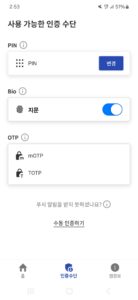
SingleID Authenticator 앱을 사용하면 SingleID 웹의 추가 인증을 생체 또는 PIN으로 보다 편리하게 이용할 수 있습니다.
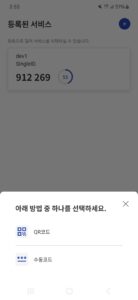
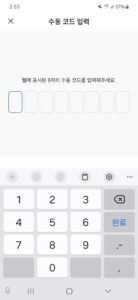
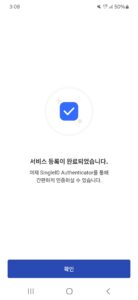
* 처음 앱 이용 시 SingleID 웹의 추가인증 화면에 나타난 QR을 스캔하거나 또는 서비스 등록코드를 입력하여 서비스를 등록하세요.
* SingleID 웹에서 추가 인증 필요 시 모바일 PUSH를 통해 앱에서 사용자가 선택한 인증수단으로 인증할 수 있습니다.
SingleID Authenticator 앱을 사용하면 SingleID 웹의 추가 인증을 생체 또는 PIN으로 보다 편리하게 이용할 수 있습니다.
* 처음 앱 이용 시 SingleID 웹의 추가인증 화면에 나타난 QR을 스캔하거나 또는 서비스 등록코드를 입력하여 서비스를 등록하세요.
* SingleID 웹에서 추가 인증 필요 시 모바일 PUSH를 통해 앱에서 사용자가 선택한 인증수단으로 인증할 수 있습니다.
Download SingleID Authenticator APK
Fast, free and safe download.
APK Permissions 21
- android.permission.ACCESS_ADSERVICES_AD_ID
- android.permission.ACCESS_ADSERVICES_ATTRIBUTION
- android.permission.ACCESS_NETWORK_STATE
- android.permission.CAMERA
- android.permission.INTERNET
- android.permission.POST_NOTIFICATIONS
- android.permission.READ_EXTERNAL_STORAGE
- android.permission.RECEIVE_BOOT_COMPLETED
- android.permission.REQUEST_IGNORE_BATTERY_OPTIMIZATIONS
- android.permission.USE_BIOMETRIC
- android.permission.USE_FINGERPRINT
- android.permission.VIBRATE
- android.permission.WAKE_LOCK
- android.permission.WRITE_EXTERNAL_STORAGE
- com.google.android.c2dm.permission.RECEIVE
- com.google.android.finsky.permission.BIND_GET_INSTALL_REFERRER_SERVICE
- com.google.android.gms.permission.AD_ID
- com.samsung.android.providers.context.permission.WRITE_USE_APP_FEATURE_SURVEY
- com.samsungsds.nexsign.client.singleid.pub.DYNAMIC_RECEIVER_NOT_EXPORTED_PERMISSION
- org.fidoalliance.uaf.permissions.FIDO_CLIENT
- org.simalliance.openmobileapi.SMARTCARD
APK Verified
The cryptographic signature guarantees that the file is safe to install and was not tampered with in any way.
Similar in Tools


More by Samsung SDS Co,. Ltd.

Frequently Asked Questions about SingleID Authenticator APK
This is the universal variant — a single APK that contains native libraries for every CPU architecture. It installs on any Android device but is larger than per-architecture variants.
Yes — the APK's signature has been cryptographically verified against the publisher's signing key. The SHA-256 hash is shown in the File Information panel so you can independently confirm the file matches the original release.
Android 24 (API level 35) or newer. Older devices will refuse the install.
Install a free app like 'CPU-Z' or 'Droid Hardware Info' from the Play Store and look at the ABI / Instruction Set row. Most phones made after 2017 are arm64-v8a; if in doubt, download the universal variant.
All variants are functionally identical — same features, same version. They differ only in which CPU architectures the native code is compiled for, and (sometimes) which screen densities the included graphics target. Pick the one that matches your device for the smallest install size, or pick 'Universal' if you're unsure.