
This is the universal build of Key Mapper & Floating buttons 3.1.1. It contains native libraries for every CPU architecture (arm64-v8a, armeabi-v7a, x86, x86_64), so it installs on any Android device. The trade-off is size — it's larger than per-architecture variants. Pick this one if you're unsure which CPU your phone has, or if you plan to share the APK with multiple devices.
File size: 6.6 MB • Min Android: 21 • Target Android: 35 • Version code: 118 • Framework: Native (Java/Kotlin) • Permissions: 29
Screenshots
File Information
| Package Name | io.github.sds100.keymapper |
|---|---|
| Version Name | 3.1.1 |
| Version Code | 118 |
| Architecture | Universal |
| Min Android Version | Android 21 (API 35) |
| Main Activity | io.github.sds100.keymapper.MainActivity |
| Framework | Native (Java/Kotlin) |
| File Size | 6.60 MB |
| Signature (SHA1) | 2645FB8ABB28C74F84C81591E1073BE736AFD8B4 |
| File Hash (SHA256) | 6bfb40522a98b072767c19bc1694bf75ca2ab05031c237a4966bc3d105aa270d |
What's New
Fix for Minecraft 1.21.80!
⏰ Time constraints.
🔎 Action to interact with app elements.
See all the changes at
changelog.keymapper.club
.
⏰ Time constraints.
🔎 Action to interact with app elements.
See all the changes at
changelog.keymapper.club
.
App Description
Make custom macros on your keyboard or gamepad, make on-screen buttons in any app, and unlock new functionality from your volume buttons!
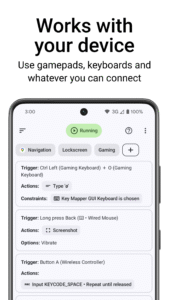
Key Mapper supports a huge variety of buttons and keys*:
- ALL your phone buttons (volume AND side key)
- Game controllers (D-pad, ABXY, and most others)
- Keyboards
- Headsets and headphones
- Fingerprint sensor
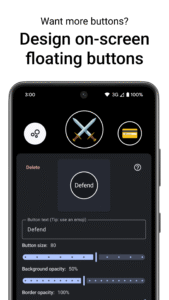
Not enough keys? Design your own on-screen button layouts and remap those just like real keys!
What shortcuts can I make?
--------------------------
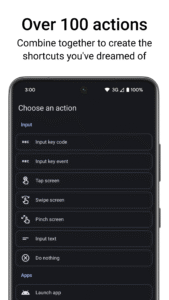
With over 100 individual actions, the sky is the limit.
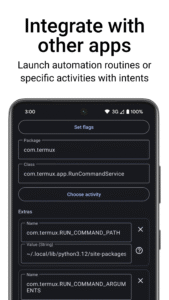
Build complex macros with screen taps and gestures, keyboard inputs, open apps, control media, and even send intents directly to other apps.
How much control do I have?
---------------------------
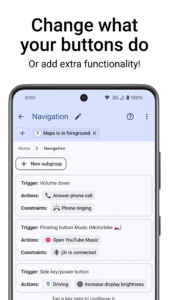
TRIGGERS: You decide how to trigger a key map. Long press, double press, press as many times as you like! Combine keys on different devices, and even include your on-screen buttons.
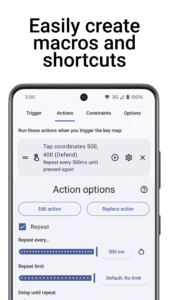
ACTIONS: Design specific macros for what you want to do. Combine over 100 actions, and choose the delay between each one. Set repeating actions to automate and speed up slow tasks.
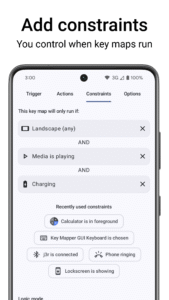
CONSTRAINTS: You choose when key maps should run and when they shouldn't. Only need it in one specific app? Or when media is playing? On your lockscreen? Constrain your key maps for maximum control.
* Most devices are already supported, with new devices being added over time. Let us know if it's not working for you and we can prioritize your device.
Not currently supported:
- Mouse buttons
- Joysticks and triggers (LT,RT) on gamepads
Security and accessibility services
---------------------------
This app includes our Key Mapper Accessibility service that uses the Android Accessibility API to detect the app in focus and adapt key presses to user-defined key maps. It is also used to draw assistive Floating Button overlays on top of other apps.
By accepting to run the accessibility service, the app will monitor key strokes while you're using your device. It will also emulate swipes and pinches if you are using those actions in the app.
It will NOT collect any user data or connect to the internet to send any data anywhere.
Our accessibility service is only triggered by the user when pressing a physical key on their device. It can be turned off any time by the user in the system accessibility settings.
Come say hi in our Discord community!
www.keymapper.club
See the code for yourself! (Open source)
code.keymapper.club
Read the documentation:
docs.keymapper.club
Key Mapper supports a huge variety of buttons and keys*:
- ALL your phone buttons (volume AND side key)
- Game controllers (D-pad, ABXY, and most others)
- Keyboards
- Headsets and headphones
- Fingerprint sensor
Not enough keys? Design your own on-screen button layouts and remap those just like real keys!
What shortcuts can I make?
--------------------------
With over 100 individual actions, the sky is the limit.
Build complex macros with screen taps and gestures, keyboard inputs, open apps, control media, and even send intents directly to other apps.
How much control do I have?
---------------------------
TRIGGERS: You decide how to trigger a key map. Long press, double press, press as many times as you like! Combine keys on different devices, and even include your on-screen buttons.
ACTIONS: Design specific macros for what you want to do. Combine over 100 actions, and choose the delay between each one. Set repeating actions to automate and speed up slow tasks.
CONSTRAINTS: You choose when key maps should run and when they shouldn't. Only need it in one specific app? Or when media is playing? On your lockscreen? Constrain your key maps for maximum control.
* Most devices are already supported, with new devices being added over time. Let us know if it's not working for you and we can prioritize your device.
Not currently supported:
- Mouse buttons
- Joysticks and triggers (LT,RT) on gamepads
Security and accessibility services
---------------------------
This app includes our Key Mapper Accessibility service that uses the Android Accessibility API to detect the app in focus and adapt key presses to user-defined key maps. It is also used to draw assistive Floating Button overlays on top of other apps.
By accepting to run the accessibility service, the app will monitor key strokes while you're using your device. It will also emulate swipes and pinches if you are using those actions in the app.
It will NOT collect any user data or connect to the internet to send any data anywhere.
Our accessibility service is only triggered by the user when pressing a physical key on their device. It can be turned off any time by the user in the system accessibility settings.
Come say hi in our Discord community!
www.keymapper.club
See the code for yourself! (Open source)
code.keymapper.club
Read the documentation:
docs.keymapper.club
Download Key Mapper & Floating buttons APK
Fast, free and safe download.
APK Permissions 29
- android.permission.ACCESS_FINE_LOCATION
- android.permission.ACCESS_NETWORK_STATE
- android.permission.ACCESS_NOTIFICATION_POLICY
- android.permission.ACCESS_WIFI_STATE
- android.permission.ANSWER_PHONE_CALLS
- android.permission.BLUETOOTH
- android.permission.BLUETOOTH_ADMIN
- android.permission.BLUETOOTH_CONNECT
- android.permission.CALL_PHONE
- android.permission.CAMERA
- android.permission.CHANGE_WIFI_STATE
- android.permission.EXPAND_STATUS_BAR
- android.permission.INTERNET
- android.permission.POST_NOTIFICATIONS
- android.permission.QUERY_ALL_PACKAGES
- android.permission.READ_EXTERNAL_STORAGE
- android.permission.READ_PHONE_STATE
- android.permission.RECEIVE_BOOT_COMPLETED
- android.permission.REORDER_TASKS
- android.permission.REQUEST_IGNORE_BATTERY_OPTIMIZATIONS
- android.permission.USE_FINGERPRINT
- android.permission.VIBRATE
- android.permission.WRITE_EXTERNAL_STORAGE
- android.permission.WRITE_SECURE_SETTINGS
- android.permission.WRITE_SETTINGS
- com.android.vending.BILLING
- com.termux.permission.RUN_COMMAND
- io.github.sds100.keymapper.DYNAMIC_RECEIVER_NOT_EXPORTED_PERMISSION
- moe.shizuku.manager.permission.API_V23
APK Verified
The cryptographic signature guarantees that the file is safe to install and was not tampered with in any way.


Frequently Asked Questions about Key Mapper & Floating buttons APK
This is the universal variant — a single APK that contains native libraries for every CPU architecture. It installs on any Android device but is larger than per-architecture variants.
Yes — the APK's signature has been cryptographically verified against the publisher's signing key. The SHA-256 hash is shown in the File Information panel so you can independently confirm the file matches the original release.
Android 21 (API level 35) or newer. Older devices will refuse the install.
Install a free app like 'CPU-Z' or 'Droid Hardware Info' from the Play Store and look at the ABI / Instruction Set row. Most phones made after 2017 are arm64-v8a; if in doubt, download the universal variant.
All variants are functionally identical — same features, same version. They differ only in which CPU architectures the native code is compiled for, and (sometimes) which screen densities the included graphics target. Pick the one that matches your device for the smallest install size, or pick 'Universal' if you're unsure.