
This is the universal build of Epson Label Editor Mobile 1.5.0. It contains native libraries for every CPU architecture (arm64-v8a, armeabi-v7a, x86, x86_64), so it installs on any Android device. The trade-off is size — it's larger than per-architecture variants. Pick this one if you're unsure which CPU your phone has, or if you plan to share the APK with multiple devices.
File size: 44.5 MB • Min Android: 29 • Target Android: 34 • Version code: 39 • Framework: Native (Java/Kotlin) • Permissions: 17
Screenshots
File Information
| Package Name | com.epson.labeleditormobile |
|---|---|
| Version Name | 1.5.0 |
| Version Code | 39 |
| Architecture | Universal |
| Min Android Version | Android 29 (API 34) |
| Main Activity | com.epson.labeleditorcore.MainActivity |
| Framework | Native (Java/Kotlin) |
| File Size | 44.53 MB |
| Signature (SHA1) | B524C62FE136E7C61B06839CB69AAB5E09C772EC |
| File Hash (SHA256) | 159d1aa642c4a6c70024a3f0883a79bde4843930d96ad6030c5752511b9e0207 |
What's New
- Add new content.
App Description
Epson Label Works new app Epson Label Editor Mobile is now release!
Greatly improved from Epson iLabel;
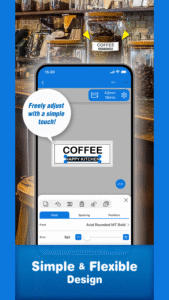
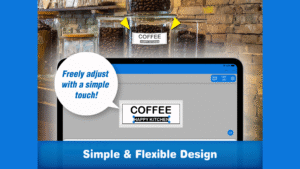
- Greater flexibility in label design
- Intuitive operability
- Many new features have been implemented
- Create your own label -
You can design label freely and thanks to simple operation, you can easily create a label that suits your needs.
In addition, we have many convenient features that will satisfy business users such as working at the office and jobsite.
You can watch a simple how-to video.
www.youtube.com/playlist?list=PL_i6ZFZucFD8kUS0JHLJRJ01APyWSli3C
[Recommended features for each scene]
Using at home
- Font: Use any font you like installed on your device.
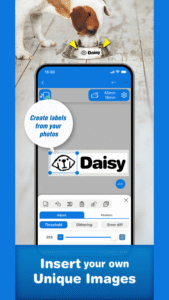
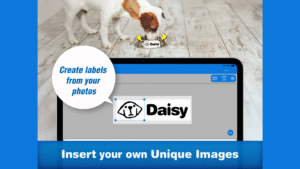
- Insert image: Inserts your favorite images such as photos or illustrations.
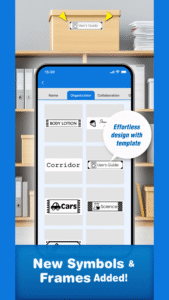
- Rich pre-install contents: Create and design your labels with a wide variety of symbols, frames, and shapes.
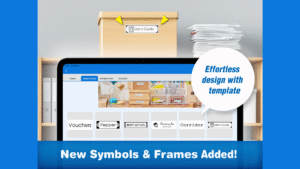
- Templates: Easily edit and print labels by selecting your favorite pre-designed label templates.
Using at office and jobsite
- Table: The most suitable for the equipment management.
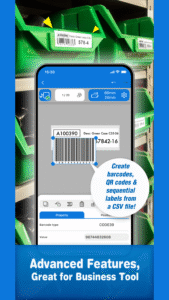
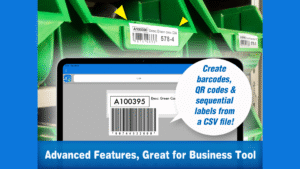
- Barcode/QR code: Recommended for the equipment and stock management. Code scan feature can be easily duplicated various codes just scanning.
- Import: Create multiple labels at once by importing an Excel or CSV file.
- You can print labels created by "Label Editor" (PC software) on this mobile application. For details, go to the help of the PC software.
All users
- Save : Save your frequently used label design.
- Label sharing: Share your own labels with friends and colleagues.
[Supported models]
support.epson.net/appinfo/labeleditormobile/list/
* Note: Please visit our website for more information about Epson Label Editor Mobile and LabelWorks solutions.
Greatly improved from Epson iLabel;
- Greater flexibility in label design
- Intuitive operability
- Many new features have been implemented
- Create your own label -
You can design label freely and thanks to simple operation, you can easily create a label that suits your needs.
In addition, we have many convenient features that will satisfy business users such as working at the office and jobsite.
You can watch a simple how-to video.
www.youtube.com/playlist?list=PL_i6ZFZucFD8kUS0JHLJRJ01APyWSli3C
[Recommended features for each scene]
Using at home
- Font: Use any font you like installed on your device.
- Insert image: Inserts your favorite images such as photos or illustrations.
- Rich pre-install contents: Create and design your labels with a wide variety of symbols, frames, and shapes.
- Templates: Easily edit and print labels by selecting your favorite pre-designed label templates.
Using at office and jobsite
- Table: The most suitable for the equipment management.
- Barcode/QR code: Recommended for the equipment and stock management. Code scan feature can be easily duplicated various codes just scanning.
- Import: Create multiple labels at once by importing an Excel or CSV file.
- You can print labels created by "Label Editor" (PC software) on this mobile application. For details, go to the help of the PC software.
All users
- Save : Save your frequently used label design.
- Label sharing: Share your own labels with friends and colleagues.
[Supported models]
support.epson.net/appinfo/labeleditormobile/list/
* Note: Please visit our website for more information about Epson Label Editor Mobile and LabelWorks solutions.
Download Epson Label Editor Mobile APK
Fast, free and safe download.
APK Permissions 17
- android.permission.ACCESS_COARSE_LOCATION
- android.permission.ACCESS_FINE_LOCATION
- android.permission.ACCESS_NETWORK_STATE
- android.permission.ACCESS_WIFI_STATE
- android.permission.BLUETOOTH
- android.permission.BLUETOOTH_ADMIN
- android.permission.BLUETOOTH_CONNECT
- android.permission.BLUETOOTH_SCAN
- android.permission.CAMERA
- android.permission.CHANGE_NETWORK_STATE
- android.permission.CHANGE_WIFI_MULTICAST_STATE
- android.permission.CHANGE_WIFI_STATE
- android.permission.INTERNET
- android.permission.POST_NOTIFICATIONS
- android.permission.VIBRATE
- android.permission.WAKE_LOCK
- com.google.android.finsky.permission.BIND_GET_INSTALL_REFERRER_SERVICE
APK Verified
The cryptographic signature guarantees that the file is safe to install and was not tampered with in any way.
Similar in Tools


More by Seiko Epson Corporation


Frequently Asked Questions about Epson Label Editor Mobile APK
This is the universal variant — a single APK that contains native libraries for every CPU architecture. It installs on any Android device but is larger than per-architecture variants.
Yes — the APK's signature has been cryptographically verified against the publisher's signing key. The SHA-256 hash is shown in the File Information panel so you can independently confirm the file matches the original release.
Android 29 (API level 34) or newer. Older devices will refuse the install.
Install a free app like 'CPU-Z' or 'Droid Hardware Info' from the Play Store and look at the ABI / Instruction Set row. Most phones made after 2017 are arm64-v8a; if in doubt, download the universal variant.
All variants are functionally identical — same features, same version. They differ only in which CPU architectures the native code is compiled for, and (sometimes) which screen densities the included graphics target. Pick the one that matches your device for the smallest install size, or pick 'Universal' if you're unsure.