
Download Dr.Fone: Photo & Data Recovery APK 5.2.13.930 Universal · Android 23+
Download APK
Verified Safe
This is the universal build of Dr.Fone: Photo & Data Recovery 5.2.13.930. It contains native libraries for every CPU architecture (arm64-v8a, armeabi-v7a, x86, x86_64), so it installs on any Android device. The trade-off is size — it's larger than per-architecture variants. Pick this one if you're unsure which CPU your phone has, or if you plan to share the APK with multiple devices.
File size: 154.1 MB • Min Android: 23 • Target Android: 35 • Version code: 930 • Framework: Native (Java/Kotlin) • Permissions: 90
Screenshots
File Information
| Package Name | com.wondershare.drfoneapp |
|---|---|
| Version Name | 5.2.13.930 |
| Version Code | 930 |
| Architecture | Universal |
| Min Android Version | Android 23 (API 35) |
| Main Activity | com.wondershare.drfoneapp.AppStartupActivity |
| Framework | Native (Java/Kotlin) |
| File Size | 154.08 MB |
| Signature (SHA1) | 8D8AC30DFECC123F0CC30F360AFCB773B5E4D95E |
| File Hash (SHA256) | b45340ccc1cc840b6f34d3c35fc6794c6e3d1c818544f4620e1948ad93fb90ba |
What's New
Dear customers,
In this version, we fixed some bugs and improved our app.
We are sure you will like it.
In this version, we fixed some bugs and improved our app.
We are sure you will like it.
App Description
Dr.Fone provides a comprehensive solution for all your phone management needs, including deleted data recovery, photo recovery, phone data transfer (including WhatsApp data transfer), photo transfer, privacy space, unlock device, AI image enhancement, and more.
🔓
Device Unlock
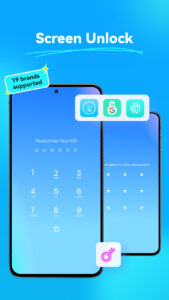
●Dr.Fone - unlock screen app- can remove device lock with pattern, PIN, password and fingerprint, simple click-through operations to bypass the Android lock screen. You can also use this unlocking app to remove google frp passcode. Besides Samsung and LG phones, this device unlock app also supports most mainstream Android models.
♻️
Deleted Data Recovery
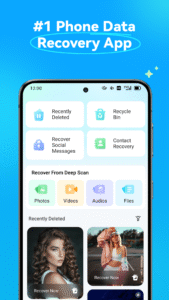
●Dr.Fone's deleted photo recovery solution helps you quickly recover recently deleted photos, messages, videos, files, contacts, and audio with just one click.
●Recovering data from the phone’s recycle bin is also a breeze with Dr.Fone.
●If you accidentally delete information in social apps or other apps, don't worry—Dr.Fone can help you restore it.
🔧
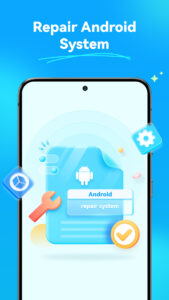
System Repair
●Dr.Fone - System Repair allows you to resolve common Android problems like black screens, boot loops, bricked devices, and more. What sets Dr.Fone apart is its simplicity, enabling anyone to fix Android issues effortlessly, even without technical skills.
📲
Data Transfer
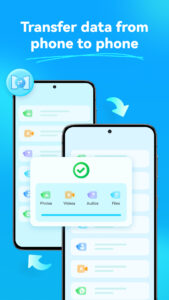
●Use Dr.Fone to transfer pictures, videos, apps, music, contacts, and files to another mobile phone with just one click.
●Contact transfer, photo transfer, music transfer, file transfer, and other data transfers are all supported.
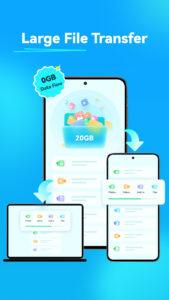
●Wireless Transfer- transfer large files (up to 20GB) between mobile phones and between mobile phones and computers without consuming mobile data.
💬
WhatsApp Transfer
●Supports the transfer of WhatsApp and WhatsApp Business data from Android to iOS or from iOS to Android.
🔐
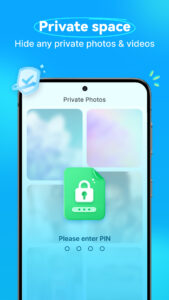
Privacy Space
●Dr.Fone securely hides and encrypts photos and videos that you don't want others to see. Your data privacy and file safety are perfectly protected by Dr.Fone.
📷
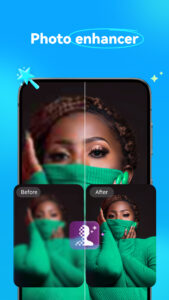
AI Photo Enhancer & Restore Old Photos
●Image quality is automatically enhanced by AI. No more giving up on a nice picture because of poor image quality. You can also restore old photos with our AI picture enhancer.
🛡️
Data Security
●We value your privacy as much as you do. Your data is encrypted from beginning to end, ensuring that no sensitive information is at risk. With Dr.Fone, you no longer need to worry about data recovery and transfer from your mobile device.
Dr.Fone can help you:
Recover deleted data from Android phones, including photos, videos, audio, and files.
Recover WhatsApp messages deleted by the sender and retrieve missing chats, photos, videos, and audio.
Transfer phone data between phones, regardless of iOS or Android OS.
Save your personal photos and videos in a privacy space.
Dr.Fone is a trusted software provider specializing in delivering the best customer experience for recovering lost or forgotten data from various devices. The Dr.Fone app is specifically tailored for recovering lost data from Android phones, such as contacts, photos, notifications and messages from other apps, and videos. Additionally, you can use the Dr.Fone app to enhance blurry pictures with AI!
To address as many of your mobile phone usage issues as possible, our developers continually strive to develop better and more diverse features. Whether you need to recover phone data, transfer data, unlock your phone screen, or simply desire a more private space, Dr.Fone is your best choice.
Contact:
customer_service@wondershare.com
🔓
Device Unlock
●Dr.Fone - unlock screen app- can remove device lock with pattern, PIN, password and fingerprint, simple click-through operations to bypass the Android lock screen. You can also use this unlocking app to remove google frp passcode. Besides Samsung and LG phones, this device unlock app also supports most mainstream Android models.
♻️
Deleted Data Recovery
●Dr.Fone's deleted photo recovery solution helps you quickly recover recently deleted photos, messages, videos, files, contacts, and audio with just one click.
●Recovering data from the phone’s recycle bin is also a breeze with Dr.Fone.
●If you accidentally delete information in social apps or other apps, don't worry—Dr.Fone can help you restore it.
🔧
System Repair
●Dr.Fone - System Repair allows you to resolve common Android problems like black screens, boot loops, bricked devices, and more. What sets Dr.Fone apart is its simplicity, enabling anyone to fix Android issues effortlessly, even without technical skills.
📲
Data Transfer
●Use Dr.Fone to transfer pictures, videos, apps, music, contacts, and files to another mobile phone with just one click.
●Contact transfer, photo transfer, music transfer, file transfer, and other data transfers are all supported.
●Wireless Transfer- transfer large files (up to 20GB) between mobile phones and between mobile phones and computers without consuming mobile data.
💬
WhatsApp Transfer
●Supports the transfer of WhatsApp and WhatsApp Business data from Android to iOS or from iOS to Android.
🔐
Privacy Space
●Dr.Fone securely hides and encrypts photos and videos that you don't want others to see. Your data privacy and file safety are perfectly protected by Dr.Fone.
📷
AI Photo Enhancer & Restore Old Photos
●Image quality is automatically enhanced by AI. No more giving up on a nice picture because of poor image quality. You can also restore old photos with our AI picture enhancer.
🛡️
Data Security
●We value your privacy as much as you do. Your data is encrypted from beginning to end, ensuring that no sensitive information is at risk. With Dr.Fone, you no longer need to worry about data recovery and transfer from your mobile device.
Dr.Fone can help you:
Recover deleted data from Android phones, including photos, videos, audio, and files.
Recover WhatsApp messages deleted by the sender and retrieve missing chats, photos, videos, and audio.
Transfer phone data between phones, regardless of iOS or Android OS.
Save your personal photos and videos in a privacy space.
Dr.Fone is a trusted software provider specializing in delivering the best customer experience for recovering lost or forgotten data from various devices. The Dr.Fone app is specifically tailored for recovering lost data from Android phones, such as contacts, photos, notifications and messages from other apps, and videos. Additionally, you can use the Dr.Fone app to enhance blurry pictures with AI!
To address as many of your mobile phone usage issues as possible, our developers continually strive to develop better and more diverse features. Whether you need to recover phone data, transfer data, unlock your phone screen, or simply desire a more private space, Dr.Fone is your best choice.
Contact:
customer_service@wondershare.com
Download Dr.Fone: Photo & Data Recovery APK
Fast, free and safe download.
APK Permissions 90
- android.hardware.usb.host
- android.permission.ACCESS_ADSERVICES_AD_ID
- android.permission.ACCESS_ADSERVICES_ATTRIBUTION
- android.permission.ACCESS_COARSE_LOCATION
- android.permission.ACCESS_FINE_LOCATION
- android.permission.ACCESS_MOCK_LOCATION
- android.permission.ACCESS_NETWORK_STATE
- android.permission.ACCESS_WIFI_STATE
- android.permission.BATTERY_STATS
- android.permission.BLUETOOTH
- android.permission.BLUETOOTH_ADMIN
- android.permission.BLUETOOTH_ADVERTISE
- android.permission.BLUETOOTH_CONNECT
- android.permission.BLUETOOTH_SCAN
- android.permission.CALL_PHONE
- android.permission.CAMERA
- android.permission.CAPTURE_VIDEO_OUTPUT
- android.permission.CHANGE_CONFIGURATION
- android.permission.CHANGE_NETWORK_STATE
- android.permission.CHANGE_WIFI_STATE
- android.permission.CLEAR_APP_CACHE
- android.permission.DELETE_PACKAGES
- android.permission.DEVICE_POWER
- android.permission.FLASHLIGHT
- android.permission.FOREGROUND_SERVICE
- android.permission.FOREGROUND_SERVICE_DATA_SYNC
- android.permission.FOREGROUND_SERVICE_LOCATION
- android.permission.GET_ACCOUNTS
- android.permission.GET_PACKAGE_SIZE
- android.permission.GET_TASKS
- android.permission.INSTALL_PACKAGES
- android.permission.INTERNET
- android.permission.KILL_BACKGROUND_PROCESSES
- android.permission.LOCAL_MAC_ADDRESS
- android.permission.MANAGE_EXTERNAL_STORAGE
- android.permission.MODIFY_AUDIO_SETTINGS
- android.permission.MODIFY_PHONE_STATE
- android.permission.MOUNT_UNMOUNT_FILESYSTEMS
- android.permission.NEARBY_WIFI_DEVICES
- android.permission.PACKAGE_USAGE_STATS
- android.permission.POST_NOTIFICATIONS
- android.permission.PROJECT_MEDIA
- android.permission.QUERY_ALL_PACKAGES
- android.permission.READ_CALENDAR
- android.permission.READ_CONTACTS
- android.permission.READ_EXTERNAL_STORAGE
- android.permission.READ_LOGS
- android.permission.READ_MEDIA_AUDIO
- android.permission.READ_MEDIA_IMAGES
- android.permission.READ_MEDIA_VIDEO
- android.permission.READ_PHONE_STATE
- android.permission.READ_PRIVILEGED_PHONE_STATE
- android.permission.RECEIVE_BOOT_COMPLETED
- android.permission.RECORD_AUDIO
- android.permission.REQUEST_DELETE_PACKAGES
- android.permission.REQUEST_IGNORE_BATTERY_OPTIMIZATIONS
- android.permission.REQUEST_INSTALL_PACKAGES
- android.permission.RESTART_PACKAGES
- android.permission.SCHEDULE_EXACT_ALARM
- android.permission.SET_WALLPAPER
- android.permission.SYSTEM_ALERT_WINDOW
- android.permission.SYSTEM_OVERLAY_WINDOW
- android.permission.UPDATE_DEVICE_STATS
- android.permission.USE_BIOMETRIC
- android.permission.USE_FINGERPRINT
- android.permission.VIBRATE
- android.permission.WAKE_LOCK
- android.permission.WRITE_CALENDAR
- android.permission.WRITE_CONTACTS
- android.permission.WRITE_EXTERNAL_STORAGE
- android.permission.WRITE_MEDIA_STORAGE
- android.permission.WRITE_SETTINGS
- com.android.alarm.permission.SET_ALARM
- com.android.browser.permission.READ_HISTORY_BOOKMARKS
- com.android.browser.permission.WRITE_HISTORY_BOOKMARKS
- com.android.launcher.permission.INSTALL_SHORTCUT
- com.android.launcher.permission.READ_SETTINGS
- com.android.launcher.permission.UNINSTALL_SHORTCUT
- com.android.launcher2.permission.READ_SETTINGS
- com.android.permission.GET_INSTALLED_APPS
- com.android.vending.BILLING
- com.android.vending.CHECK_LICENSE
- com.google.android.c2dm.permission.RECEIVE
- com.google.android.finsky.permission.BIND_GET_INSTALL_REFERRER_SERVICE
- com.google.android.gms.permission.AD_ID
- com.google.android.providers.gsf.permission.READ_GSERVICES
- com.htc.launcher.permission.READ_SETTINGS
- com.huawei.android.launcher.permission.READ_SETTINGS
- com.huawei.launcher3.permission.READ_SETTINGS
- com.wondershare.drfoneapp.DYNAMIC_RECEIVER_NOT_EXPORTED_PERMISSION
APK Verified
The cryptographic signature guarantees that the file is safe to install and was not tampered with in any way.


Frequently Asked Questions about Dr.Fone: Photo & Data Recovery APK
This is the universal variant — a single APK that contains native libraries for every CPU architecture. It installs on any Android device but is larger than per-architecture variants.
Yes — the APK's signature has been cryptographically verified against the publisher's signing key. The SHA-256 hash is shown in the File Information panel so you can independently confirm the file matches the original release.
Android 23 (API level 35) or newer. Older devices will refuse the install.
Install a free app like 'CPU-Z' or 'Droid Hardware Info' from the Play Store and look at the ABI / Instruction Set row. Most phones made after 2017 are arm64-v8a; if in doubt, download the universal variant.
All variants are functionally identical — same features, same version. They differ only in which CPU architectures the native code is compiled for, and (sometimes) which screen densities the included graphics target. Pick the one that matches your device for the smallest install size, or pick 'Universal' if you're unsure.