
Download Smart AppLock: Privacy Protect APK 4.3.11 Universal · Android 24+
Download APK
Verified Safe
This is the universal build of Smart AppLock: Privacy Protect 4.3.11. It contains native libraries for every CPU architecture (arm64-v8a, armeabi-v7a, x86, x86_64), so it installs on any Android device. The trade-off is size — it's larger than per-architecture variants. Pick this one if you're unsure which CPU your phone has, or if you plan to share the APK with multiple devices.
File size: 24.1 MB • Min Android: 24 • Target Android: 34 • Version code: 40311 • Framework: Native (Java/Kotlin) • Permissions: 47
Screenshots
File Information
| Package Name | com.thinkyeah.smartlockfree |
|---|---|
| Version Name | 4.3.11 |
| Version Code | 40311 |
| Architecture | Universal |
| Min Android Version | Android 24 (API 34) |
| Main Activity | com.thinkyeah.smartlock.main.ui.activity.LandingActivity |
| Framework | Native (Java/Kotlin) |
| File Size | 24.10 MB |
| Signature (SHA1) | 58932F5BE705E70D4608F8ABA6A88261E3B64F2C |
| File Hash (SHA256) | e550b4e3706ee6b5751c0836b721338c05ae2e0cf68c59c9106e5e3514f87963 |
What's New
1. Improve the stability.
App Description
★ The elegant, light and professional App Lock - Smart AppLock ★
-- Unlock with Fingerprint (Samsung or Android 6.0 devices) --
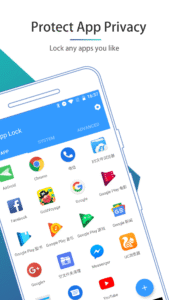
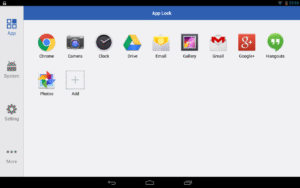
Smart AppLock is a tool to lock apps you like, protect you from privacy leak!
It is your great privacy guard and app lock!
With AppLock, you are able to
☆
Lock privacy
- lock apps containing privacy content, such as photos, videos(Gallery), short messages(SMS or MMS) and call logs
☆
Lock apps
- lock SNS apps, such as Facebook, Whatsapp, Twitter
☆
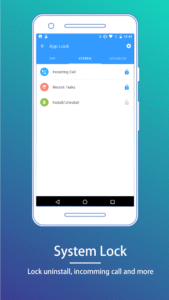
Lock Incoming Calls
☆
Lock settings
- lock system settings, install/uninstall apps to keep phone away from being messed up by others or kids
☆
Lock markets
- lock games and markets to prevent your kids from addicting in games or purchasing in markets without your knowing
Special Features of AppLock:
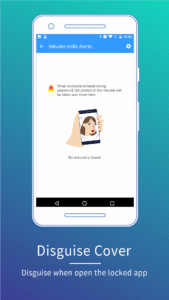
• Disguise your lock screen to prevent from breaking into your password
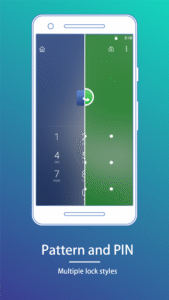
• Protect apps with multiple lock types, such as Pattern Lock, PIN lock
• With AppLock home screen widget, one click to toggle lock status
• Custom lock screen style, custom lock screen background
• Light, less memory usage
• Advice you to lock related apps smartly, privacy has never been so safe
• Beautiful UI and easy to use
• No delay auto start after device reboots
• Lock recent history, prevent app screenshot being leaked
• Hide and encrypt pictures and videos with GalleryVault
• Launch locked app within AppLock without password
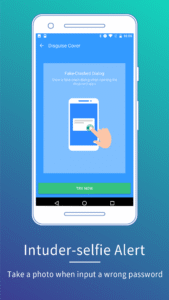
• Break-in Alerts: Take a photo when someone tries to enter your locked app with an invalid password
• DelayLock: Once unlock any app, no password is required within a delay time
• Unlock with Fingerprint.
----------- FAQ ---------
►
I forgot my password, how to retrieve it?
When you setup the password/pattern the first time, AppLock will ask you to setup a Password Retrieve method: "Security Question".
To retrieve password, tap the "Forgot?" button to show Retrieve Password panel.
Security Question
Input the answer to the question you setup before.
►
Dose Smart AppLock support iOS platform?
Yes, we have an iOS version "iAppLock" for iOS users, you can visit
iapplock.thinkyeah.com
to get the download or search "iapplock" in Cydia to install.(requires Jailbreaked iOS)
----
Any issue or suggest for AppLock, welcome to send mail to us!
SmartAppLock@thinkyeah.com
We focus on Privacy Protect, provide the professional AppLock to protect your privacy!
website:
www.thinkyeah.com
Google+ :
plus.google.com/105614151477767438997
Facebook:
www.facebook.com/smartapplock
Twitter:
twitter.com/thinkyeahapp
Supported languages:
English, Russian, Spanish, Turkish, German, Portuguese, French, Japanese, Korean, Polish, Simplified Chinese, Traditional Chinese.
-- Unlock with Fingerprint (Samsung or Android 6.0 devices) --
Smart AppLock is a tool to lock apps you like, protect you from privacy leak!
It is your great privacy guard and app lock!
With AppLock, you are able to
☆
Lock privacy
- lock apps containing privacy content, such as photos, videos(Gallery), short messages(SMS or MMS) and call logs
☆
Lock apps
- lock SNS apps, such as Facebook, Whatsapp, Twitter
☆
Lock Incoming Calls
☆
Lock settings
- lock system settings, install/uninstall apps to keep phone away from being messed up by others or kids
☆
Lock markets
- lock games and markets to prevent your kids from addicting in games or purchasing in markets without your knowing
Special Features of AppLock:
• Disguise your lock screen to prevent from breaking into your password
• Protect apps with multiple lock types, such as Pattern Lock, PIN lock
• With AppLock home screen widget, one click to toggle lock status
• Custom lock screen style, custom lock screen background
• Light, less memory usage
• Advice you to lock related apps smartly, privacy has never been so safe
• Beautiful UI and easy to use
• No delay auto start after device reboots
• Lock recent history, prevent app screenshot being leaked
• Hide and encrypt pictures and videos with GalleryVault
• Launch locked app within AppLock without password
• Break-in Alerts: Take a photo when someone tries to enter your locked app with an invalid password
• DelayLock: Once unlock any app, no password is required within a delay time
• Unlock with Fingerprint.
----------- FAQ ---------
►
I forgot my password, how to retrieve it?
When you setup the password/pattern the first time, AppLock will ask you to setup a Password Retrieve method: "Security Question".
To retrieve password, tap the "Forgot?" button to show Retrieve Password panel.
Security Question
Input the answer to the question you setup before.
►
Dose Smart AppLock support iOS platform?
Yes, we have an iOS version "iAppLock" for iOS users, you can visit
iapplock.thinkyeah.com
to get the download or search "iapplock" in Cydia to install.(requires Jailbreaked iOS)
----
Any issue or suggest for AppLock, welcome to send mail to us!
SmartAppLock@thinkyeah.com
We focus on Privacy Protect, provide the professional AppLock to protect your privacy!
website:
www.thinkyeah.com
Google+ :
plus.google.com/105614151477767438997
Facebook:
www.facebook.com/smartapplock
Twitter:
twitter.com/thinkyeahapp
Supported languages:
English, Russian, Spanish, Turkish, German, Portuguese, French, Japanese, Korean, Polish, Simplified Chinese, Traditional Chinese.
Download Smart AppLock: Privacy Protect APK
Fast, free and safe download.
APK Permissions 47
- android.permission.ACCESS_ADSERVICES_AD_ID
- android.permission.ACCESS_ADSERVICES_ATTRIBUTION
- android.permission.ACCESS_ADSERVICES_TOPICS
- android.permission.ACCESS_NETWORK_STATE
- android.permission.ACCESS_WIFI_STATE
- android.permission.AUTHENTICATE_ACCOUNTS
- android.permission.CAMERA
- android.permission.CHANGE_WIFI_STATE
- android.permission.CLEAR_APP_CACHE
- android.permission.DELETE_CACHE_FILES
- android.permission.EXPAND_STATUS_BAR
- android.permission.FLASHLIGHT
- android.permission.FOREGROUND_SERVICE
- android.permission.FOREGROUND_SERVICE_SPECIAL_USE
- android.permission.GET_ACCOUNTS
- android.permission.GET_PACKAGE_SIZE
- android.permission.GET_TASKS
- android.permission.INTERNET
- android.permission.KILL_BACKGROUND_PROCESSES
- android.permission.MANAGE_EXTERNAL_STORAGE
- android.permission.MOUNT_UNMOUNT_FILESYSTEMS
- android.permission.PACKAGE_USAGE_STATS
- android.permission.POST_NOTIFICATIONS
- android.permission.QUERY_ALL_PACKAGES
- android.permission.READ_EXTERNAL_STORAGE
- android.permission.READ_NETWORK_USAGE_HISTORY
- android.permission.READ_PHONE_STATE
- android.permission.RECEIVE_BOOT_COMPLETED
- android.permission.REQUEST_DELETE_PACKAGES
- android.permission.REQUEST_IGNORE_BATTERY_OPTIMIZATIONS
- android.permission.RESTART_PACKAGES
- android.permission.SCHEDULE_EXACT_ALARM
- android.permission.SYSTEM_ALERT_WINDOW
- android.permission.USE_FINGERPRINT
- android.permission.VIBRATE
- android.permission.WAKE_LOCK
- android.permission.WRITE_EXTERNAL_STORAGE
- android.permission.WRITE_SETTINGS
- com.android.launcher.permission.INSTALL_SHORTCUT
- com.android.launcher.permission.READ_SETTINGS
- com.applovin.array.apphub.permission.BIND_APPHUB_SERVICE
- com.google.android.c2dm.permission.RECEIVE
- com.google.android.finsky.permission.BIND_GET_INSTALL_REFERRER_SERVICE
- com.google.android.gms.permission.AD_ID
- com.samsung.android.providers.context.permission.WRITE_USE_APP_FEATURE_SURVEY
- com.thinkyeah.smartlockfree.DYNAMIC_RECEIVER_NOT_EXPORTED_PERMISSION
- oppo.permission.OPPO_COMPONENT_SAFE
APK Verified
The cryptographic signature guarantees that the file is safe to install and was not tampered with in any way.
Similar in Tools


Frequently Asked Questions about Smart AppLock: Privacy Protect APK
This is the universal variant — a single APK that contains native libraries for every CPU architecture. It installs on any Android device but is larger than per-architecture variants.
Yes — the APK's signature has been cryptographically verified against the publisher's signing key. The SHA-256 hash is shown in the File Information panel so you can independently confirm the file matches the original release.
Android 24 (API level 34) or newer. Older devices will refuse the install.
Install a free app like 'CPU-Z' or 'Droid Hardware Info' from the Play Store and look at the ABI / Instruction Set row. Most phones made after 2017 are arm64-v8a; if in doubt, download the universal variant.
All variants are functionally identical — same features, same version. They differ only in which CPU architectures the native code is compiled for, and (sometimes) which screen densities the included graphics target. Pick the one that matches your device for the smallest install size, or pick 'Universal' if you're unsure.