
Screenshots
File Information
| Package Name | kr.sira.measure |
|---|---|
| Version Name | 1.8.1 |
| Version Code | 87 |
| Architecture | Universal |
| Min Android Version | Android 23 (API 35) |
| Main Activity | kr.sira.measure.Intro |
| Framework | Native (Java/Kotlin) |
| File Size | 5.76 MB |
| Signature (SHA1) | EF45BACD52C25843705984109B7A883CB7E92A81 |
| File Hash (SHA256) | f6fc6bae824be2490c9864c6cc784dbee1c2492be2f198367bf713fc5333e5b6 |
What's New
- v1.8.1 : More models are calibrated
- v1.8.0 : Support for Android 15
- v1.8.0 : Support for Android 15
App Description
Smart Measure is a tool in the 2nd set of the Smart Tools collection.
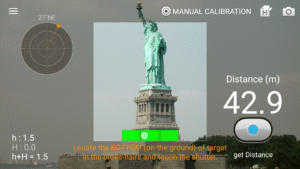
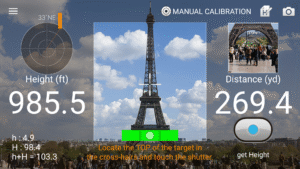
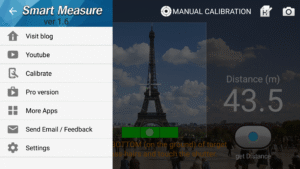
This rangefinder (telemeter) measures the distance and height of a target using trigonometry.
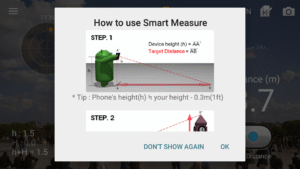
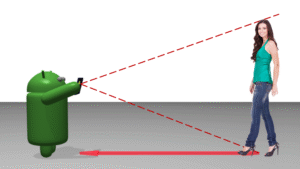
Usage is simple : Stand up and press the shutter. The important point is that you must aim your camera at the GROUND, NOT the object. (i.e. In order to measure the distance from someone, aim at his shoes.)
After measuring the distance, you can measure your friend's height.
If it is not accurate, please read the instructions and see checklist diagram in my blog. You can calibrate the measurement app with calibration menu for yourself.
* Main features:
- Meter Feet
- Virtual Horizon
- Screen capture
- Sound effect on/off
- Material design
* Pro version added features:
- No ads
- Width and Area
- Camera Zoom
* 3 tools for distance were completed.
1) Smart Ruler (short, touch) : 1-50cm
2) Smart Measure (medium, trigonometry) : 1-50m
3) Smart Distance (long, perspective) : 10m-1km
* Do you want more tools?
download [Smart Measure Pro] and [Smart Tools] package.
For more information, watch YouTube and visit the blog. Thank you.
This rangefinder (telemeter) measures the distance and height of a target using trigonometry.
Usage is simple : Stand up and press the shutter. The important point is that you must aim your camera at the GROUND, NOT the object. (i.e. In order to measure the distance from someone, aim at his shoes.)
After measuring the distance, you can measure your friend's height.
If it is not accurate, please read the instructions and see checklist diagram in my blog. You can calibrate the measurement app with calibration menu for yourself.
* Main features:
- Meter Feet
- Virtual Horizon
- Screen capture
- Sound effect on/off
- Material design
* Pro version added features:
- No ads
- Width and Area
- Camera Zoom
* 3 tools for distance were completed.
1) Smart Ruler (short, touch) : 1-50cm
2) Smart Measure (medium, trigonometry) : 1-50m
3) Smart Distance (long, perspective) : 10m-1km
* Do you want more tools?
download [Smart Measure Pro] and [Smart Tools] package.
For more information, watch YouTube and visit the blog. Thank you.
Download Smart Measure APK
Fast, free and safe download.
APK Permissions 14
- android.permission.ACCESS_ADSERVICES_AD_ID
- android.permission.ACCESS_ADSERVICES_ATTRIBUTION
- android.permission.ACCESS_ADSERVICES_TOPICS
- android.permission.ACCESS_NETWORK_STATE
- android.permission.CAMERA
- android.permission.FOREGROUND_SERVICE
- android.permission.INTERNET
- android.permission.REQUEST_DELETE_PACKAGES
- android.permission.VIBRATE
- android.permission.WAKE_LOCK
- android.permission.WRITE_EXTERNAL_STORAGE
- com.google.android.finsky.permission.BIND_GET_INSTALL_REFERRER_SERVICE
- com.google.android.gms.permission.AD_ID
- kr.sira.measure.DYNAMIC_RECEIVER_NOT_EXPORTED_PERMISSION
APK Verified
The cryptographic signature guarantees that the file is safe to install and was not tampered with in any way.


