
Download aShell - an ADB shell (f-droid version) v0.12 APK v0.17 Universal · Android 24+
Download APK
Verified Safe
This is the universal build of aShell - an ADB shell (f-droid version) v0.12 v0.17. It contains native libraries for every CPU architecture (arm64-v8a, armeabi-v7a, x86, x86_64), so it installs on any Android device. The trade-off is size — it's larger than per-architecture variants. Pick this one if you're unsure which CPU your phone has, or if you plan to share the APK with multiple devices.
File size: 1.7 MB • Min Android: 24 • Target Android: 35 • Version code: 17 • Framework: Native (Java/Kotlin) • Permissions: 3
Screenshots
File Information
| Package Name | in.sunilpaulmathew.ashell |
|---|---|
| Version Name | v0.17 |
| Version Code | 17 |
| Architecture | Universal |
| Min Android Version | Android 24 (API 35) |
| Main Activity | in.sunilpaulmathew.ashell.activities.aShellActivity |
| Framework | Native (Java/Kotlin) |
| File Size | 1.75 MB |
| Signature (SHA1) | E008DFDE2A59C58EBA4E05A10412AF5210760EE1 |
| File Hash (SHA256) | 5cd1cd15a829b2cf379989496cd8454761545c3a05bffff3bb45b47b3f07ab7e |
What's New
Added French, Polish, and Arabic translations
Updated build tools (aShell now targets SDK 35).
Miscellaneous changes.
Updated build tools (aShell now targets SDK 35).
Miscellaneous changes.
App Description
📌 Important Notes
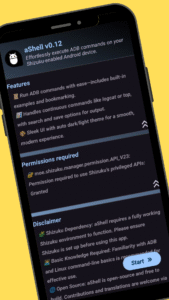
📱 Shizuku Dependency: aShell requires a fully functional Shizuku environment. If you're unfamiliar with Shizuku or prefer not to use it, this app may not be suitable for you (Learn more at: shizuku.rikka.app).
🧠 Basic ADB Knowledge Recommended: While aShell includes examples of common ADB commands, some familiarity with ADB/Linux command-line operations will enhance your experience.
🖥️ Introduction
aShell is a lightweight, open-source ADB shell designed for Android devices running Shizuku. It enables you to execute ADB commands directly from your phone, eliminating the need for a PC. Ideal for developers, power users, and enthusiasts seeking full control over their device's internals.
⚙️ Key Features
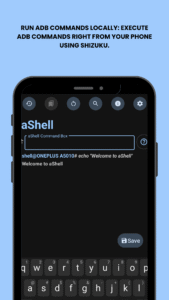
🧑💻 Run ADB Commands Locally: Execute ADB commands right from your phone using Shizuku.
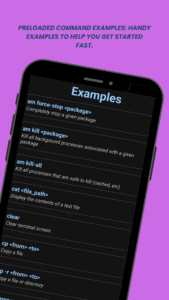
📂 Preloaded Command Examples: Handy examples to help you get started fast.
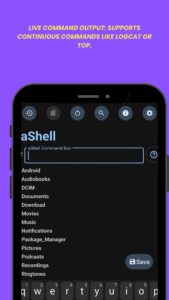
🔄 Live Command Output: Supports continuous commands like logcat or top.
🔍 Search Within Output: Easily find what you're looking for in command results.
💾 Save Output to File: Export outputs to .txt for reference or sharing.
🌙 Dark/Light Mode Support: Automatically adapts to your system theme.
⭐ Bookmark Your Commands: Save frequently used commands for quick access.
🔗 Additional Resources
🔗 Source Code:
gitlab.com/sunilpaulmathew/ashell
🐞 Issue Tracker:
gitlab.com/sunilpaulmathew/ashell/-/issues
🌍 Translations:
poeditor.com/join/project/20PSoEAgfX
➡️ Learn Shizuku:
shizuku.rikka.app/
🛠️ Build It Yourself
Don’t want to purchase aShell? Build it yourself! The full source code is available at GitLab:
gitlab.com/sunilpaulmathew/ashell
📱 Shizuku Dependency: aShell requires a fully functional Shizuku environment. If you're unfamiliar with Shizuku or prefer not to use it, this app may not be suitable for you (Learn more at: shizuku.rikka.app).
🧠 Basic ADB Knowledge Recommended: While aShell includes examples of common ADB commands, some familiarity with ADB/Linux command-line operations will enhance your experience.
🖥️ Introduction
aShell is a lightweight, open-source ADB shell designed for Android devices running Shizuku. It enables you to execute ADB commands directly from your phone, eliminating the need for a PC. Ideal for developers, power users, and enthusiasts seeking full control over their device's internals.
⚙️ Key Features
🧑💻 Run ADB Commands Locally: Execute ADB commands right from your phone using Shizuku.
📂 Preloaded Command Examples: Handy examples to help you get started fast.
🔄 Live Command Output: Supports continuous commands like logcat or top.
🔍 Search Within Output: Easily find what you're looking for in command results.
💾 Save Output to File: Export outputs to .txt for reference or sharing.
🌙 Dark/Light Mode Support: Automatically adapts to your system theme.
⭐ Bookmark Your Commands: Save frequently used commands for quick access.
🔗 Additional Resources
🔗 Source Code:
gitlab.com/sunilpaulmathew/ashell
🐞 Issue Tracker:
gitlab.com/sunilpaulmathew/ashell/-/issues
🌍 Translations:
poeditor.com/join/project/20PSoEAgfX
➡️ Learn Shizuku:
shizuku.rikka.app/
🛠️ Build It Yourself
Don’t want to purchase aShell? Build it yourself! The full source code is available at GitLab:
gitlab.com/sunilpaulmathew/ashell
Download aShell - an ADB shell (f-droid version) v0.12 APK
Fast, free and safe download.
APK Permissions 3
- android.permission.WRITE_EXTERNAL_STORAGE
- in.sunilpaulmathew.ashell.DYNAMIC_RECEIVER_NOT_EXPORTED_PERMISSION
- moe.shizuku.manager.permission.API_V23
APK Verified
The cryptographic signature guarantees that the file is safe to install and was not tampered with in any way.


Frequently Asked Questions about aShell - an ADB shell (f-droid version) v0.12 APK
This is the universal variant — a single APK that contains native libraries for every CPU architecture. It installs on any Android device but is larger than per-architecture variants.
Yes — the APK's signature has been cryptographically verified against the publisher's signing key. The SHA-256 hash is shown in the File Information panel so you can independently confirm the file matches the original release.
Android 24 (API level 35) or newer. Older devices will refuse the install.
Install a free app like 'CPU-Z' or 'Droid Hardware Info' from the Play Store and look at the ABI / Instruction Set row. Most phones made after 2017 are arm64-v8a; if in doubt, download the universal variant.
All variants are functionally identical — same features, same version. They differ only in which CPU architectures the native code is compiled for, and (sometimes) which screen densities the included graphics target. Pick the one that matches your device for the smallest install size, or pick 'Universal' if you're unsure.