
Download aShell - an ADB shell (f-droid version) v0.12 APK v0.23 Universal · Android 24+
Download APK
Verified Safe
This is the universal build of aShell - an ADB shell (f-droid version) v0.12 v0.23. It contains native libraries for every CPU architecture (arm64-v8a, armeabi-v7a, x86, x86_64), so it installs on any Android device. The trade-off is size — it's larger than per-architecture variants. Pick this one if you're unsure which CPU your phone has, or if you plan to share the APK with multiple devices.
File size: 1.9 MB • Min Android: 24 • Target Android: 35 • Version code: 23 • Framework: Native (Java/Kotlin) • Permissions: 3
Screenshots
File Information
| Package Name | in.sunilpaulmathew.ashell |
|---|---|
| Version Name | v0.23 |
| Version Code | 23 |
| Architecture | Universal |
| Min Android Version | Android 24 (API 35) |
| Main Activity | in.sunilpaulmathew.ashell.activities.aShellActivity |
| Framework | Native (Java/Kotlin) |
| File Size | 1.89 MB |
| Signature (SHA1) | E008DFDE2A59C58EBA4E05A10412AF5210760EE1 |
| File Hash (SHA256) | 9b0860d2749f96f3092c3da3e6d4e9d32690dafacbf828ca1b15cdb9bed5ee4b |
What's New
New in version v0.23
* Fixed small layout issues on the main screen.
* Improved initializing Shizuku service.
* Views: Added slight animation effect.
* Improved examples and policy dialog.
* Fixed occasional crashes in some screens.
* Added Italian and Partial Czech translations.
* Updated Korean and Chinese (TW) translations.
* Miscellaneous changes.
* Fixed small layout issues on the main screen.
* Improved initializing Shizuku service.
* Views: Added slight animation effect.
* Improved examples and policy dialog.
* Fixed occasional crashes in some screens.
* Added Italian and Partial Czech translations.
* Updated Korean and Chinese (TW) translations.
* Miscellaneous changes.
App Description
aShell
is a local ADB shell for [Shizuku](
shizuku.rikka.app/
) powered android devices.
Requirements
- A fully working [Shizuku](
shizuku.rikka.app/
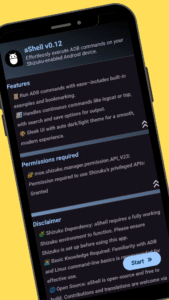
) (a completely opn-source project) environment. If you are not aware about Shizuku or don't want to use it, please do not bother installing this app. It simply won't work.
- Basic knowledge about adb/Linux command-line.
Features
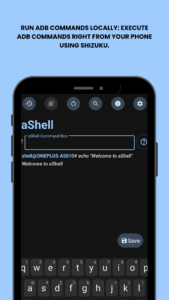
- An elegantly designed user interface.
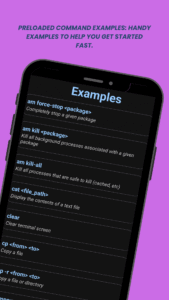
- Included a bundle of examples about common adb commands.
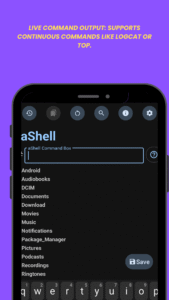
- Handles continuously running commands, such as logcat, top, etc.
- Search for specific text from the last command output.
- Option to save last command output as a text file.
- Bookmark frequently using commands.
- An auto-dark/light theme.
- A lot more.
Translations
Please help me to translate this application via
POEditor
. You may also translate after downloading the original language string available
GitHub
.
Author:
sunilpaulmathew
License:
GNU General Public License v3.0 or later
Issue Tracker
Source Code
Changelog
Build Metadata
Reproducibility Status
is a local ADB shell for [Shizuku](
shizuku.rikka.app/
) powered android devices.
Requirements
- A fully working [Shizuku](
shizuku.rikka.app/
) (a completely opn-source project) environment. If you are not aware about Shizuku or don't want to use it, please do not bother installing this app. It simply won't work.
- Basic knowledge about adb/Linux command-line.
Features
- An elegantly designed user interface.
- Included a bundle of examples about common adb commands.
- Handles continuously running commands, such as logcat, top, etc.
- Search for specific text from the last command output.
- Option to save last command output as a text file.
- Bookmark frequently using commands.
- An auto-dark/light theme.
- A lot more.
Translations
Please help me to translate this application via
POEditor
. You may also translate after downloading the original language string available
GitHub
.
Author:
sunilpaulmathew
License:
GNU General Public License v3.0 or later
Issue Tracker
Source Code
Changelog
Build Metadata
Reproducibility Status
Download aShell - an ADB shell (f-droid version) v0.12 APK
Fast, free and safe download.
APK Permissions 3
- android.permission.WRITE_EXTERNAL_STORAGE
- in.sunilpaulmathew.ashell.DYNAMIC_RECEIVER_NOT_EXPORTED_PERMISSION
- moe.shizuku.manager.permission.API_V23
APK Verified
The cryptographic signature guarantees that the file is safe to install and was not tampered with in any way.


Frequently Asked Questions about aShell - an ADB shell (f-droid version) v0.12 APK
This is the universal variant — a single APK that contains native libraries for every CPU architecture. It installs on any Android device but is larger than per-architecture variants.
Yes — the APK's signature has been cryptographically verified against the publisher's signing key. The SHA-256 hash is shown in the File Information panel so you can independently confirm the file matches the original release.
Android 24 (API level 35) or newer. Older devices will refuse the install.
Install a free app like 'CPU-Z' or 'Droid Hardware Info' from the Play Store and look at the ABI / Instruction Set row. Most phones made after 2017 are arm64-v8a; if in doubt, download the universal variant.
All variants are functionally identical — same features, same version. They differ only in which CPU architectures the native code is compiled for, and (sometimes) which screen densities the included graphics target. Pick the one that matches your device for the smallest install size, or pick 'Universal' if you're unsure.