
This is the universal build of FolderSync 4.8.0. It contains native libraries for every CPU architecture (arm64-v8a, armeabi-v7a, x86, x86_64), so it installs on any Android device. The trade-off is size — it's larger than per-architecture variants. Pick this one if you're unsure which CPU your phone has, or if you plan to share the APK with multiple devices.
File size: 28.0 MB • Min Android: 26 • Target Android: 36 • Version code: 2020100183 • Framework: Native (Java/Kotlin) • Permissions: 27
Screenshots
File Information
| Package Name | dk.tacit.android.foldersync.lite |
|---|---|
| Version Name | 4.8.0 |
| Version Code | 2020100183 |
| Architecture | Universal |
| Min Android Version | Android 26 (API 36) |
| Main Activity | dk.tacit.android.foldersync.activity.MainActivity |
| Framework | Native (Java/Kotlin) |
| File Size | 27.97 MB |
| Signature (SHA1) | B3525321E8B033200852DB9D7195705347454E56 |
| File Hash (SHA256) | 8e0d2836863388a2a4dd2ee3aa0eb6fbc0b37bb55f00758586c4b56fe121e363 |
What's New
File manager multiple window/tab support, support for file sorting in sync
App Description
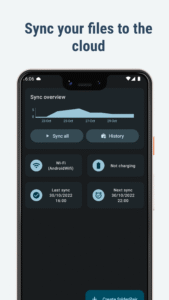
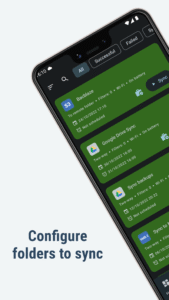
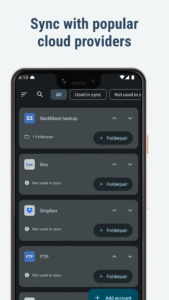
FolderSync enables simple sync to cloud based storage to and from local folders on the device SD cards. It support a wide range of different cloud providers and file protocols, and support for more platforms are added continuously. Root file access supported on rooted devices.
Effortlessly sync your files. Backup your music, pictures and other important files from the phone to your cloud storage or the other way around. It has never been easier. Automation support using Tasker and similar programs enables fine grained control of your syncs.
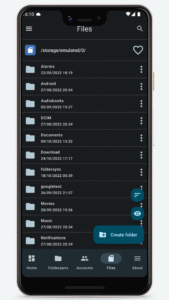
FolderSync contains a full file manager, that enables you to manage your files locally and in the cloud. Copy, move and delete your files in your cloud/remote accounts. Support for creation/deletion of buckets in Amazon S3. Upload and download files from the phone. It's all supported.
Supported cloud providers
- Amazon S3 Simple Storage Service
- Box
- CloudMe
- Dropbox
- Google Cloud Storage
- Google Drive
- HiDrive
- Kolab Now
- Koofr
- Livedrive Premium
- luckycloud
- MEGA
- MinIO
- MyDrive.ch
- NetDocuments
- NextCloud
- OneDrive
- OneDrive for Business
- OwnCloud
- pCloud
- Storegate
- SugarSync
- WEB.DE
- Yandex Disk
Supported protocols
- FTP
- FTPS (SSL/TLS implicit)
- FTPES (SSL/TLS explicit)
- SFTP (SSH File Transfer)
- SMB1/Samba/CIFS/Windows Share
- SMB2
- SMB3
- WebDAV (HTTPS)
Change log
foldersync.io/changelog
Support
foldersync.io/support
FAQ
foldersync.io/docs/faq
Permissions
ACCESS_FINE_LOCATION
Optional permission that can be granted if Foldersync should detect SSID name on Android 9 or newer.
ACCESS_NETWORK_STATE
Needed to determine current network state
ACCESS_WIFI_STATE
Needed to access info about the current WiFi state (SSID etc.)
CHANGE_NETWORK_STATE/CHANGE_WIFI_STATE
These two are needed to be allowed to turn WiFi on and off
CHANGE_WIFI_MULTICAST_STATE
Needed to autodiscover WebDAV, SMB, FTP and SFTP servers using Bonjour/UPNP protocol
INTERNET
Needed to access the internet connection to send and retrieve files
READ_EXTERNAL_STORAGE/WRITE_EXTERNAL_STORAGE
Needed to read and write files from and to SD card
RECEIVE_BOOT_COMPLETED
Needed to automatically start after reboot of device, so scheduled syncs will still run
WAKE_LOCK
Needed to keep the device running during a sync, so it doesn't enter sleep mode
Effortlessly sync your files. Backup your music, pictures and other important files from the phone to your cloud storage or the other way around. It has never been easier. Automation support using Tasker and similar programs enables fine grained control of your syncs.
FolderSync contains a full file manager, that enables you to manage your files locally and in the cloud. Copy, move and delete your files in your cloud/remote accounts. Support for creation/deletion of buckets in Amazon S3. Upload and download files from the phone. It's all supported.
Supported cloud providers
- Amazon S3 Simple Storage Service
- Box
- CloudMe
- Dropbox
- Google Cloud Storage
- Google Drive
- HiDrive
- Kolab Now
- Koofr
- Livedrive Premium
- luckycloud
- MEGA
- MinIO
- MyDrive.ch
- NetDocuments
- NextCloud
- OneDrive
- OneDrive for Business
- OwnCloud
- pCloud
- Storegate
- SugarSync
- WEB.DE
- Yandex Disk
Supported protocols
- FTP
- FTPS (SSL/TLS implicit)
- FTPES (SSL/TLS explicit)
- SFTP (SSH File Transfer)
- SMB1/Samba/CIFS/Windows Share
- SMB2
- SMB3
- WebDAV (HTTPS)
Change log
foldersync.io/changelog
Support
foldersync.io/support
FAQ
foldersync.io/docs/faq
Permissions
ACCESS_FINE_LOCATION
Optional permission that can be granted if Foldersync should detect SSID name on Android 9 or newer.
ACCESS_NETWORK_STATE
Needed to determine current network state
ACCESS_WIFI_STATE
Needed to access info about the current WiFi state (SSID etc.)
CHANGE_NETWORK_STATE/CHANGE_WIFI_STATE
These two are needed to be allowed to turn WiFi on and off
CHANGE_WIFI_MULTICAST_STATE
Needed to autodiscover WebDAV, SMB, FTP and SFTP servers using Bonjour/UPNP protocol
INTERNET
Needed to access the internet connection to send and retrieve files
READ_EXTERNAL_STORAGE/WRITE_EXTERNAL_STORAGE
Needed to read and write files from and to SD card
RECEIVE_BOOT_COMPLETED
Needed to automatically start after reboot of device, so scheduled syncs will still run
WAKE_LOCK
Needed to keep the device running during a sync, so it doesn't enter sleep mode
Download FolderSync APK
Fast, free and safe download.
APK Permissions 27
- android.permission.ACCESS_BACKGROUND_LOCATION
- android.permission.ACCESS_COARSE_LOCATION
- android.permission.ACCESS_FINE_LOCATION
- android.permission.ACCESS_NETWORK_STATE
- android.permission.ACCESS_WIFI_STATE
- android.permission.CHANGE_NETWORK_STATE
- android.permission.CHANGE_WIFI_MULTICAST_STATE
- android.permission.CHANGE_WIFI_STATE
- android.permission.FOREGROUND_SERVICE
- android.permission.FOREGROUND_SERVICE_DATA_SYNC
- android.permission.INTERNET
- android.permission.MANAGE_EXTERNAL_STORAGE
- android.permission.POST_NOTIFICATIONS
- android.permission.READ_EXTERNAL_STORAGE
- android.permission.RECEIVE_BOOT_COMPLETED
- android.permission.REQUEST_IGNORE_BATTERY_OPTIMIZATIONS
- android.permission.REQUEST_INSTALL_PACKAGES
- android.permission.USE_BIOMETRIC
- android.permission.USE_FINGERPRINT
- android.permission.WAKE_LOCK
- android.permission.WRITE_EXTERNAL_STORAGE
- android.permission.WRITE_MEDIA_STORAGE
- com.android.launcher.permission.INSTALL_SHORTCUT
- com.android.vending.BILLING
- com.google.android.finsky.permission.BIND_GET_INSTALL_REFERRER_SERVICE
- com.google.android.gms.permission.AD_ID
- dk.tacit.android.foldersync.lite.DYNAMIC_RECEIVER_NOT_EXPORTED_PERMISSION
APK Verified
The cryptographic signature guarantees that the file is safe to install and was not tampered with in any way.
Similar in Communication


Frequently Asked Questions about FolderSync APK
This is the universal variant — a single APK that contains native libraries for every CPU architecture. It installs on any Android device but is larger than per-architecture variants.
Yes — the APK's signature has been cryptographically verified against the publisher's signing key. The SHA-256 hash is shown in the File Information panel so you can independently confirm the file matches the original release.
Android 26 (API level 36) or newer. Older devices will refuse the install.
Install a free app like 'CPU-Z' or 'Droid Hardware Info' from the Play Store and look at the ABI / Instruction Set row. Most phones made after 2017 are arm64-v8a; if in doubt, download the universal variant.
All variants are functionally identical — same features, same version. They differ only in which CPU architectures the native code is compiled for, and (sometimes) which screen densities the included graphics target. Pick the one that matches your device for the smallest install size, or pick 'Universal' if you're unsure.