
This is the universal build of To-Do List & Planner: Taskito 1.1.4. It contains native libraries for every CPU architecture (arm64-v8a, armeabi-v7a, x86, x86_64), so it installs on any Android device. The trade-off is size — it's larger than per-architecture variants. Pick this one if you're unsure which CPU your phone has, or if you plan to share the APK with multiple devices.
File size: 9.1 MB • Min Android: 25 • Target Android: 35 • Version code: 1141 • Framework: Native (Java/Kotlin) • Permissions: 15
Screenshots
File Information
| Package Name | com.fenchtose.reflog |
|---|---|
| Version Name | 1.1.4 |
| Version Code | 1141 |
| Architecture | Universal |
| Min Android Version | Android 25 (API 35) |
| Main Activity | com.fenchtose.reflog.MainActivity |
| Framework | Native (Java/Kotlin) |
| File Size | 9.13 MB |
| Signature (SHA1) | 35B57D84C5239064E9560223C760D1009EB2B543 |
| File Hash (SHA256) | d3ca08ca93f9d4c7ed5b1459d7956620cdab13ea947ced8b462eeb389bb07efe |
What's New
- Fixed the issue with widgets for Android 16
- Support added for edge to edge
- Support added for edge to edge
App Description
Taskito is one of the best task manager apps available on Android & iOS. With simple & effective design, we are making the to-do list app more accessible. Our goal is to help you
plan & accomplish your daily tasks
.
Are you tired of seeing too many ads or paying expensive subscriptions? We are building an ad free to-do list app which is economical. No ads 🙅♀️. Download now! Over
1 Million people
already have.
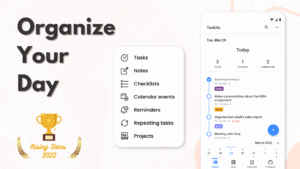
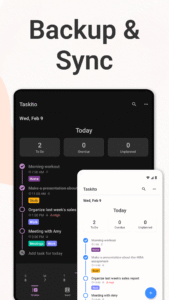
With the balance of simplicity & features, you can organize tasks, notes, google calendar events, todo list, reminders, recurring tasks - All in one Timeline.
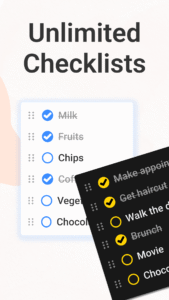
Use timeline view to stay organized and manage day-to-day agenda. Make a shopping list or task lists, take notes, track projects and set reminders to increase productivity and focus on what matters to you.
Students find it easy to manage schedules, assignments and curriculum with Taskito. You can create simple to-do for each subject, add tasks with checklist for each chapter. Professionals can schedule daily agenda with calendar events integration. Scheduling can also help you with time blocking.
Taskito is versatile and configurable. Import Google Calendar to see meetings and tasks side-by-side. Organize your board with color coded projects to accomplish hobbies, school work or side projects. You can combine reminder with calendar.
Based on suggestions from people, we keep improving Taskito to make it the best task manager app.
Core features:
• Timeline View to see all your to-do tasks, checklists, notes, calendar events, reminders in one place.
• Calendar integrated to-do list.
• Daily planner with notes and tasks.
• Add reminder to keep check on your agenda.
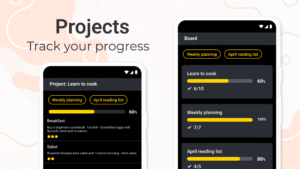
• Project planner to organize tasks.
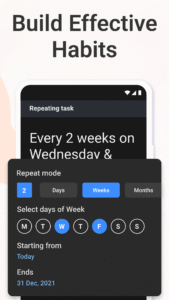
• Recurring tasks or habit tracking.
• Task reminders - Weekly or Monthly reminders to keep track of your important tasks.
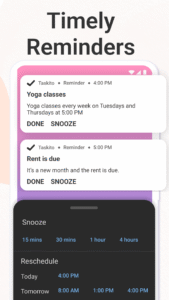
• Full Screen reminder notifications with snooze & reschedule options.
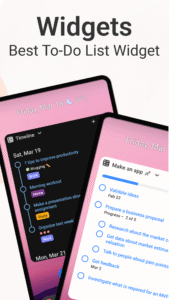
• To-Do widget to see daily tasks to do on your home screen.
• Sync tasks and projects instantly with Android & iPhones.
Why people love Taskito?
⭐ Ad free to-do list.
⭐ Sort project tasks based on priority, due date, or manual drag and drop.
⭐ Crate color coded tags and labels. Categorize to-do tasks with tags.
⭐ Templates to automate your day. Create grocery checklist template, workout routine templates, daily routine template.
⭐ Assign color to projects, manually change to do task order by simple drag/drop.
⭐ Powerful to-do list widget. Switch between Timeline, Unplanned task & Notes, select theme & background opacity.
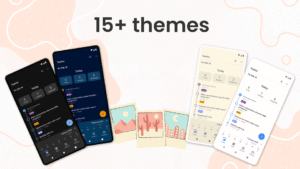
⭐ 15 themes including dark, light & AMOLED Dark.
⭐ Bulk actions: Reschedule tasks, convert to notes, make duplicates
⭐ Snooze task reminders and reschedule tasks from notification.
How people use Taskito:
• Make a digital planner and timeline diary.
• Make a Bullet Journal (BuJo) using Timeline & projects.
• Habit tracker with recurring tasks and reminders.
• Daily task app.
• Grocery list, shopping checklist template.
• Daily reminder to track work and plan meetings.
• Keep a health log with notes and tags.
• Always stay informed with to-do widget.
• Daily diary and notes.
• Kanban style project planner.
• Calendar integration to keep track of holiday events, meeting events, time blocking and much more.
Taskito will assist you to improve your productivity. Download now and join thousands of other people who found Taskito productivity app helpful.
• • •
If you have feedback or suggestions, feel free to send us an email:
hey.taskito@gmail.com
Website:
taskito.io/
Help Center:
taskito.io/help
Blog:
taskito.io/blog
plan & accomplish your daily tasks
.
Are you tired of seeing too many ads or paying expensive subscriptions? We are building an ad free to-do list app which is economical. No ads 🙅♀️. Download now! Over
1 Million people
already have.
With the balance of simplicity & features, you can organize tasks, notes, google calendar events, todo list, reminders, recurring tasks - All in one Timeline.
Use timeline view to stay organized and manage day-to-day agenda. Make a shopping list or task lists, take notes, track projects and set reminders to increase productivity and focus on what matters to you.
Students find it easy to manage schedules, assignments and curriculum with Taskito. You can create simple to-do for each subject, add tasks with checklist for each chapter. Professionals can schedule daily agenda with calendar events integration. Scheduling can also help you with time blocking.
Taskito is versatile and configurable. Import Google Calendar to see meetings and tasks side-by-side. Organize your board with color coded projects to accomplish hobbies, school work or side projects. You can combine reminder with calendar.
Based on suggestions from people, we keep improving Taskito to make it the best task manager app.
Core features:
• Timeline View to see all your to-do tasks, checklists, notes, calendar events, reminders in one place.
• Calendar integrated to-do list.
• Daily planner with notes and tasks.
• Add reminder to keep check on your agenda.
• Project planner to organize tasks.
• Recurring tasks or habit tracking.
• Task reminders - Weekly or Monthly reminders to keep track of your important tasks.
• Full Screen reminder notifications with snooze & reschedule options.
• To-Do widget to see daily tasks to do on your home screen.
• Sync tasks and projects instantly with Android & iPhones.
Why people love Taskito?
⭐ Ad free to-do list.
⭐ Sort project tasks based on priority, due date, or manual drag and drop.
⭐ Crate color coded tags and labels. Categorize to-do tasks with tags.
⭐ Templates to automate your day. Create grocery checklist template, workout routine templates, daily routine template.
⭐ Assign color to projects, manually change to do task order by simple drag/drop.
⭐ Powerful to-do list widget. Switch between Timeline, Unplanned task & Notes, select theme & background opacity.
⭐ 15 themes including dark, light & AMOLED Dark.
⭐ Bulk actions: Reschedule tasks, convert to notes, make duplicates
⭐ Snooze task reminders and reschedule tasks from notification.
How people use Taskito:
• Make a digital planner and timeline diary.
• Make a Bullet Journal (BuJo) using Timeline & projects.
• Habit tracker with recurring tasks and reminders.
• Daily task app.
• Grocery list, shopping checklist template.
• Daily reminder to track work and plan meetings.
• Keep a health log with notes and tags.
• Always stay informed with to-do widget.
• Daily diary and notes.
• Kanban style project planner.
• Calendar integration to keep track of holiday events, meeting events, time blocking and much more.
Taskito will assist you to improve your productivity. Download now and join thousands of other people who found Taskito productivity app helpful.
• • •
If you have feedback or suggestions, feel free to send us an email:
hey.taskito@gmail.com
Website:
taskito.io/
Help Center:
taskito.io/help
Blog:
taskito.io/blog
Download To-Do List & Planner: Taskito APK
Fast, free and safe download.
APK Permissions 15
- android.permission.ACCESS_NETWORK_STATE
- android.permission.FOREGROUND_SERVICE
- android.permission.INTERNET
- android.permission.POST_NOTIFICATIONS
- android.permission.READ_CALENDAR
- android.permission.RECEIVE_BOOT_COMPLETED
- android.permission.SCHEDULE_EXACT_ALARM
- android.permission.USE_BIOMETRIC
- android.permission.USE_FINGERPRINT
- android.permission.USE_FULL_SCREEN_INTENT
- android.permission.WAKE_LOCK
- com.android.vending.BILLING
- com.fenchtose.reflog.DYNAMIC_RECEIVER_NOT_EXPORTED_PERMISSION
- com.google.android.c2dm.permission.RECEIVE
- com.google.android.finsky.permission.BIND_GET_INSTALL_REFERRER_SERVICE
APK Verified
The cryptographic signature guarantees that the file is safe to install and was not tampered with in any way.


Frequently Asked Questions about To-Do List & Planner: Taskito APK
This is the universal variant — a single APK that contains native libraries for every CPU architecture. It installs on any Android device but is larger than per-architecture variants.
Yes — the APK's signature has been cryptographically verified against the publisher's signing key. The SHA-256 hash is shown in the File Information panel so you can independently confirm the file matches the original release.
Android 25 (API level 35) or newer. Older devices will refuse the install.
Install a free app like 'CPU-Z' or 'Droid Hardware Info' from the Play Store and look at the ABI / Instruction Set row. Most phones made after 2017 are arm64-v8a; if in doubt, download the universal variant.
All variants are functionally identical — same features, same version. They differ only in which CPU architectures the native code is compiled for, and (sometimes) which screen densities the included graphics target. Pick the one that matches your device for the smallest install size, or pick 'Universal' if you're unsure.