
This is the universal build of WeCom 5.0.0. It contains native libraries for every CPU architecture (arm64-v8a, armeabi-v7a, x86, x86_64), so it installs on any Android device. The trade-off is size — it's larger than per-architecture variants. Pick this one if you're unsure which CPU your phone has, or if you plan to share the APK with multiple devices.
File size: 210.6 MB • Min Android: 21 • Target Android: 34 • Version code: 55974 • Framework: Native (Java/Kotlin) • Permissions: 80
Screenshots


File Information
| Package Name | com.tencent.wework |
|---|---|
| Version Name | 5.0.0 |
| Version Code | 55974 |
| Architecture | Universal |
| Min Android Version | Android 21 (API 34) |
| Main Activity | com.tencent.wework.launch.LaunchSplashActivity |
| Framework | Native (Java/Kotlin) |
| File Size | 210.59 MB |
| Signature (SHA1) | B2E0B64D7536E4AF8363B4022A9F7472D580FA0B |
| File Hash (SHA256) | 4627b36edb67ee50b145113686947b6331fbae3dc33568630b74ee9216a93580 |
What's New
I.AI Helps Improve Office Efficiency
- Intelligent summary
- Smart search
- Intelligent robot
- Intelligent service summary
II. Efficiency Tools and Basic Experience
- Smart sheet capabilities
- Improved email efficiency
III. Connect to WeChat
- Company business card
IV. Cross-border Communication and Overseas User Experience
- Overseas members joining
- Multilingual translation
- Cross-time zone communication
- Management and compliance
- Intelligent summary
- Smart search
- Intelligent robot
- Intelligent service summary
II. Efficiency Tools and Basic Experience
- Smart sheet capabilities
- Improved email efficiency
III. Connect to WeChat
- Company business card
IV. Cross-border Communication and Overseas User Experience
- Overseas members joining
- Multilingual translation
- Cross-time zone communication
- Management and compliance
App Description
WeCom is a business communication and office collaboration tool developed by Tencent WeChat Team. WeCom provides the familiar communication experience as WeChat and connects with WeChat in an all-round manner. It also offers productivity tools such as Event, Meeting, WeDoc and WeDrive, and flexible OA apps for effective business communication and management.
WeCom has been widely adopted by millions of leading organizations, including Rainbow, P&G, Cartier, WalMart, Chow Tai Fook, L'Oreal, IKEA, Bank of China, PICC, Deppon Express, and Changan Automobile.
1. A familiar communication experience
[Ease of Use] Provides a IM experience consistent with WeChat’s.
[Reliable Storage] Enables real-time message syncing to PCs, mobiles phones, the cloud, and other devices.
[Efficient Communication] Allows users to check message read status to ensure effective communication.
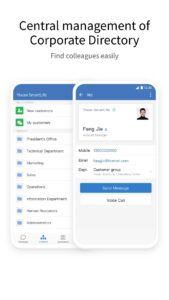
[Corporate Directory] Allows administrators to batch import and manage corporate directory. Finding co-workers has never been easier.
2. Connecting with WeChat
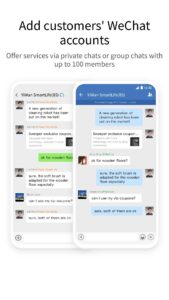
[Exchange Messages] Add WeChat users as contacts and offer services via private or group chats.
[Contact Customers] Companies can view and manage customers added by members, and assign customers of former members.
[Customer Moments] Share posts about activity information and product updates to Moments to interact with customers.
[Customer Group] Group chat with WeChat can reach up to 100 people. Members can use efficient tools in group chats, and companies can assign group chats of former members.
[Company Pay] Companies can use WeChat Pay to make funds with WeChat users, and can also receive payments from members or send red packets.
3. Integrated with kinds of efficiency tool
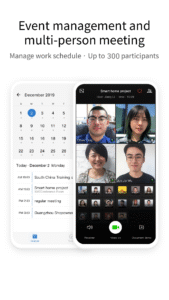
[Event Management] Simultaneously, through "Make an Appointment", you can easily check the idle/busy status of the group members and select the appropriate time to start the event. Members will receive the event invitation in their Event app.
[Multi-person Meeting] Initiate and join online meetings anytime & anywhere, allowing sharing documents and screens among up to 25 participants, and providing some management features for hosts.
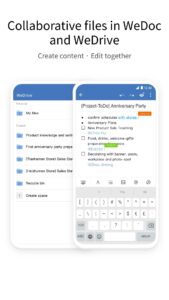
[WeDoc] Online real-time collaborative docs and sheets. Edits can be updated in real-time, freeing collaborators from transferring the files with each other.
[WeDrive] Free 100 GB of shared space for file sharing between colleagues. Space permission can be specified as needed for real-time sync of files and higher security of data.
[Business Mailbox] Send and receive business emails and forward to Group Chats if needed.
4. Diversified Office Apps
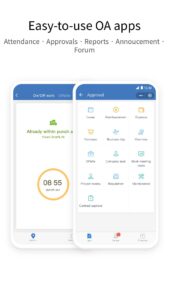
[Basic Office Apps] Preset ready-to-use office apps such as Attendance, Approvals, Reports, Announcement, and Forum.
[Third-party Apps] Provide companies with high-quality third-party apps and hardware, covering mobile office, and other fields, as well as smart attendance, unlimited screen casting, and meeting television.
[APIs] Provide various APIs, making it easier for you to integrate company apps.
5. Strong security and management capabilities
[all-round safeguard] Based on the integration of offense and defense capabilities of Tencent over the past 20 years, WeChat Work is the first domestic office product to pass SOC2Type2 auditing, and has obtained ISO27018, ISO20000, ISO27001, and national three-level certifications to provide reliable data security guarantee for companies.
[Corporate Directory Management] Batch import contacts into a directory where they are managed in one place for convenient and accurate lookup.
[App Management] Manage all company apps and configure the authorized scopes. Sending messages by apps, custom app menu, asset library and other features are also provided.
[Plentiful Configuration]Configure Employee Identity Information and view permission to Corporate Directory, hide departments or members if needed.
WeCom, Offering Every Enterprise their own WeChat
WeCom has been widely adopted by millions of leading organizations, including Rainbow, P&G, Cartier, WalMart, Chow Tai Fook, L'Oreal, IKEA, Bank of China, PICC, Deppon Express, and Changan Automobile.
1. A familiar communication experience
[Ease of Use] Provides a IM experience consistent with WeChat’s.
[Reliable Storage] Enables real-time message syncing to PCs, mobiles phones, the cloud, and other devices.
[Efficient Communication] Allows users to check message read status to ensure effective communication.
[Corporate Directory] Allows administrators to batch import and manage corporate directory. Finding co-workers has never been easier.
2. Connecting with WeChat
[Exchange Messages] Add WeChat users as contacts and offer services via private or group chats.
[Contact Customers] Companies can view and manage customers added by members, and assign customers of former members.
[Customer Moments] Share posts about activity information and product updates to Moments to interact with customers.
[Customer Group] Group chat with WeChat can reach up to 100 people. Members can use efficient tools in group chats, and companies can assign group chats of former members.
[Company Pay] Companies can use WeChat Pay to make funds with WeChat users, and can also receive payments from members or send red packets.
3. Integrated with kinds of efficiency tool
[Event Management] Simultaneously, through "Make an Appointment", you can easily check the idle/busy status of the group members and select the appropriate time to start the event. Members will receive the event invitation in their Event app.
[Multi-person Meeting] Initiate and join online meetings anytime & anywhere, allowing sharing documents and screens among up to 25 participants, and providing some management features for hosts.
[WeDoc] Online real-time collaborative docs and sheets. Edits can be updated in real-time, freeing collaborators from transferring the files with each other.
[WeDrive] Free 100 GB of shared space for file sharing between colleagues. Space permission can be specified as needed for real-time sync of files and higher security of data.
[Business Mailbox] Send and receive business emails and forward to Group Chats if needed.
4. Diversified Office Apps
[Basic Office Apps] Preset ready-to-use office apps such as Attendance, Approvals, Reports, Announcement, and Forum.
[Third-party Apps] Provide companies with high-quality third-party apps and hardware, covering mobile office, and other fields, as well as smart attendance, unlimited screen casting, and meeting television.
[APIs] Provide various APIs, making it easier for you to integrate company apps.
5. Strong security and management capabilities
[all-round safeguard] Based on the integration of offense and defense capabilities of Tencent over the past 20 years, WeChat Work is the first domestic office product to pass SOC2Type2 auditing, and has obtained ISO27018, ISO20000, ISO27001, and national three-level certifications to provide reliable data security guarantee for companies.
[Corporate Directory Management] Batch import contacts into a directory where they are managed in one place for convenient and accurate lookup.
[App Management] Manage all company apps and configure the authorized scopes. Sending messages by apps, custom app menu, asset library and other features are also provided.
[Plentiful Configuration]Configure Employee Identity Information and view permission to Corporate Directory, hide departments or members if needed.
WeCom, Offering Every Enterprise their own WeChat
Download WeCom APK
Fast, free and safe download.
APK Permissions 80
- android.hardware.usb.accessory
- android.hardware.usb.host
- android.permission.ACCESS_COARSE_LOCATION
- android.permission.ACCESS_FINE_LOCATION
- android.permission.ACCESS_NETWORK_STATE
- android.permission.ACCESS_WIFI_STATE
- android.permission.ACTIVITY_RECOGNITION
- android.permission.ALARM_LOCK
- android.permission.BLUETOOTH
- android.permission.BLUETOOTH_ADMIN
- android.permission.BLUETOOTH_ADVERTISE
- android.permission.BLUETOOTH_CONNECT
- android.permission.BLUETOOTH_SCAN
- android.permission.BROADCAST_STICKY
- android.permission.CAMERA
- android.permission.CHANGE_NETWORK_STATE
- android.permission.CHANGE_WIFI_MULTICAST_STATE
- android.permission.CHANGE_WIFI_STATE
- android.permission.DISABLE_KEYGUARD
- android.permission.FLASHLIGHT
- android.permission.FOREGROUND_SERVICE
- android.permission.FOREGROUND_SERVICE_DATA_SYNC
- android.permission.FOREGROUND_SERVICE_MEDIA_PROJECTION
- android.permission.GET_TASKS
- android.permission.INTERNET
- android.permission.MODIFY_AUDIO_SETTINGS
- android.permission.NEARBY_WIFI_DEVICES
- android.permission.NFC
- android.permission.POST_NOTIFICATIONS
- android.permission.READ_APP_BADGE
- android.permission.READ_CALENDAR
- android.permission.READ_CONTACTS
- android.permission.READ_EXTERNAL_STORAGE
- android.permission.READ_MEDIA_AUDIO
- android.permission.READ_MEDIA_IMAGES
- android.permission.READ_MEDIA_VIDEO
- android.permission.READ_PHONE_STATE
- android.permission.RECEIVE_BOOT_COMPLETED
- android.permission.RECEIVE_USER_PRESENT
- android.permission.RECORD_AUDIO
- android.permission.RECOVERY
- android.permission.REORDER_TASKS
- android.permission.SCHEDULE_EXACT_ALARM
- android.permission.SYSTEM_ALERT_WINDOW
- android.permission.USE_BIOMETRIC
- android.permission.USE_FINGERPRINT
- android.permission.USE_FULL_SCREEN_INTENT
- android.permission.VIBRATE
- android.permission.WAKE_LOCK
- android.permission.WRITE_CALENDAR
- android.permission.WRITE_CONTACTS
- android.permission.WRITE_EXTERNAL_STORAGE
- com.android.launcher.permission.INSTALL_SHORTCUT
- com.android.launcher.permission.READ_SETTINGS
- com.android.launcher.permission.UNINSTALL_SHORTCUT
- com.asus.msa.SupplementaryDID.ACCESS
- com.coloros.mcs.permission.RECIEVE_MCS_MESSAGE
- com.hihonor.permission.sec.SDK_LAUNCHER
- com.hihonor.push.permission.READ_PUSH_NOTIFICATION_INFO
- com.htc.launcher.permission.UPDATE_SHORTCUT
- com.huawei.android.launcher.permission.CHANGE_BADGE
- com.huawei.android.launcher.permission.CHANGE_BADGE
- com.huawei.android.launcher.permission.READ_SETTINGS
- com.huawei.android.launcher.permission.WRITE_SETTINGS
- com.huawei.permission.sec.SDK_LAUNCHER
- com.huawei.pushagent.permission.RICHMEDIA_PROVIDER
- com.huawei.systemmanager.permission.ACCESS_INTERFACE
- com.oplus.ocs.permission.third
- com.sonyericsson.home.permission.BROADCAST_BADGE
- com.tencent.wecastlauncher.READ
- com.tencent.wework.backtrace.warmed_up
- com.tencent.wework.manual.dump
- com.tencent.wework.permission.MIPUSH_RECEIVE
- com.tencent.wework.permission.PROCESS_PUSH_MSG
- com.tencent.wework.permission.PUSH_PROVIDER
- com.tencent.wework.READ_PHONE_NUMBERS
- com.tencent.wework.vfs.broadcast
- com.vivo.abe.permission.launcher.notification.num
- com.vivo.notification.permission.BADGE_ICON
- miui.permission.READ_STEPS
APK Verified
The cryptographic signature guarantees that the file is safe to install and was not tampered with in any way.
Similar in Business


Frequently Asked Questions about WeCom APK
This is the universal variant — a single APK that contains native libraries for every CPU architecture. It installs on any Android device but is larger than per-architecture variants.
Yes — the APK's signature has been cryptographically verified against the publisher's signing key. The SHA-256 hash is shown in the File Information panel so you can independently confirm the file matches the original release.
Android 21 (API level 34) or newer. Older devices will refuse the install.
Install a free app like 'CPU-Z' or 'Droid Hardware Info' from the Play Store and look at the ABI / Instruction Set row. Most phones made after 2017 are arm64-v8a; if in doubt, download the universal variant.
All variants are functionally identical — same features, same version. They differ only in which CPU architectures the native code is compiled for, and (sometimes) which screen densities the included graphics target. Pick the one that matches your device for the smallest install size, or pick 'Universal' if you're unsure.