
Screenshots




File Information
| Package Name | com.server.auditor.ssh.client |
|---|---|
| Version Name | 7.4.0 |
| Version Code | 908 |
| Architecture | Universal |
| Min Android Version | Android 26 (API 35) |
| Main Activity | com.server.auditor.ssh.client.navigation.MainActivity |
| Framework | Native (Java/Kotlin) |
| File Size | 48.13 MB |
| Signature (SHA1) | B7B8E8F58C6C039CF2FD07583E1478468D05104A |
| File Hash (SHA256) | 7f10b52c7211ef2844899dfafc3375bc6c0d501ae843be399659550ea04225f8 |
What's New
- Introducing SSH.id — device-bound, biometric-protected SSH keys you can provision anywhere using your SSH.id handle
- Added host icons for Rocky, Alma, Alpine, and Amazon Linux
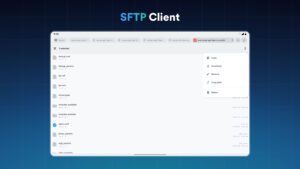
- Added ability to edit files in SFTP using a file editor in the terminal
- Fixed a bug with missing path separator when copying an SFTP item path to the clipboard
- Fixed a bug with handling of ssh:// links
- Stability improvements
- Added host icons for Rocky, Alma, Alpine, and Amazon Linux
- Added ability to edit files in SFTP using a file editor in the terminal
- Fixed a bug with missing path separator when copying an SFTP item path to the clipboard
- Fixed a bug with handling of ssh:// links
- Stability improvements
App Description
Termius is an SSH client and terminal how it should be. Connect with one tap from any mobile and desktop device—no re-entering IP addresses, ports, and passwords.
With a free Termius Starter plan, you can:
· Connect from your mobile and desktop device with SSH, Mosh, Telnet, Port Forwarding, and SFTP.
· Get a desktop-grade terminal experience with a virtual keyboard covering all the special keys required, or connect your Bluetooth keyboard.
Use gestures or shake the device while in the terminal to emulate stroking of Tab, arrows, PgUp/Down, Home, and End, etc.
· Work in several sessions simultaneously with a multi-tab interface and split-view support.
· Customize your terminal themes and fonts for each connection.
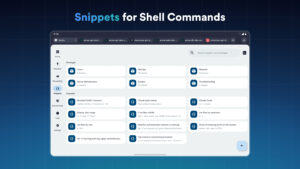
· Save your favorite and frequently used commands and shell scripts to execute them with a tap instead of typing.
· Quickly access the unified history of your terminal commands.
· Get the support of ECDSA and ed25519 keys as well as a chacha20-poly1305 cipher.
Ad-free.
With the Termius Pro plan, you can also:
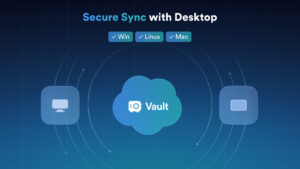
· Access your connection settings and credentials from all your devices anytime with an encrypted cloud vault.
· No limitations on the number of devices to sync.
· Run your saved commands on multiple sessions or servers or instantly get them autocompleted in the terminal.
· Connect to your hardware via Serial Cable.
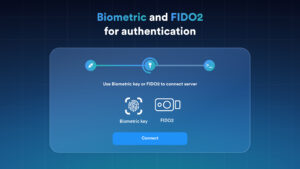
· Authenticate using hardware FIDO2 keys.
· Connect through Proxy and jump servers.
· Set custom environment variables.
Integrate with AWS and DigitalOcean.
· Protect your credentials with Touch ID or Face ID and your account with two-factor authentication.
· Keep your keys on your machine with SSH agent forwarding.
Termius reinvents the command line experience. We strive to make remote access for admins and engineers a more productive and enjoyable experience.
With a free Termius Starter plan, you can:
· Connect from your mobile and desktop device with SSH, Mosh, Telnet, Port Forwarding, and SFTP.
· Get a desktop-grade terminal experience with a virtual keyboard covering all the special keys required, or connect your Bluetooth keyboard.
Use gestures or shake the device while in the terminal to emulate stroking of Tab, arrows, PgUp/Down, Home, and End, etc.
· Work in several sessions simultaneously with a multi-tab interface and split-view support.
· Customize your terminal themes and fonts for each connection.
· Save your favorite and frequently used commands and shell scripts to execute them with a tap instead of typing.
· Quickly access the unified history of your terminal commands.
· Get the support of ECDSA and ed25519 keys as well as a chacha20-poly1305 cipher.
Ad-free.
With the Termius Pro plan, you can also:
· Access your connection settings and credentials from all your devices anytime with an encrypted cloud vault.
· No limitations on the number of devices to sync.
· Run your saved commands on multiple sessions or servers or instantly get them autocompleted in the terminal.
· Connect to your hardware via Serial Cable.
· Authenticate using hardware FIDO2 keys.
· Connect through Proxy and jump servers.
· Set custom environment variables.
Integrate with AWS and DigitalOcean.
· Protect your credentials with Touch ID or Face ID and your account with two-factor authentication.
· Keep your keys on your machine with SSH agent forwarding.
Termius reinvents the command line experience. We strive to make remote access for admins and engineers a more productive and enjoyable experience.
Download Termius - Modern SSH Client APK
Fast, free and safe download.
APK Permissions 16
- android.permission.ACCESS_NETWORK_STATE
- android.permission.CHANGE_WIFI_MULTICAST_STATE
- android.permission.FOREGROUND_SERVICE
- android.permission.FOREGROUND_SERVICE_SPECIAL_USE
- android.permission.INTERNET
- android.permission.NFC
- android.permission.POST_NOTIFICATIONS
- android.permission.RECEIVE_BOOT_COMPLETED
- android.permission.USE_BIOMETRIC
- android.permission.USE_FINGERPRINT
- android.permission.VIBRATE
- android.permission.WAKE_LOCK
- com.android.vending.BILLING
- com.google.android.c2dm.permission.RECEIVE
- com.google.android.providers.gsf.permission.READ_GSERVICES
- com.server.auditor.ssh.client.DYNAMIC_RECEIVER_NOT_EXPORTED_PERMISSION
APK Verified
The cryptographic signature guarantees that the file is safe to install and was not tampered with in any way.


