
This is the universal build of Atomic Time - NTP Clock Sync 1.10.2. It contains native libraries for every CPU architecture (arm64-v8a, armeabi-v7a, x86, x86_64), so it installs on any Android device. The trade-off is size — it's larger than per-architecture variants. Pick this one if you're unsure which CPU your phone has, or if you plan to share the APK with multiple devices.
File size: 19.9 MB • Min Android: 21 • Target Android: 36 • Version code: 14 • Framework: Native (Java/Kotlin) • Permissions: 3
Screenshots
File Information
| Package Name | com.twiegold.atomictime |
|---|---|
| Version Name | 1.10.2 |
| Version Code | 14 |
| Architecture | Universal |
| Min Android Version | Android 21 (API 36) |
| Main Activity | com.twiegold.atomictime.MainActivity |
| Framework | Native (Java/Kotlin) |
| File Size | 19.89 MB |
| Signature (SHA1) | 1D439F135A434DFFDCBA62EF6FC08E10A7718C2A |
| File Hash (SHA256) | 40d58a73e41790919876c461099265dcd94a5b2328f75c8836ef6debd8bef746 |
What's New
- fixed layout crop
- fixed large offset display
- fixed large offset display
App Description
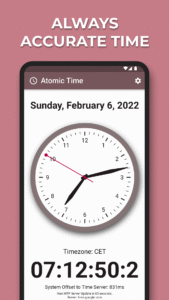
Step into the world of unparalleled accuracy with Atomic Time, the premier clock app. It redefines the standard for timekeeping by providing users with the most accurate time, meticulously synchronized with global NTP servers. Witness the essence of time through our elegantly minimalist analog display, beautifully paired with a crystal-clear digital clock beneath.
Especially valuable for enthusiasts and professionals alike, Atomic Time serves as a trusted reference for checking the accuracy of watches and setting them to the precise second. Crafted for simplicity and readability, this app is the definitive choice for anyone who values precision and style.
- Elegant Design: Enjoy a minimalist graphical analog clock along with a digital display, crafted for optimum clarity and aesthetic appeal.
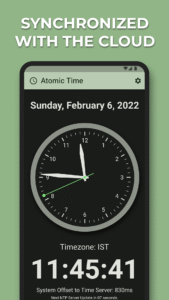
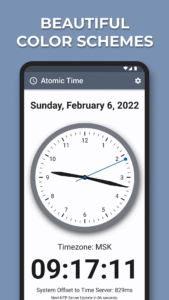
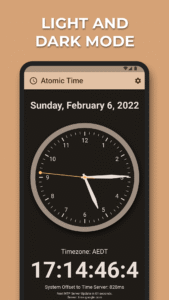
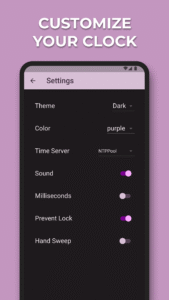
- Customizable Themes: Personalize your clock with multiple color schemes such as Light, Dark, and Black (optimized for OLED displays). Dive into a world of color with variations like Warm Blaze, Pink Candy, and Bluebird to match your mood or decor.
- Time Server Selection: Choose from a wide array of time servers to sync with, ensuring you always have the fastest and most reliable connection.
- Sound & Display Settings: Customize your app with options to turn sound on or off, keep the display active, and select your preferred second hand animation – tick or sweep.
- Lightweight & Fast: Atomic Time is designed to be both fast and light, ensuring minimal impact on your device’s performance.
Especially valuable for enthusiasts and professionals alike, Atomic Time serves as a trusted reference for checking the accuracy of watches and setting them to the precise second. Crafted for simplicity and readability, this app is the definitive choice for anyone who values precision and style.
- Elegant Design: Enjoy a minimalist graphical analog clock along with a digital display, crafted for optimum clarity and aesthetic appeal.
- Customizable Themes: Personalize your clock with multiple color schemes such as Light, Dark, and Black (optimized for OLED displays). Dive into a world of color with variations like Warm Blaze, Pink Candy, and Bluebird to match your mood or decor.
- Time Server Selection: Choose from a wide array of time servers to sync with, ensuring you always have the fastest and most reliable connection.
- Sound & Display Settings: Customize your app with options to turn sound on or off, keep the display active, and select your preferred second hand animation – tick or sweep.
- Lightweight & Fast: Atomic Time is designed to be both fast and light, ensuring minimal impact on your device’s performance.
Download Atomic Time - NTP Clock Sync APK
Fast, free and safe download.
APK Permissions 3
- android.permission.INTERNET
- android.permission.READ_EXTERNAL_STORAGE
- com.twiegold.atomictime.DYNAMIC_RECEIVER_NOT_EXPORTED_PERMISSION
APK Verified
The cryptographic signature guarantees that the file is safe to install and was not tampered with in any way.


Frequently Asked Questions about Atomic Time - NTP Clock Sync APK
This is the universal variant — a single APK that contains native libraries for every CPU architecture. It installs on any Android device but is larger than per-architecture variants.
Yes — the APK's signature has been cryptographically verified against the publisher's signing key. The SHA-256 hash is shown in the File Information panel so you can independently confirm the file matches the original release.
Android 21 (API level 36) or newer. Older devices will refuse the install.
Install a free app like 'CPU-Z' or 'Droid Hardware Info' from the Play Store and look at the ABI / Instruction Set row. Most phones made after 2017 are arm64-v8a; if in doubt, download the universal variant.
All variants are functionally identical — same features, same version. They differ only in which CPU architectures the native code is compiled for, and (sometimes) which screen densities the included graphics target. Pick the one that matches your device for the smallest install size, or pick 'Universal' if you're unsure.