
This is the universal build of Titanium Backup (root needed) 3.0.3. It contains native libraries for every CPU architecture (arm64-v8a, armeabi-v7a, x86, x86_64), so it installs on any Android device. The trade-off is size — it's larger than per-architecture variants. Pick this one if you're unsure which CPU your phone has, or if you plan to share the APK with multiple devices.
File size: 0.3 MB • Min Android: 1 • Target Android: 3 • Version code: 74 • Framework: Native (Java/Kotlin) • Permissions: 3
Screenshots
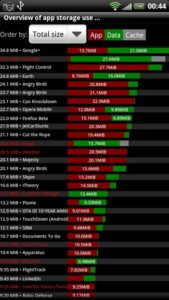
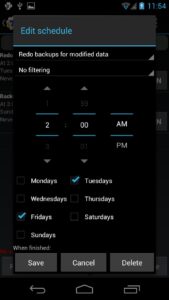
File Information
| Package Name | com.keramidas.TitaniumBackup |
|---|---|
| Version Name | 3.0.3 |
| Version Code | 74 |
| Architecture | Universal |
| Min Android Version | Android 1 (API 3) |
| Main Activity | com.keramidas.TitaniumBackup.MainActivity |
| Framework | Native (Java/Kotlin) |
| File Size | 277.63 KB |
| Signature (SHA1) | 8F07144E14EB24E9B39679B4DB770869F7BA74AE |
| File Hash (SHA256) | 86494e8aec7f816f72c776f3c247ff862e63b839dd5456e51d4b196dec786735 |
What's New
• Fixed built-in MENU action not appearing on some devices (+ added GUI setting to forcibly hide it).
• Updated translations.
• Updated translations.
App Description
☆Needs
ROOT
, Android 1.5-10+ (ARM,x86,MIPS)
☆Over 25 million users, 32+ languages.
☆PRO Key is available on Play Store!
☆Voted #1 TOP ROOT APP on Twitter.
☆Problem? See titaniumtrack.com/kb
☆Scroll down for more info & DEMO VIDEOS ;-)
☆ ☆ ☆
Titanium Backup is the most powerful backup tool on Android, and then some.
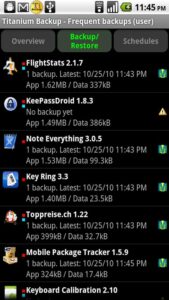
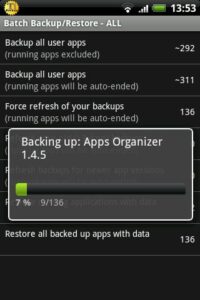
You can backup, restore, freeze (with Pro) your apps + data + Market links. This includes all protected apps & system apps, plus external data on your SD card. You can do 0-click batch & scheduled backups. Backups will operate without closing any apps (with Pro). You can move any app (or app data) to/from the SD card. You can browse any app's data and even query the Market to see detailed information about the app.
Also see the paid PRO key which adds EVEN MORE awesome features such as:
[✔] 0-click batch restores
[✔] Keep multiple backups per app
[✔] Backup/restore SMS,MMS,calls,bookmarks,Wi-Fi AP as XML
[✔] Multi-user app data
[✔] Apps freezer
[✔] Sync to/from Dropbox (manual/scheduled)
[✔] Sync to/from Box (manual/scheduled)
[✔] Sync to/from Google Drive (manual/scheduled)
[✔] TB Web Server: download/upload your backups as a single ZIP on your computer
[✔] Convert user apps system apps
[✔] Integrate system app updates into ROM
[✔] Encryption
[✔] Market Doctor (relink apps to Market)
[✔] "Destroy all Market links" feature
[✔] Hypershell speed
[✔] Backup apps without closing them!
[✔] Create your own update.zip containing apps+data!
[✔] Restore individual apps+data from non-root ADB backups!
[✔] Restore individual apps+data from CWM backups!
[✔] Restore individual apps+data from TWRP backups!
[✔] Market "auto updating" manager
[✔] System logs cleaner
[✔] Dalvik cache cleaner
[✔] Integrate Dalvik cache system elements into ROM
[✔] Unlimited schedules
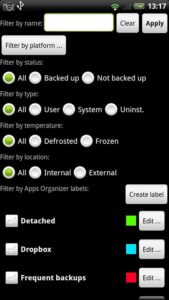
[✔] Load/Save a Filter and use it in Widgets/Schedules
[✔] Change the device's Android ID, restore it from a backup or after a factory reset
[✔] Protect backup against deletion
[✔] Send backup (to e-mail/cloud) and import it in 1 click
[✔] Backup→Verify→Un-install an app in one shot
[✔] Freeze/defrost/launch apps in a single click
[✔] CSV export any app DB (e-mail or Google Docs)
[✔] Convert app data to/from fast WAL format
[✔] WAY MORE!
Check out this in-depth review of TB PRO:
youtube.com/watch?v=vuvDTS9RDrM&hd=1
And check out the new TB PRO demo video:
youtube.com/watch?v=YU33zabluSY&hd=1
Here's the older TB demo video:
youtube.com/watch?v=pZdqITHxCsM&hd=1
More info on permissions:
• "Internet" is used to access Market,Dropbox,ChangeLog.
• "Accounts" is used to access Market.
Some advice:
• We recommend to avoid "modified" TB versions because they can cause various problems down the road.
ROOT
, Android 1.5-10+ (ARM,x86,MIPS)
☆Over 25 million users, 32+ languages.
☆PRO Key is available on Play Store!
☆Voted #1 TOP ROOT APP on Twitter.
☆Problem? See titaniumtrack.com/kb
☆Scroll down for more info & DEMO VIDEOS ;-)
☆ ☆ ☆
Titanium Backup is the most powerful backup tool on Android, and then some.
You can backup, restore, freeze (with Pro) your apps + data + Market links. This includes all protected apps & system apps, plus external data on your SD card. You can do 0-click batch & scheduled backups. Backups will operate without closing any apps (with Pro). You can move any app (or app data) to/from the SD card. You can browse any app's data and even query the Market to see detailed information about the app.
Also see the paid PRO key which adds EVEN MORE awesome features such as:
[✔] 0-click batch restores
[✔] Keep multiple backups per app
[✔] Backup/restore SMS,MMS,calls,bookmarks,Wi-Fi AP as XML
[✔] Multi-user app data
[✔] Apps freezer
[✔] Sync to/from Dropbox (manual/scheduled)
[✔] Sync to/from Box (manual/scheduled)
[✔] Sync to/from Google Drive (manual/scheduled)
[✔] TB Web Server: download/upload your backups as a single ZIP on your computer
[✔] Convert user apps system apps
[✔] Integrate system app updates into ROM
[✔] Encryption
[✔] Market Doctor (relink apps to Market)
[✔] "Destroy all Market links" feature
[✔] Hypershell speed
[✔] Backup apps without closing them!
[✔] Create your own update.zip containing apps+data!
[✔] Restore individual apps+data from non-root ADB backups!
[✔] Restore individual apps+data from CWM backups!
[✔] Restore individual apps+data from TWRP backups!
[✔] Market "auto updating" manager
[✔] System logs cleaner
[✔] Dalvik cache cleaner
[✔] Integrate Dalvik cache system elements into ROM
[✔] Unlimited schedules
[✔] Load/Save a Filter and use it in Widgets/Schedules
[✔] Change the device's Android ID, restore it from a backup or after a factory reset
[✔] Protect backup against deletion
[✔] Send backup (to e-mail/cloud) and import it in 1 click
[✔] Backup→Verify→Un-install an app in one shot
[✔] Freeze/defrost/launch apps in a single click
[✔] CSV export any app DB (e-mail or Google Docs)
[✔] Convert app data to/from fast WAL format
[✔] WAY MORE!
Check out this in-depth review of TB PRO:
youtube.com/watch?v=vuvDTS9RDrM&hd=1
And check out the new TB PRO demo video:
youtube.com/watch?v=YU33zabluSY&hd=1
Here's the older TB demo video:
youtube.com/watch?v=pZdqITHxCsM&hd=1
More info on permissions:
• "Internet" is used to access Market,Dropbox,ChangeLog.
• "Accounts" is used to access Market.
Some advice:
• We recommend to avoid "modified" TB versions because they can cause various problems down the road.
Download Titanium Backup (root needed) APK
Fast, free and safe download.
APK Permissions 3
- android.permission.INTERNET
- android.permission.WAKE_LOCK
- android.permission.WRITE_EXTERNAL_STORAGE
APK Verified
The cryptographic signature guarantees that the file is safe to install and was not tampered with in any way.


Frequently Asked Questions about Titanium Backup (root needed) APK
This is the universal variant — a single APK that contains native libraries for every CPU architecture. It installs on any Android device but is larger than per-architecture variants.
Yes — the APK's signature has been cryptographically verified against the publisher's signing key. The SHA-256 hash is shown in the File Information panel so you can independently confirm the file matches the original release.
Android 1 (API level 3) or newer. Older devices will refuse the install.
Install a free app like 'CPU-Z' or 'Droid Hardware Info' from the Play Store and look at the ABI / Instruction Set row. Most phones made after 2017 are arm64-v8a; if in doubt, download the universal variant.
All variants are functionally identical — same features, same version. They differ only in which CPU architectures the native code is compiled for, and (sometimes) which screen densities the included graphics target. Pick the one that matches your device for the smallest install size, or pick 'Universal' if you're unsure.