
This is the universal build of Super Status Bar - Customize 2.10.1. It contains native libraries for every CPU architecture (arm64-v8a, armeabi-v7a, x86, x86_64), so it installs on any Android device. The trade-off is size — it's larger than per-architecture variants. Pick this one if you're unsure which CPU your phone has, or if you plan to share the APK with multiple devices.
File size: 7.4 MB • Min Android: 23 • Target Android: 36 • Version code: 55 • Framework: Native (Java/Kotlin) • Permissions: 27
Screenshots
File Information
| Package Name | com.tombayley.statusbar |
|---|---|
| Version Name | 2.10.1 |
| Version Code | 55 |
| Architecture | Universal |
| Min Android Version | Android 23 (API 36) |
| Main Activity | com.tombayley.statusbar.app.ui.home.MainActivity |
| Framework | Native (Java/Kotlin) |
| File Size | 7.36 MB |
| Signature (SHA1) | 140D6732DA1FB943D43E52CB91E8ADE67870FBBB |
| File Hash (SHA256) | 3d80b914a5897e8819d0cc2476c948df5727301c175f4d0dc6742b1e92b13c27 |
What's New
Version 2.10.1
- Updated UI
- Bug fixes and improvements
- Updated UI
- Bug fixes and improvements
App Description
Super Status Bar
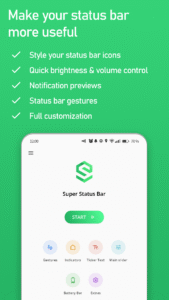
adds useful tweaks to your status bar such as gestures, notification previews, and quick brightness & volume control.
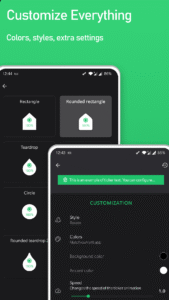
Everything about the app and its tweaks is fully customizable, making it easy to change things to the way that you like.
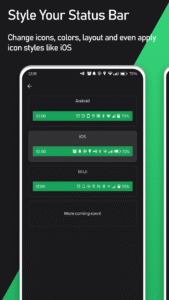
Apply styles such as iOS 14 status bar, MIUI 12 and Android R.
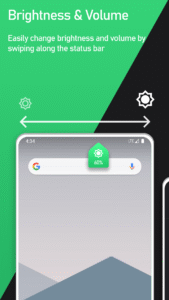
STATUS BAR BRIGHTNESS & VOLUME
- Easily change brightness and volume just by swiping along the status bar
- Includes: Brightness control as well as music/media, ring, notification, voice call and alarm volumes
- Able to automatically detect the type of sound playing. If you're listening to music, swiping along the status bar will change your music volume
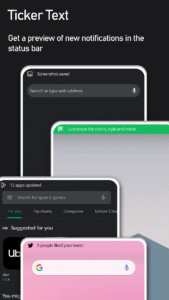
STATUS BAR NOTIFICATION TICKER TEXT
- Bring back the unobtrusive status bar notification ticker text
- When a new notification arrives, it will display along your status bar
- The style can be fully customized to you're liking
- Replaces your heads up notifications if you enable it
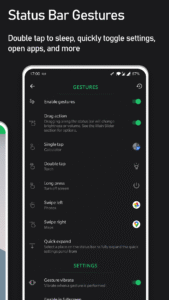
GESTURES
- You can use simple gestures in the status bar to perform custom actions
- Including: tap, double tap, long press and swipe left/right
Available actions:
- Double tap to sleep (turn off screen)
- Flashlight / Torch
- Toggle rotation
- Open apps
- Open app shortcuts
- Screenshot
- Power off menu
- Back / Home / Recents
- Go to previous / next app
- Set brightness (when tapping)
- Expand notifications
- Expand quick settings
- Split screen
ICON STYLES
- Change the style of the status bar icons to iOS 14, MIUI 12 or Android R (more coming soon!)
- Hide status bar icons you dont want to see
- Change the color of icons and the status bar background
STATUS BAR MODS ⚙
- Vibrate when tapping quick settings
BATTERY BAR
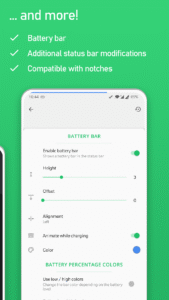
- Display your current battery level as a small bar along the status bar
- Animates when charging
- Fully customizable with colors and positioning
Super Status Bar uses Accessibility Services for status bar gestures and to display the custom status bar.
LINKS
- Twitter: twitter.com/tombayleyapps
- Telegram: t.me/SuperStatusBar
- XDA forum: forum.xda-developers.com/android/apps-games/app-super-status-bar-ticker-text-t4065545
- Email:
support@tombayley.dev
adds useful tweaks to your status bar such as gestures, notification previews, and quick brightness & volume control.
Everything about the app and its tweaks is fully customizable, making it easy to change things to the way that you like.
Apply styles such as iOS 14 status bar, MIUI 12 and Android R.
STATUS BAR BRIGHTNESS & VOLUME
- Easily change brightness and volume just by swiping along the status bar
- Includes: Brightness control as well as music/media, ring, notification, voice call and alarm volumes
- Able to automatically detect the type of sound playing. If you're listening to music, swiping along the status bar will change your music volume
STATUS BAR NOTIFICATION TICKER TEXT
- Bring back the unobtrusive status bar notification ticker text
- When a new notification arrives, it will display along your status bar
- The style can be fully customized to you're liking
- Replaces your heads up notifications if you enable it
GESTURES
- You can use simple gestures in the status bar to perform custom actions
- Including: tap, double tap, long press and swipe left/right
Available actions:
- Double tap to sleep (turn off screen)
- Flashlight / Torch
- Toggle rotation
- Open apps
- Open app shortcuts
- Screenshot
- Power off menu
- Back / Home / Recents
- Go to previous / next app
- Set brightness (when tapping)
- Expand notifications
- Expand quick settings
- Split screen
ICON STYLES
- Change the style of the status bar icons to iOS 14, MIUI 12 or Android R (more coming soon!)
- Hide status bar icons you dont want to see
- Change the color of icons and the status bar background
STATUS BAR MODS ⚙
- Vibrate when tapping quick settings
BATTERY BAR
- Display your current battery level as a small bar along the status bar
- Animates when charging
- Fully customizable with colors and positioning
Super Status Bar uses Accessibility Services for status bar gestures and to display the custom status bar.
LINKS
- Twitter: twitter.com/tombayleyapps
- Telegram: t.me/SuperStatusBar
- XDA forum: forum.xda-developers.com/android/apps-games/app-super-status-bar-ticker-text-t4065545
- Email:
support@tombayley.dev
Download Super Status Bar - Customize APK
Fast, free and safe download.
APK Permissions 27
- android.permission.ACCESS_ADSERVICES_AD_ID
- android.permission.ACCESS_ADSERVICES_ATTRIBUTION
- android.permission.ACCESS_ADSERVICES_TOPICS
- android.permission.ACCESS_NETWORK_STATE
- android.permission.ACCESS_NOTIFICATION_POLICY
- android.permission.ACCESS_WIFI_STATE
- android.permission.BLUETOOTH
- android.permission.BLUETOOTH_CONNECT
- android.permission.EXPAND_STATUS_BAR
- android.permission.FLASHLIGHT
- android.permission.FOREGROUND_SERVICE
- android.permission.INTERNET
- android.permission.POST_NOTIFICATIONS
- android.permission.QUERY_ALL_PACKAGES
- android.permission.READ_EXTERNAL_STORAGE
- android.permission.READ_PHONE_STATE
- android.permission.READ_SYNC_SETTINGS
- android.permission.SYSTEM_ALERT_WINDOW
- android.permission.VIBRATE
- android.permission.WAKE_LOCK
- android.permission.WRITE_SECURE_SETTINGS
- android.permission.WRITE_SETTINGS
- com.android.vending.BILLING
- com.android.vending.CHECK_LICENSE
- com.google.android.finsky.permission.BIND_GET_INSTALL_REFERRER_SERVICE
- com.google.android.gms.permission.AD_ID
- com.tombayley.statusbar.DYNAMIC_RECEIVER_NOT_EXPORTED_PERMISSION
APK Verified
The cryptographic signature guarantees that the file is safe to install and was not tampered with in any way.
Similar in Personalization


Frequently Asked Questions about Super Status Bar - Customize APK
This is the universal variant — a single APK that contains native libraries for every CPU architecture. It installs on any Android device but is larger than per-architecture variants.
Yes — the APK's signature has been cryptographically verified against the publisher's signing key. The SHA-256 hash is shown in the File Information panel so you can independently confirm the file matches the original release.
Android 23 (API level 36) or newer. Older devices will refuse the install.
Install a free app like 'CPU-Z' or 'Droid Hardware Info' from the Play Store and look at the ABI / Instruction Set row. Most phones made after 2017 are arm64-v8a; if in doubt, download the universal variant.
All variants are functionally identical — same features, same version. They differ only in which CPU architectures the native code is compiled for, and (sometimes) which screen densities the included graphics target. Pick the one that matches your device for the smallest install size, or pick 'Universal' if you're unsure.