
This is the universal build of URLCheck 3.4. It contains native libraries for every CPU architecture (arm64-v8a, armeabi-v7a, x86, x86_64), so it installs on any Android device. The trade-off is size — it's larger than per-architecture variants. Pick this one if you're unsure which CPU your phone has, or if you plan to share the APK with multiple devices.
File size: 1.0 MB • Min Android: 19 • Target Android: 34 • Version code: 45 • Framework: Native (Java/Kotlin) • Permissions: 1
Screenshots
File Information
| Package Name | com.trianguloy.urlchecker |
|---|---|
| Version Name | 3.4 |
| Version Code | 45 |
| Architecture | Universal |
| Min Android Version | Android 19 (API 34) |
| Main Activity | com.trianguloy.urlchecker.activities.MainActivity |
| Framework | Native (Java/Kotlin) |
| File Size | 1003.47 KB |
| Signature (SHA1) | 5F5FB954198D7E31302BBFEA337DC83D4F3374A6 |
| File Hash (SHA256) | b92ac738a390f1b3db427f41a3db6c539e02c5a1496cab773481586d3b6e5eda |
What's New
V 3.4
- Improve: Rewritten VirusTotal integration: use api v3 and show more details (vote third place)
- Improve: Allow app component and/or package in the open automation
- Improve: Allow list of strings on 'regex' and 'excludeRegex' for patterns
- Improve: $REFERRER$ for the webhook body
- Improve: Close url editText on enter
- New: excludeRegex on automations
- New: Toast automation sample
- Fix: bold host display not working with host-only urls
- Fix: non-clickable links on json editor
- Improve: Rewritten VirusTotal integration: use api v3 and show more details (vote third place)
- Improve: Allow app component and/or package in the open automation
- Improve: Allow list of strings on 'regex' and 'excludeRegex' for patterns
- Improve: $REFERRER$ for the webhook body
- Improve: Close url editText on enter
- New: excludeRegex on automations
- New: Toast automation sample
- Fix: bold host display not working with host-only urls
- Fix: non-clickable links on json editor
App Description
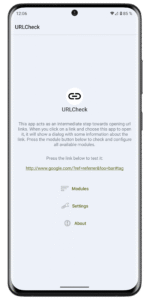
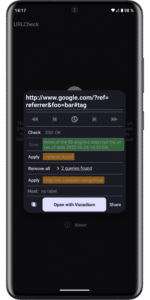
This application acts as an intermediary when opening url links. When you do so, a window containing information about the url is displayed, allowing you to make changes to it as well.
Specially useful when you need to open an external link either from an email, a social network app or others.
URLCheck is developed by TrianguloY, originally for personal use. It is open source (under CC BY 4.0 license), free, without any ads or trackers, light sized and using as few permissions as necessary (only the internet permission, for module checks that will only be performed when the user request them). The source code is available on GitHub too, if you want to suggest changes, perform modifications or propose a new translation:
github.com/TrianguloY/URLCheck
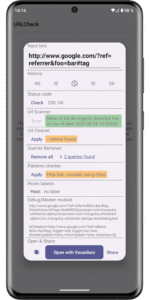
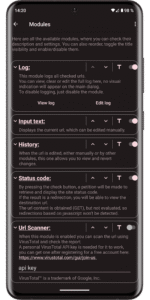
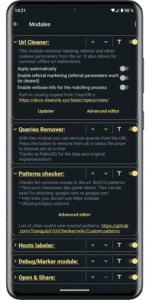
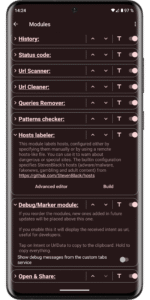
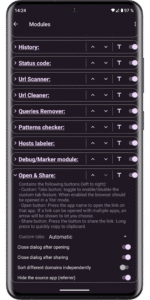
The app is structured with a modular setup, you can enable/disable and reorder individual modules, which include:
* Input text: Displays the current url which can be edited manually. Can't be disabled.
* History: View and revert any change from other modules, including edits from the user (typical undo/redo feature)
* Log: Keeps a log of all checked urls, which you can view, edit, copy, clear...
* Status code: By pressing the button a network request will be made to retrieve that url, and the status code will be displayed (ok, server error, not found...). Additionally, if it corresponds to a redirection, press the message to check the new url. The url is fetched, but not evaluated, so redirection based on javascript won't be detected.
* Url Scanner: Allows you to scan the url using VirusTotal, and check the report. A free personal VirusTotal API key is needed for it to work. VirusTotal™ is a trademark of Google, Inc.
* Url Cleaner: Uses the ClearURLs catalog to remove referral and useless parameters from the url. It also allows for common offline url redirections. Built-in catalog from
docs.clearurls.xyz/latest/specs/rules/
* Unshortener: Uses
unshorten.me/
to unshorten urls remotely.
* Queries remover: Displays the decoded individual url queries, which you can remove or check.
* Pattern module: Checks the url with regex patterns that warns, suggests or applies replacements. You can modify or create your own patterns, or even use user-created ones.
Built-in patterns include:
- Warning when contains non-ascii characters like greek letters. This can be used for phishing: googĺe.com vs google.com
- Suggest replacing 'http' with 'https'
- Suggest replacing Youtube, Reddit or Twitter with privacy-friendly alternatives [disabled by default]
* Hosts checker: This module labels hosts, configured either by specifying them manually or by using a remote hosts-like file. You can use it to warn about dangerous or special sites. The builtin configuration specifies StevenBlack's hosts (adware/malware, fakenews, gambling and adult content) from
github.com/StevenBlack/hosts
* Debug module: Displays the intent uri, and optionally info about the ctabs (custom tabs) service. This is intended for developers.
* Open module: Contains the open and share buttons. If a link can be opened with multiple apps, an arrow will be shown to let you choose. Can't be disabled.
Specially useful when you need to open an external link either from an email, a social network app or others.
URLCheck is developed by TrianguloY, originally for personal use. It is open source (under CC BY 4.0 license), free, without any ads or trackers, light sized and using as few permissions as necessary (only the internet permission, for module checks that will only be performed when the user request them). The source code is available on GitHub too, if you want to suggest changes, perform modifications or propose a new translation:
github.com/TrianguloY/URLCheck
The app is structured with a modular setup, you can enable/disable and reorder individual modules, which include:
* Input text: Displays the current url which can be edited manually. Can't be disabled.
* History: View and revert any change from other modules, including edits from the user (typical undo/redo feature)
* Log: Keeps a log of all checked urls, which you can view, edit, copy, clear...
* Status code: By pressing the button a network request will be made to retrieve that url, and the status code will be displayed (ok, server error, not found...). Additionally, if it corresponds to a redirection, press the message to check the new url. The url is fetched, but not evaluated, so redirection based on javascript won't be detected.
* Url Scanner: Allows you to scan the url using VirusTotal, and check the report. A free personal VirusTotal API key is needed for it to work. VirusTotal™ is a trademark of Google, Inc.
* Url Cleaner: Uses the ClearURLs catalog to remove referral and useless parameters from the url. It also allows for common offline url redirections. Built-in catalog from
docs.clearurls.xyz/latest/specs/rules/
* Unshortener: Uses
unshorten.me/
to unshorten urls remotely.
* Queries remover: Displays the decoded individual url queries, which you can remove or check.
* Pattern module: Checks the url with regex patterns that warns, suggests or applies replacements. You can modify or create your own patterns, or even use user-created ones.
Built-in patterns include:
- Warning when contains non-ascii characters like greek letters. This can be used for phishing: googĺe.com vs google.com
- Suggest replacing 'http' with 'https'
- Suggest replacing Youtube, Reddit or Twitter with privacy-friendly alternatives [disabled by default]
* Hosts checker: This module labels hosts, configured either by specifying them manually or by using a remote hosts-like file. You can use it to warn about dangerous or special sites. The builtin configuration specifies StevenBlack's hosts (adware/malware, fakenews, gambling and adult content) from
github.com/StevenBlack/hosts
* Debug module: Displays the intent uri, and optionally info about the ctabs (custom tabs) service. This is intended for developers.
* Open module: Contains the open and share buttons. If a link can be opened with multiple apps, an arrow will be shown to let you choose. Can't be disabled.
Download URLCheck APK
Fast, free and safe download.
APK Permissions 1
- android.permission.INTERNET
APK Verified
The cryptographic signature guarantees that the file is safe to install and was not tampered with in any way.


Frequently Asked Questions about URLCheck APK
This is the universal variant — a single APK that contains native libraries for every CPU architecture. It installs on any Android device but is larger than per-architecture variants.
Yes — the APK's signature has been cryptographically verified against the publisher's signing key. The SHA-256 hash is shown in the File Information panel so you can independently confirm the file matches the original release.
Android 19 (API level 34) or newer. Older devices will refuse the install.
Install a free app like 'CPU-Z' or 'Droid Hardware Info' from the Play Store and look at the ABI / Instruction Set row. Most phones made after 2017 are arm64-v8a; if in doubt, download the universal variant.
All variants are functionally identical — same features, same version. They differ only in which CPU architectures the native code is compiled for, and (sometimes) which screen densities the included graphics target. Pick the one that matches your device for the smallest install size, or pick 'Universal' if you're unsure.