
This is the universal build of Mobile Passport Control 3.2.3. It contains native libraries for every CPU architecture (arm64-v8a, armeabi-v7a, x86, x86_64), so it installs on any Android device. The trade-off is size — it's larger than per-architecture variants. Pick this one if you're unsure which CPU your phone has, or if you plan to share the APK with multiple devices.
File size: 98.2 MB • Min Android: 24 • Target Android: 35 • Version code: 397 • Framework: Native (Java/Kotlin) • Permissions: 11
Screenshots
File Information
| Package Name | gov.dhs.cbp.pspd.mpc |
|---|---|
| Version Name | 3.2.3 |
| Version Code | 397 |
| Architecture | Universal |
| Min Android Version | Android 24 (API 35) |
| Main Activity | gov.cbp.pspd.mpc.ui.BaseActivity |
| Framework | Native (Java/Kotlin) |
| File Size | 98.23 MB |
| Signature (SHA1) | A8E6052A1D31B283B5CCAE5B69F97EB7CFE95229 |
| File Hash (SHA256) | f083ed222343a55f2f0ad3dd03223fdc8bff1717750bd46aec712aa1c68b0e94 |
What's New
Fixes:
- Fixed an issue where submission was not completing
- Fixed an issue where submission was not completing
App Description
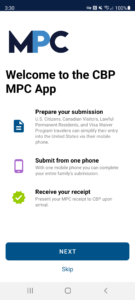
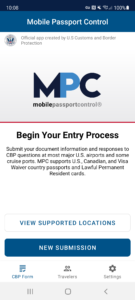
Mobile Passport Control (MPC) is an official application created by U.S. Customs and Border Protection that streamlines your CBP inspection process at select U.S. entry locations. Simply complete your travel information, answer CBP inspection questions, capture a photo of yourself and of each member of your group, and follow the instructions provided on your receipt.
Important Notes:
- MPC does not replace your passport; your passport will still be required for travel.
- MPC is only available at supported CBP entry locations.
- MPC is a voluntary program which can be used by U.S. Citizens, certain Canadian Citizen Visitors, Lawful Permanent Residents, and returning Visa Waiver Program applicants with an approved ESTA.
More information regarding eligibility and supported CBP entry locations can be found on our website:
www.cbp.gov/travel/us-citizens/mobile-passport-control
MPC can be used in 6 simple steps:
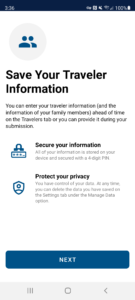
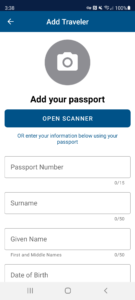
1. Create a primary profile to save your travel documents and biographic information. You can add and save additional eligible people to the MPC app so that you can submit together from one device. Your information will be securely stored on your device to be used for future travel.
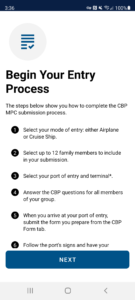
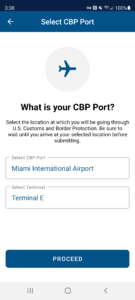
2. Select your CBP port of entry, terminal (if applicable), and add up to 11 additional members of your group to include in your submission.
3. Answer CBP inspection questions and certify the truthfulness and accuracy of your answers.
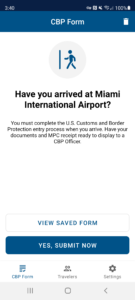
4. Upon arriving at your selected port of entry, tap the “Yes, Submit Now” button. You will be asked to capture a clear and unobstructed photo of yourself and of each other person that you included in your submission.
5. Once your submission is processed, CBP will send a virtual receipt back to your device. Follow the instructions on your receipt and be prepared to present your passport and other relevant travel documents.
6. The CBP Officer will complete the inspection. If further information is required, the CBP Officer will let you know. Please note: The CBP Officer may ask to capture an additional photo of you or your group members for verification.
Important Notes:
- MPC does not replace your passport; your passport will still be required for travel.
- MPC is only available at supported CBP entry locations.
- MPC is a voluntary program which can be used by U.S. Citizens, certain Canadian Citizen Visitors, Lawful Permanent Residents, and returning Visa Waiver Program applicants with an approved ESTA.
More information regarding eligibility and supported CBP entry locations can be found on our website:
www.cbp.gov/travel/us-citizens/mobile-passport-control
MPC can be used in 6 simple steps:
1. Create a primary profile to save your travel documents and biographic information. You can add and save additional eligible people to the MPC app so that you can submit together from one device. Your information will be securely stored on your device to be used for future travel.
2. Select your CBP port of entry, terminal (if applicable), and add up to 11 additional members of your group to include in your submission.
3. Answer CBP inspection questions and certify the truthfulness and accuracy of your answers.
4. Upon arriving at your selected port of entry, tap the “Yes, Submit Now” button. You will be asked to capture a clear and unobstructed photo of yourself and of each other person that you included in your submission.
5. Once your submission is processed, CBP will send a virtual receipt back to your device. Follow the instructions on your receipt and be prepared to present your passport and other relevant travel documents.
6. The CBP Officer will complete the inspection. If further information is required, the CBP Officer will let you know. Please note: The CBP Officer may ask to capture an additional photo of you or your group members for verification.
Download Mobile Passport Control APK
Fast, free and safe download.
APK Permissions 11
- android.permission.ACCESS_NETWORK_STATE
- android.permission.CAMERA
- android.permission.FLASHLIGHT
- android.permission.INTERNET
- android.permission.POST_NOTIFICATIONS
- android.permission.READ_EXTERNAL_STORAGE
- android.permission.SCHEDULE_EXACT_ALARM
- android.permission.USE_BIOMETRIC
- android.permission.USE_FINGERPRINT
- android.permission.WRITE_EXTERNAL_STORAGE
- gov.dhs.cbp.pspd.mpc.DYNAMIC_RECEIVER_NOT_EXPORTED_PERMISSION
APK Verified
The cryptographic signature guarantees that the file is safe to install and was not tampered with in any way.
Similar in Travel & Local


Frequently Asked Questions about Mobile Passport Control APK
This is the universal variant — a single APK that contains native libraries for every CPU architecture. It installs on any Android device but is larger than per-architecture variants.
Yes — the APK's signature has been cryptographically verified against the publisher's signing key. The SHA-256 hash is shown in the File Information panel so you can independently confirm the file matches the original release.
Android 24 (API level 35) or newer. Older devices will refuse the install.
Install a free app like 'CPU-Z' or 'Droid Hardware Info' from the Play Store and look at the ABI / Instruction Set row. Most phones made after 2017 are arm64-v8a; if in doubt, download the universal variant.
All variants are functionally identical — same features, same version. They differ only in which CPU architectures the native code is compiled for, and (sometimes) which screen densities the included graphics target. Pick the one that matches your device for the smallest install size, or pick 'Universal' if you're unsure.