
This is the universal build of WiFiman 2.12.1. It contains native libraries for every CPU architecture (arm64-v8a, armeabi-v7a, x86, x86_64), so it installs on any Android device. The trade-off is size — it's larger than per-architecture variants. Pick this one if you're unsure which CPU your phone has, or if you plan to share the APK with multiple devices.
File size: 133.0 MB • Min Android: 26 • Target Android: 34 • Version code: 212010003 • Framework: Native (Java/Kotlin) • Permissions: 27
Screenshots
File Information
| Package Name | com.ubnt.usurvey |
|---|---|
| Version Name | 2.12.1 |
| Version Code | 212010003 |
| Architecture | Universal |
| Min Android Version | Android 26 (API 34) |
| Main Activity | com.ubnt.usurvey.ui.splash.SplashActivity |
| Framework | Native (Java/Kotlin) |
| File Size | 132.95 MB |
| Signature (SHA1) | 7329B798CD6AEB7A01A5AFF9D280152FD93B81FE |
| File Hash (SHA256) | ec56d66dd4be9229f991fb30c5612e25030adb425be676998faf2f1a030fc477 |
What's New
Improvements
Added Access Point latency to the Latency graph.
Improved the overall user experience.
Improved the console connection resiliency.
Improved Teleport VPN resiliency.
Bugfixes
Fixed topology issues when using a cellular connection.
Added Access Point latency to the Latency graph.
Improved the overall user experience.
Improved the console connection resiliency.
Improved Teleport VPN resiliency.
Bugfixes
Fixed topology issues when using a cellular connection.
App Description
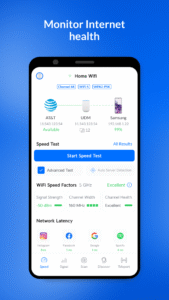
WiFiman is here to save your network from sluggish surfing, endless buffering, and congested data channels. With this free-to-use (and ad-free) app, you can:
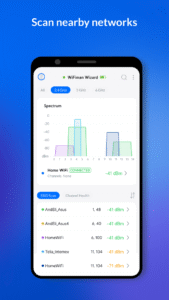
* Detect available WiFi networks and Bluetooth LE devices instantly.
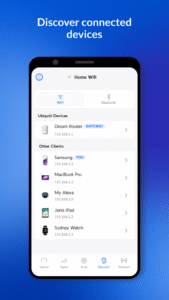
* Scan network subnets for additional details on detected devices, such as Bonjour, SNMP, NetBIOS, and Ubiquiti discovery protocols.
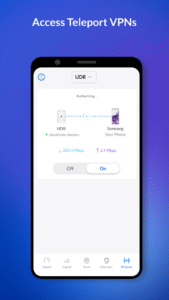
* Connect to your UniFi network remotely via Teleport - a free, zero-configuration VPN.
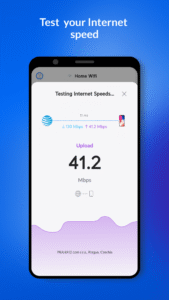
* Conduct download/upload speed tests, store results, compare network performance, and share insights with others.
* Relocate your access points (APs) to nearby data channels to instantly increase signal strength and reduce traffic volume.
* Test the connection speed between your UniFi Dream Machine or UDM Pro and mobile devices.
* See enhanced details about all of the Ubiquiti devices on your network (UniFi, AmpliFi, AirMAX, EdgeMAX, EdgeRouter, EdgeSwitch, UISP, AirCube, AirFiber).
What information does WiFiman show?
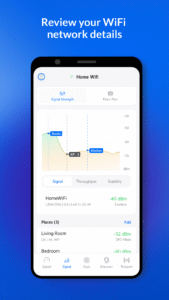
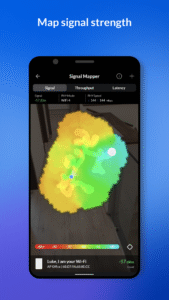
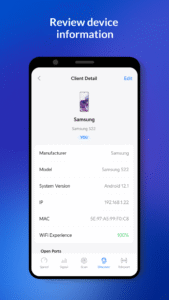
You'll see IP address, netmask, gateway, DNS server, SSID, BSSID, signal strength, wireless channel, ping latency, and packet loss information.
WiFiman's network tools include:
* A network analyzer with WiFi 6 support and a signal strength meter.
* WiFi speed testing.
* Detailed network cell information.
* A network scanner for device discovery.
* A port scanner.
* Detect available WiFi networks and Bluetooth LE devices instantly.
* Scan network subnets for additional details on detected devices, such as Bonjour, SNMP, NetBIOS, and Ubiquiti discovery protocols.
* Connect to your UniFi network remotely via Teleport - a free, zero-configuration VPN.
* Conduct download/upload speed tests, store results, compare network performance, and share insights with others.
* Relocate your access points (APs) to nearby data channels to instantly increase signal strength and reduce traffic volume.
* Test the connection speed between your UniFi Dream Machine or UDM Pro and mobile devices.
* See enhanced details about all of the Ubiquiti devices on your network (UniFi, AmpliFi, AirMAX, EdgeMAX, EdgeRouter, EdgeSwitch, UISP, AirCube, AirFiber).
What information does WiFiman show?
You'll see IP address, netmask, gateway, DNS server, SSID, BSSID, signal strength, wireless channel, ping latency, and packet loss information.
WiFiman's network tools include:
* A network analyzer with WiFi 6 support and a signal strength meter.
* WiFi speed testing.
* Detailed network cell information.
* A network scanner for device discovery.
* A port scanner.
Download WiFiman APK
Fast, free and safe download.
APK Permissions 27
- android.permission.ACCESS_ADSERVICES_AD_ID
- android.permission.ACCESS_ADSERVICES_ATTRIBUTION
- android.permission.ACCESS_COARSE_LOCATION
- android.permission.ACCESS_FINE_LOCATION
- android.permission.ACCESS_NETWORK_STATE
- android.permission.ACCESS_WIFI_STATE
- android.permission.BLUETOOTH
- android.permission.BLUETOOTH_ADMIN
- android.permission.BLUETOOTH_CONNECT
- android.permission.BLUETOOTH_SCAN
- android.permission.CAMERA
- android.permission.CHANGE_NETWORK_STATE
- android.permission.CHANGE_WIFI_MULTICAST_STATE
- android.permission.CHANGE_WIFI_STATE
- android.permission.FOREGROUND_SERVICE
- android.permission.FOREGROUND_SERVICE_CONNECTED_DEVICE
- android.permission.INTERNET
- android.permission.POST_NOTIFICATIONS
- android.permission.READ_EXTERNAL_STORAGE
- android.permission.READ_PHONE_STATE
- android.permission.VIBRATE
- android.permission.WAKE_LOCK
- android.permission.WRITE_EXTERNAL_STORAGE
- com.google.android.finsky.permission.BIND_GET_INSTALL_REFERRER_SERVICE
- com.google.android.gms.permission.AD_ID
- com.google.android.providers.gsf.permission.READ_GSERVICES
- com.ubnt.usurvey.DYNAMIC_RECEIVER_NOT_EXPORTED_PERMISSION
APK Verified
The cryptographic signature guarantees that the file is safe to install and was not tampered with in any way.
Similar in Tools


Frequently Asked Questions about WiFiman APK
This is the universal variant — a single APK that contains native libraries for every CPU architecture. It installs on any Android device but is larger than per-architecture variants.
Yes — the APK's signature has been cryptographically verified against the publisher's signing key. The SHA-256 hash is shown in the File Information panel so you can independently confirm the file matches the original release.
Android 26 (API level 34) or newer. Older devices will refuse the install.
Install a free app like 'CPU-Z' or 'Droid Hardware Info' from the Play Store and look at the ABI / Instruction Set row. Most phones made after 2017 are arm64-v8a; if in doubt, download the universal variant.
All variants are functionally identical — same features, same version. They differ only in which CPU architectures the native code is compiled for, and (sometimes) which screen densities the included graphics target. Pick the one that matches your device for the smallest install size, or pick 'Universal' if you're unsure.