
Download UniCredit RO - Mobile Banking APK 25.6.6.0 Universal · Android 24+
Download APK
Verified Safe
This is the universal build of UniCredit RO - Mobile Banking 25.6.6.0. It contains native libraries for every CPU architecture (arm64-v8a, armeabi-v7a, x86, x86_64), so it installs on any Android device. The trade-off is size — it's larger than per-architecture variants. Pick this one if you're unsure which CPU your phone has, or if you plan to share the APK with multiple devices.
File size: 89.8 MB • Min Android: 24 • Target Android: 35 • Version code: 25060600 • Framework: Native (Java/Kotlin) • Permissions: 30
Screenshots
File Information
| Package Name | hr.asseco.android.jimba.mUCI.ro |
|---|---|
| Version Name | 25.6.6.0 |
| Version Code | 25060600 |
| Architecture | Universal |
| Min Android Version | Android 24 (API 35) |
| Main Activity | hr.asseco.android.muci.ae.prelogin.SplashScreenActivity |
| Framework | Native (Java/Kotlin) |
| File Size | 89.82 MB |
| Signature (SHA1) | 62FD4FBC491FAF80F151F1383E4F74A3B5D89458 |
| File Hash (SHA256) | e20c91be1f9835bbdcc28c142ae40af958201b9584b32964c3104b9393a7a83f |
What's New
Thank you for using the app! What’s new with this version?
• some small bug fixing and improvements for your overall experience with the app.
• some small bug fixing and improvements for your overall experience with the app.
App Description
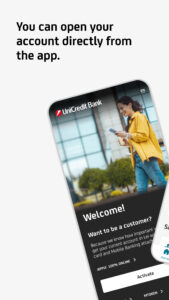
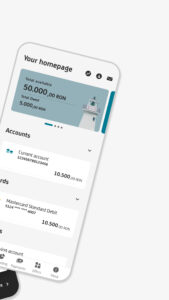
The mobile application from UniCredit Bank has an intuitive, safe navigation and helps you save time for the things that really matter.
• Do you need quickly a debit card?
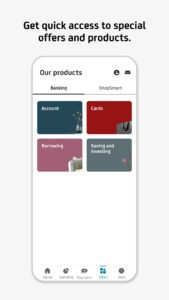
Request a virtual one from home page or “Offers” menu. Easy to issue it, easy to close it.
• Do you want to get money back for some of your transactions?
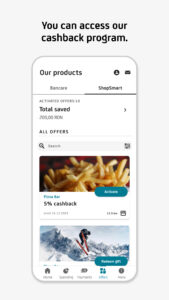
Activate and use offers from ShopSmart cashback program that you may find in “Offers” menu. We have more than 100 partners.
• Do you need to credit your UniCredit account quickly in order to pay contactless using your phone or to pay your monthly rate for your loan?
Access "Add money" icon from Account page, fill in the amount and the card details, and authorize the card transaction as you normally do when making online payments using that card.
• Have you changed your phone number or e-mail address and want to update your contact details in relationship with the Bank?
From "My Profile" menu you can update the phone number, the email address and even upload your ID picture.
• Do you want to stop worrying about bill payment deadlines?
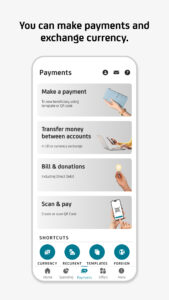
You can activate a Direct Debit mandate from Payments/Utility Payments and the bills will be automatically payed each month from your current account. You can set up a limit or cancel the mandate at any time.
• Do you want to pay contactless with your phone?
Go to Cards/Card Info menu, press the "Add to Google Pay" button, enroll the card and activate the NFC on your phone.
• Did you forgot your card at home and you need to withdraw cash?
All you need to do is access the mCash icon from the Accounts or Card menu (only those with RON currency), specify the amount and generate the code, which you can use at any UniCredit Romania cash withdraw terminal.
• Do you want to pay utility bills?
You can do it directly by scanning the barcode on the invoice, without the necessity to complete any additional details.
• Do you want to block a card or to set its limits?
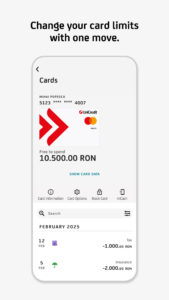
Tap on the Cards menu, choose the desired card and you have full access to its settings. You can change POS or ATM limits and you can also block/unblock it or decide whether you want to use it for online payments. Anytime, on the spot.
• Do you want to pay back your credit card?
Select the credit card repayment option from either the Payments menu, or from the Cards menu after you previously choose the desired card. You modify the amount, if you want, and sign.
• Do you want to open a term deposit?
Select the option from the Products menu and open the desired term deposit with just a few clicks.
• Do you want to get rid of the digipass?
Activate Mobile Token. The app generates unique passwords for each authentication or transaction authorization you do in Online Banking.
• And much more.
• Do you need quickly a debit card?
Request a virtual one from home page or “Offers” menu. Easy to issue it, easy to close it.
• Do you want to get money back for some of your transactions?
Activate and use offers from ShopSmart cashback program that you may find in “Offers” menu. We have more than 100 partners.
• Do you need to credit your UniCredit account quickly in order to pay contactless using your phone or to pay your monthly rate for your loan?
Access "Add money" icon from Account page, fill in the amount and the card details, and authorize the card transaction as you normally do when making online payments using that card.
• Have you changed your phone number or e-mail address and want to update your contact details in relationship with the Bank?
From "My Profile" menu you can update the phone number, the email address and even upload your ID picture.
• Do you want to stop worrying about bill payment deadlines?
You can activate a Direct Debit mandate from Payments/Utility Payments and the bills will be automatically payed each month from your current account. You can set up a limit or cancel the mandate at any time.
• Do you want to pay contactless with your phone?
Go to Cards/Card Info menu, press the "Add to Google Pay" button, enroll the card and activate the NFC on your phone.
• Did you forgot your card at home and you need to withdraw cash?
All you need to do is access the mCash icon from the Accounts or Card menu (only those with RON currency), specify the amount and generate the code, which you can use at any UniCredit Romania cash withdraw terminal.
• Do you want to pay utility bills?
You can do it directly by scanning the barcode on the invoice, without the necessity to complete any additional details.
• Do you want to block a card or to set its limits?
Tap on the Cards menu, choose the desired card and you have full access to its settings. You can change POS or ATM limits and you can also block/unblock it or decide whether you want to use it for online payments. Anytime, on the spot.
• Do you want to pay back your credit card?
Select the credit card repayment option from either the Payments menu, or from the Cards menu after you previously choose the desired card. You modify the amount, if you want, and sign.
• Do you want to open a term deposit?
Select the option from the Products menu and open the desired term deposit with just a few clicks.
• Do you want to get rid of the digipass?
Activate Mobile Token. The app generates unique passwords for each authentication or transaction authorization you do in Online Banking.
• And much more.
Download UniCredit RO - Mobile Banking APK
Fast, free and safe download.
APK Permissions 30
- android.permission.ACCESS_ADSERVICES_AD_ID
- android.permission.ACCESS_ADSERVICES_ATTRIBUTION
- android.permission.ACCESS_COARSE_LOCATION
- android.permission.ACCESS_FINE_LOCATION
- android.permission.ACCESS_LOCATION_EXTRA_COMMANDS
- android.permission.ACCESS_NETWORK_STATE
- android.permission.ACCESS_WIFI_STATE
- android.permission.BLUETOOTH
- android.permission.BLUETOOTH_CONNECT
- android.permission.CAMERA
- android.permission.FLASHLIGHT
- android.permission.FOREGROUND_SERVICE
- android.permission.FOREGROUND_SERVICE_DATA_SYNC
- android.permission.INTERNET
- android.permission.MODIFY_AUDIO_SETTINGS
- android.permission.POST_NOTIFICATIONS
- android.permission.READ_EXTERNAL_STORAGE
- android.permission.READ_PHONE_NUMBERS
- android.permission.READ_PHONE_STATE
- android.permission.RECEIVE_BOOT_COMPLETED
- android.permission.RECORD_AUDIO
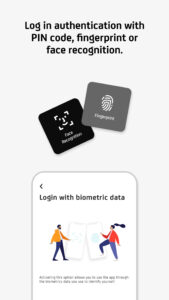
- android.permission.USE_BIOMETRIC
- android.permission.USE_FINGERPRINT
- android.permission.VIBRATE
- android.permission.WAKE_LOCK
- android.permission.WRITE_EXTERNAL_STORAGE
- com.google.android.c2dm.permission.RECEIVE
- com.google.android.finsky.permission.BIND_GET_INSTALL_REFERRER_SERVICE
- com.google.android.gms.permission.AD_ID
- hr.asseco.android.jimba.mUCI.ro.DYNAMIC_RECEIVER_NOT_EXPORTED_PERMISSION
APK Verified
The cryptographic signature guarantees that the file is safe to install and was not tampered with in any way.


Frequently Asked Questions about UniCredit RO - Mobile Banking APK
This is the universal variant — a single APK that contains native libraries for every CPU architecture. It installs on any Android device but is larger than per-architecture variants.
Yes — the APK's signature has been cryptographically verified against the publisher's signing key. The SHA-256 hash is shown in the File Information panel so you can independently confirm the file matches the original release.
Android 24 (API level 35) or newer. Older devices will refuse the install.
Install a free app like 'CPU-Z' or 'Droid Hardware Info' from the Play Store and look at the ABI / Instruction Set row. Most phones made after 2017 are arm64-v8a; if in doubt, download the universal variant.
All variants are functionally identical — same features, same version. They differ only in which CPU architectures the native code is compiled for, and (sometimes) which screen densities the included graphics target. Pick the one that matches your device for the smallest install size, or pick 'Universal' if you're unsure.