
Download UPS APK 10.21.1.10 arm64-v8a, armeabi-v7a, x86, x86_64 · Android 28+
Download APK
Verified Safe
This is the arm64-v8a, armeabi-v7a, x86, x86_64 build of UPS 10.21.1.10. Pick this build if your device's primary ABI matches.
File size: 158.0 MB • Min Android: 28 • Target Android: 35 • Version code: 522 • Framework: React Native • Permissions: 22
Screenshots

File Information
| Package Name | com.ups.mobile.android |
|---|---|
| Version Name | 10.21.1.10 |
| Version Code | 522 |
| Architecture | arm64-v8a, armeabi-v7a, x86, x86_64 |
| Min Android Version | Android 28 (API 35) |
| Main Activity | com.ups.mobile.android.MainActivity |
| Framework | React Native |
| File Size | 157.96 MB |
| Signature (SHA1) | 426A2CA79AB97DCEF58D6F577E41ECC570688F41 |
| File Hash (SHA256) | 259e1aff01fea10af6da9bd4cace916d67fa132476f89b57fd5e24939b3b01e6 |
What's New
We're consistently update our app experience, making UPS work better for you one release at a time.
Check out the newest additions:
- Pick up where you left off: Now you can start a shipment in one place and finish in another without losing your progress.
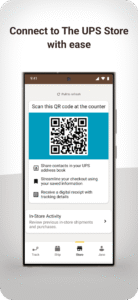
- Use your personalized QR code in the Store tab to streamline your in-store experience
- Find UPS locations for drop-offs or shipping
- Ship to more than 200 countries
- Set delivery hold preferences to avoid missing deliveries
Check out the newest additions:
- Pick up where you left off: Now you can start a shipment in one place and finish in another without losing your progress.
- Use your personalized QR code in the Store tab to streamline your in-store experience
- Find UPS locations for drop-offs or shipping
- Ship to more than 200 countries
- Set delivery hold preferences to avoid missing deliveries
App Description
Connect with The UPS Store with Ease
Save time when shipping or dropping off packages at The UPS Store.
Access a personalized QR code that helps easily ship to contacts in your UPS address book, receive digital receipts, and track outbound packages.
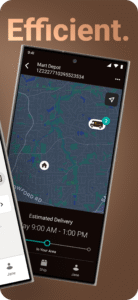
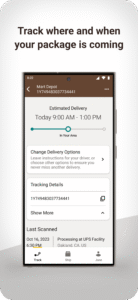
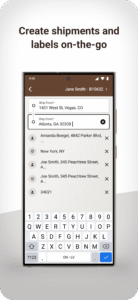
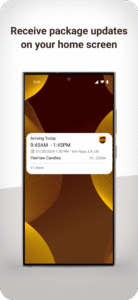
It’s never been easier to ship and track your packages on-the-go. With the UPS app, you can get updates on your home screen, create shipping labels in a snap and track deliveries, wherever and whenever.
The app’s modern, clean and responsive user experience offers game-changing functionality and gives you peace of mind with an unrivaled view into your package’s status.
International Shipping Made Easy
Let us make international shipping easier for you with the UPS app.
We’ve taken out unnecessary complications and offer clear guidance to help you ship quickly and avoid potential hold-ups.
UPS is the only carrier that offers multiple types of proactive guidance so you can ship with confidence. Track your inbound and outbound international shipments on-the-go, bringing you and your customers peace of mind.
Save time when shipping or dropping off packages at The UPS Store.
Access a personalized QR code that helps easily ship to contacts in your UPS address book, receive digital receipts, and track outbound packages.
It’s never been easier to ship and track your packages on-the-go. With the UPS app, you can get updates on your home screen, create shipping labels in a snap and track deliveries, wherever and whenever.
The app’s modern, clean and responsive user experience offers game-changing functionality and gives you peace of mind with an unrivaled view into your package’s status.
International Shipping Made Easy
Let us make international shipping easier for you with the UPS app.
We’ve taken out unnecessary complications and offer clear guidance to help you ship quickly and avoid potential hold-ups.
UPS is the only carrier that offers multiple types of proactive guidance so you can ship with confidence. Track your inbound and outbound international shipments on-the-go, bringing you and your customers peace of mind.
Download UPS APK
Fast, free and safe download.
APK Permissions 22
- android.permission.ACCESS_COARSE_LOCATION
- android.permission.ACCESS_FINE_LOCATION
- android.permission.ACCESS_NETWORK_STATE
- android.permission.ACCESS_WIFI_STATE
- android.permission.CAMERA
- android.permission.FOREGROUND_SERVICE
- android.permission.FOREGROUND_SERVICE_REMOTE_MESSAGING
- android.permission.INTERNET
- android.permission.POST_NOTIFICATIONS
- android.permission.READ_CONTACTS
- android.permission.READ_EXTERNAL_STORAGE
- android.permission.RECEIVE_BOOT_COMPLETED
- android.permission.USE_BIOMETRIC
- android.permission.USE_FINGERPRINT
- android.permission.VIBRATE
- android.permission.WAKE_LOCK
- android.permission.WRITE_EXTERNAL_STORAGE
- android.permission.WRITE.CLIPBOARD
- android.permission.WRITE.EXTERNAL_STORAGE
- com.google.android.c2dm.permission.RECEIVE
- com.google.android.finsky.permission.BIND_GET_INSTALL_REFERRER_SERVICE
- com.ups.mobile.android.DYNAMIC_RECEIVER_NOT_EXPORTED_PERMISSION
APK Verified
The cryptographic signature guarantees that the file is safe to install and was not tampered with in any way.


Frequently Asked Questions about UPS APK
This variant is built for devices that report `arm64-v8a, armeabi-v7a, x86, x86_64` as their primary ABI. If your device's CPU matches, this is the smallest, fastest version to install.
Yes — the APK's signature has been cryptographically verified against the publisher's signing key. The SHA-256 hash is shown in the File Information panel so you can independently confirm the file matches the original release.
Android 28 (API level 35) or newer. Older devices will refuse the install.
Install a free app like 'CPU-Z' or 'Droid Hardware Info' from the Play Store and look at the ABI / Instruction Set row. Most phones made after 2017 are arm64-v8a; if in doubt, download the universal variant.
All variants are functionally identical — same features, same version. They differ only in which CPU architectures the native code is compiled for, and (sometimes) which screen densities the included graphics target. Pick the one that matches your device for the smallest install size, or pick 'Universal' if you're unsure.