
This is the universal build of DontKillMyApp: Make apps work 2.8. It contains native libraries for every CPU architecture (arm64-v8a, armeabi-v7a, x86, x86_64), so it installs on any Android device. The trade-off is size — it's larger than per-architecture variants. Pick this one if you're unsure which CPU your phone has, or if you plan to share the APK with multiple devices.
File size: 3.1 MB • Min Android: 24 • Target Android: 36 • Version code: 41 • Framework: Native (Java/Kotlin) • Permissions: 8
Screenshots
File Information
| Package Name | com.urbandroid.dontkillmyapp |
|---|---|
| Version Name | 2.8 |
| Version Code | 41 |
| Architecture | Universal |
| Min Android Version | Android 24 (API 36) |
| Main Activity | com.urbandroid.dontkillmyapp.MainActivity |
| Framework | Native (Java/Kotlin) |
| File Size | 3.15 MB |
| Signature (SHA1) | 00A0E53C9A3F5D14DA5E698FF420E4A7776EA4B1 |
| File Hash (SHA256) | 785d39e3502315552598cbbfe733ceb9f504d0bec458c4ea537ffa933fa8f7b6 |
What's New
Android 16 target SDK, Material Expressive 3 redesign, exact alarm scheduling permission handling, better running benchmark handling
App Description
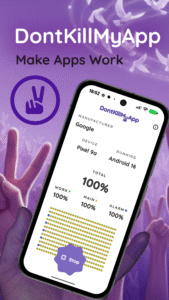
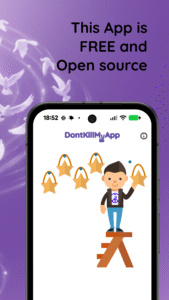
The official DontKillMyApp app is here - make apps finally work properly even if you do not own a Pixel.
Helps you set up your phone background tasks so that your apps can finally work for YOU even when not looking at the screen right now.
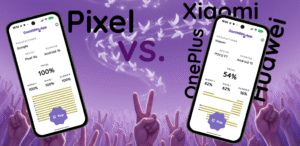
See how is your phone doing and test different settings with DontKillMyApp benchmark.
Features:
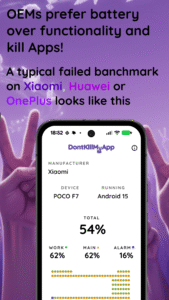
• DKMA benchmark: Measure how aggressively is your phone killing background apps
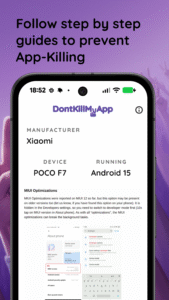
• Guides: Get actionable steps to overcome most background process restrictions
• Make a change:️ Help smartphones stay smart by sharing your benchmark report to dontkillmyapp.com
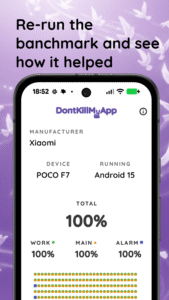
DontKillMyApp is a benchmark tool to see how well does your phone support background processing. You can measure before setting up your phone, then go through the setup guides and benchmark again to see how much has your phone been slacking in the background.
You can share your report through the app to the maintainers of the dontkillmyapp.com website who compile it and base the overall negative score on it.
How does the benchmark work? (Technical!)
The app starts a foreground service with a wake lock and schedules repetitive task on the main thread, a custom thread executor and schedules regular alarms (AlarmManager.setExactAndAllowWhileIdle). Then it calculates executed vs. expected. That's it!
For more details check the code. The app is open source available at
github.com/urbandroid-team/dontkillmy-app
This app is open source and this project is maintained by volunteers who care about the Android ecosystem, feel the current pain and want to make it better.
Special thanks to Doki (github.com/doubledotlabs/doki).
Helps you set up your phone background tasks so that your apps can finally work for YOU even when not looking at the screen right now.
See how is your phone doing and test different settings with DontKillMyApp benchmark.
Features:
• DKMA benchmark: Measure how aggressively is your phone killing background apps
• Guides: Get actionable steps to overcome most background process restrictions
• Make a change:️ Help smartphones stay smart by sharing your benchmark report to dontkillmyapp.com
DontKillMyApp is a benchmark tool to see how well does your phone support background processing. You can measure before setting up your phone, then go through the setup guides and benchmark again to see how much has your phone been slacking in the background.
You can share your report through the app to the maintainers of the dontkillmyapp.com website who compile it and base the overall negative score on it.
How does the benchmark work? (Technical!)
The app starts a foreground service with a wake lock and schedules repetitive task on the main thread, a custom thread executor and schedules regular alarms (AlarmManager.setExactAndAllowWhileIdle). Then it calculates executed vs. expected. That's it!
For more details check the code. The app is open source available at
github.com/urbandroid-team/dontkillmy-app
This app is open source and this project is maintained by volunteers who care about the Android ecosystem, feel the current pain and want to make it better.
Special thanks to Doki (github.com/doubledotlabs/doki).
Download DontKillMyApp: Make apps work APK
Fast, free and safe download.
APK Permissions 8
- android.permission.FOREGROUND_SERVICE
- android.permission.FOREGROUND_SERVICE_SPECIAL_USE
- android.permission.INTERNET
- android.permission.POST_NOTIFICATIONS
- android.permission.RECEIVE_BOOT_COMPLETED
- android.permission.SCHEDULE_EXACT_ALARM
- android.permission.WAKE_LOCK
- com.urbandroid.dontkillmyapp.DYNAMIC_RECEIVER_NOT_EXPORTED_PERMISSION
APK Verified
The cryptographic signature guarantees that the file is safe to install and was not tampered with in any way.
Similar in Tools


Frequently Asked Questions about DontKillMyApp: Make apps work APK
This is the universal variant — a single APK that contains native libraries for every CPU architecture. It installs on any Android device but is larger than per-architecture variants.
Yes — the APK's signature has been cryptographically verified against the publisher's signing key. The SHA-256 hash is shown in the File Information panel so you can independently confirm the file matches the original release.
Android 24 (API level 36) or newer. Older devices will refuse the install.
Install a free app like 'CPU-Z' or 'Droid Hardware Info' from the Play Store and look at the ABI / Instruction Set row. Most phones made after 2017 are arm64-v8a; if in doubt, download the universal variant.
All variants are functionally identical — same features, same version. They differ only in which CPU architectures the native code is compiled for, and (sometimes) which screen densities the included graphics target. Pick the one that matches your device for the smallest install size, or pick 'Universal' if you're unsure.