
Download Steam APK
com.valvesoftware.android.steam.community · by Valve Corporation
Screenshots









About Steam
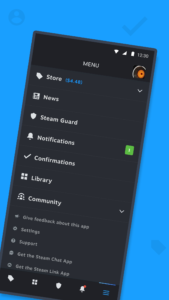
With the free Steam Mobile App, you can take Steam with you anywhere. Buy PC games and get the latest game and community news - while protecting your Steam account. Shop Steam Browse the Steam catalog of PC games from your phone. Never miss a sale again. Steam Guard Protect your Steam account and make sign in faster with two-factor authentication. • Two-factor authentication to ensure you’re the only one with access to your account • QR code sign in - Scan a QR code to sign into Steam instead of entering a password or… • Sign in confirmation - Confirm your regular Steam sign ins with simple “approve” or “deny” Library & Remote downloads The new Library view makes it easy to view game content, discussions, guides, support, and more. Plus you can manage game downloads and updates to your PC from your phone. Trade and Market Confirmations Speed up item trades and sales by using your phone to confirm them. Plus • A personalized News feed based on your Library with the latest news, events, and content updates direct from publishers and game developers. • Customizable Steam notifications: wishlist, sales, comments, trades, discussions, friend requests, and more. • Access to the entire Steam Community - discussions, groups, guides, Market, Workshop, broadcasts, and more. • Access to your friends, friend activity, groups, screenshots, inventory, wallet, and more. • Authorized Devices - Manage access to the devices your account has signed in • An improved Store browsing experience for mobile screens • Support for using multiple Steam accounts in the app • Support for customizing your app's main tabs

