
This is the universal build of MediaMonkey 2.1.0.1276. It contains native libraries for every CPU architecture (arm64-v8a, armeabi-v7a, x86, x86_64), so it installs on any Android device. The trade-off is size — it's larger than per-architecture variants. Pick this one if you're unsure which CPU your phone has, or if you plan to share the APK with multiple devices.
File size: 39.3 MB • Min Android: 26 • Target Android: 35 • Version code: 1276 • Framework: Native (Java/Kotlin) • Permissions: 27
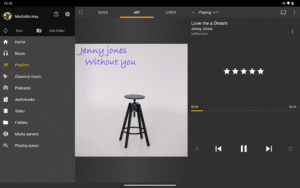
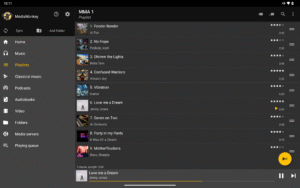
Screenshots
File Information
| Package Name | com.ventismedia.android.mediamonkey |
|---|---|
| Version Name | 2.1.0.1276 |
| Version Code | 1276 |
| Architecture | Universal |
| Min Android Version | Android 26 (API 35) |
| Main Activity | com.ventismedia.android.mediamonkey.StartActivity |
| Framework | Native (Java/Kotlin) |
| File Size | 39.29 MB |
| Signature (SHA1) | 3F6A020AF8663AD7E4AFCE1CAC14A084D8A8D29E |
| File Hash (SHA256) | cad0325fc4bdd534625b2297062de8c14bb5c0c1d27d93d6534538cd8af0c51f |
What's New
Fixed in 1276
-Volume leveling delay
-Stability / crash on boot
1273
New:
ALAC audio
Target: API 35
Translations: CZ IT FR DE JA KO NL PT-BR ES SV ZH-Hans
Improved:
Audio
-Crossfade/Gapless
-Equalizer
-Volume leveling
UPnP
-Silent on skip
-Connection/Play position on some servers
Casting: seekbar behavior
Playing track deletion
Sync
-Performance/robustness
-Nested playlist deletion
-Unknown ratings
UI
-List position lost
-Incorrect count on edit
-Location sort
-Pinch to zoom
-Scan tweaks
-Volume leveling delay
-Stability / crash on boot
1273
New:
ALAC audio
Target: API 35
Translations: CZ IT FR DE JA KO NL PT-BR ES SV ZH-Hans
Improved:
Audio
-Crossfade/Gapless
-Equalizer
-Volume leveling
UPnP
-Silent on skip
-Connection/Play position on some servers
Casting: seekbar behavior
Playing track deletion
Sync
-Performance/robustness
-Nested playlist deletion
-Unknown ratings
UI
-List position lost
-Incorrect count on edit
-Location sort
-Pinch to zoom
-Scan tweaks
App Description
MediaMonkey is a lightweight yet powerful music player that lets you manage and keep large music collections in sync across your devices. Key features:
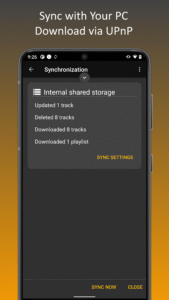
❖ Sync wirelessly with MediaMonkey for Windows *
-> Keep playlists, tracks and videos in sync.
-> Keep file info, ratings, lyrics, play history, etc. in sync.
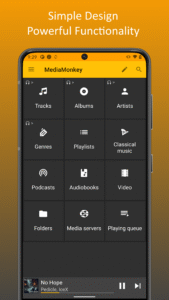
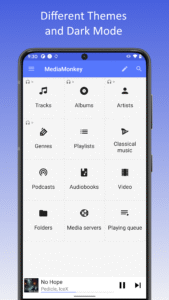
❖ Simple UI for managing Music, Classical music, Audiobooks, Podcasts, Video.
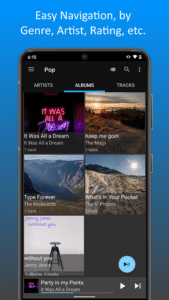
-> Navigate by Artist, Album, Composer, Genre, Playlist, etc.
-> Search entire library or find related tracks
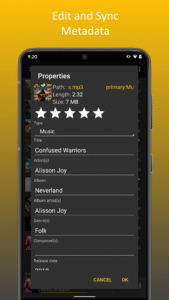
-> Edit file info (e.g. Artist, Album, Composer, rating, etc.) with support for multiple attributes (e.g. Genre=Rock;Alternative).
-> Lookup Album Art and Lyrics.
-> Edit multiple files at once.
❖ Manage Playlists
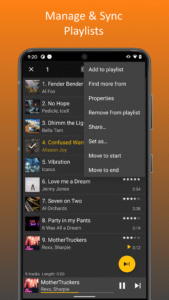
-> Set up hierarchical playlists
-> Add/remove/re-order tracks
-> Sync playlists with MediaMonkey for Windows
❖ Intuitive player and queue manager
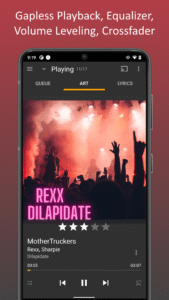
-> Play content at a steady volume (using replay gain) to avoid fidgeting with the volume
-> Tune audio with a 5-band equalizer
-> Relax with a Sleep timer
-> Share your play history with third-party scrobblers (Simple Last.fm, Last.fm)
-> Cast to Google chrome cast or UPnP/DLNA devices ** †
-> Bookmark large files (e.g. Audiobooks, videos)
❖ Android Auto support
❖ Access and download media from UPnP/DLNA servers **
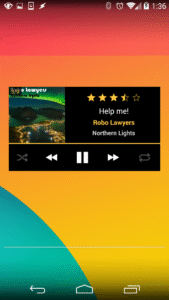
❖ Player widgets for home screen or lock screen
❖ Set tracks as ringtones
❖ Share tracks
❖ Themes
* Time-limited trial--can be unlocked with MediaMonkey Pro. USB Sync is unrestricted.
** Time-limited trial--can be unlocked with MediaMonkey Pro. Note that MediaMonkey is Ad-free and as development is supported by sales of MediaMonkey Pro.
Privacy, Safety and Security Information
----------------------------------------
Data Handling
Ventis Media, Inc. is committed to your privacy and to transparency in our data handling practices. This app doesn't collect, use, or share any of your data unless required for the functionality or service being provided.
The following explains our disclosures in the Google Play Store regarding data safety:
o Email address and device identifier is only 'collected' if you explicitly 'Submit a debug log' (encrypted in transit, deleted after 2 weeks) so that we can get in touch with you.
o Videos, Audio Files are only 'collected' and transmitted when you explicitly:
- Sync media content with MediaMonkey for Windows (files and file metadata are transmitted from MediaMonkey for Android to MediaMonkey for Windows--they are not shared with us).
- Cast media content to a Chromecast or UPnP Server (files and file metadata are streamed encrypted, from MediaMonkey for Android to your cast device--they are not shared with us).
- Give Android Auto access to MediaMonkey content (files and file metadata are shared encrypted, from MediaMonkey for Android to your Android Auto device--they are not shared with us).
- Enable 'scrobbling' to share play history with others (metadata of played files is shared through your scrobbling client with last.fm--the data is not shared with us).
o Media file metadata is only shared with 3rd parties if you enable track information to be looked up (file metadata [Artist, Album, Title] is shared with 3rd parties in order to look up additional related track information--the data is not shared with us).
Application Permissions Atypical of a Player
o CAMERA: To scan QR codes to get configuration data to facilitate connections to MediaMonkey Servers
o WRITE_EXTERNAL_STORAGE: To write to 'shared' media folders such as /Music or /Playlists
o WRITE_CONTACTS: To assign a track to a contact as a ringtone
o WRITE_SETTINGS: To change some system settings (e.g. disable touch sounds, set up ringtones/alarms)
o ACCESS_NETWORK_STATE, ACCESS_WIFI_STATE, CHANGE_WIFI_STATE, CHANGE_WIFI_MULTICAST_STATE, INTERNET: For Wi-Fi Sync, UPnP, Casting
o REQUEST_IGNORE_BATTERY_OPTIMIZATIONS, WAKE_LOCK: To prevent shutdown during extended operations (e.g. Sync)
o INSTALL_SHORTCUT: To install custom shortcuts to Playlists
❖ Sync wirelessly with MediaMonkey for Windows *
-> Keep playlists, tracks and videos in sync.
-> Keep file info, ratings, lyrics, play history, etc. in sync.
❖ Simple UI for managing Music, Classical music, Audiobooks, Podcasts, Video.
-> Navigate by Artist, Album, Composer, Genre, Playlist, etc.
-> Search entire library or find related tracks
-> Edit file info (e.g. Artist, Album, Composer, rating, etc.) with support for multiple attributes (e.g. Genre=Rock;Alternative).
-> Lookup Album Art and Lyrics.
-> Edit multiple files at once.
❖ Manage Playlists
-> Set up hierarchical playlists
-> Add/remove/re-order tracks
-> Sync playlists with MediaMonkey for Windows
❖ Intuitive player and queue manager
-> Play content at a steady volume (using replay gain) to avoid fidgeting with the volume
-> Tune audio with a 5-band equalizer
-> Relax with a Sleep timer
-> Share your play history with third-party scrobblers (Simple Last.fm, Last.fm)
-> Cast to Google chrome cast or UPnP/DLNA devices ** †
-> Bookmark large files (e.g. Audiobooks, videos)
❖ Android Auto support
❖ Access and download media from UPnP/DLNA servers **
❖ Player widgets for home screen or lock screen
❖ Set tracks as ringtones
❖ Share tracks
❖ Themes
* Time-limited trial--can be unlocked with MediaMonkey Pro. USB Sync is unrestricted.
** Time-limited trial--can be unlocked with MediaMonkey Pro. Note that MediaMonkey is Ad-free and as development is supported by sales of MediaMonkey Pro.
Privacy, Safety and Security Information
----------------------------------------
Data Handling
Ventis Media, Inc. is committed to your privacy and to transparency in our data handling practices. This app doesn't collect, use, or share any of your data unless required for the functionality or service being provided.
The following explains our disclosures in the Google Play Store regarding data safety:
o Email address and device identifier is only 'collected' if you explicitly 'Submit a debug log' (encrypted in transit, deleted after 2 weeks) so that we can get in touch with you.
o Videos, Audio Files are only 'collected' and transmitted when you explicitly:
- Sync media content with MediaMonkey for Windows (files and file metadata are transmitted from MediaMonkey for Android to MediaMonkey for Windows--they are not shared with us).
- Cast media content to a Chromecast or UPnP Server (files and file metadata are streamed encrypted, from MediaMonkey for Android to your cast device--they are not shared with us).
- Give Android Auto access to MediaMonkey content (files and file metadata are shared encrypted, from MediaMonkey for Android to your Android Auto device--they are not shared with us).
- Enable 'scrobbling' to share play history with others (metadata of played files is shared through your scrobbling client with last.fm--the data is not shared with us).
o Media file metadata is only shared with 3rd parties if you enable track information to be looked up (file metadata [Artist, Album, Title] is shared with 3rd parties in order to look up additional related track information--the data is not shared with us).
Application Permissions Atypical of a Player
o CAMERA: To scan QR codes to get configuration data to facilitate connections to MediaMonkey Servers
o WRITE_EXTERNAL_STORAGE: To write to 'shared' media folders such as /Music or /Playlists
o WRITE_CONTACTS: To assign a track to a contact as a ringtone
o WRITE_SETTINGS: To change some system settings (e.g. disable touch sounds, set up ringtones/alarms)
o ACCESS_NETWORK_STATE, ACCESS_WIFI_STATE, CHANGE_WIFI_STATE, CHANGE_WIFI_MULTICAST_STATE, INTERNET: For Wi-Fi Sync, UPnP, Casting
o REQUEST_IGNORE_BATTERY_OPTIMIZATIONS, WAKE_LOCK: To prevent shutdown during extended operations (e.g. Sync)
o INSTALL_SHORTCUT: To install custom shortcuts to Playlists
Download MediaMonkey APK
Fast, free and safe download.
APK Permissions 27
- android.permission.ACCESS_NETWORK_STATE
- android.permission.ACCESS_WIFI_STATE
- android.permission.BLUETOOTH
- android.permission.BLUETOOTH_CONNECT
- android.permission.CAMERA
- android.permission.CHANGE_WIFI_MULTICAST_STATE
- android.permission.CHANGE_WIFI_STATE
- android.permission.FOREGROUND_SERVICE
- android.permission.FOREGROUND_SERVICE_CONNECTED_DEVICE
- android.permission.FOREGROUND_SERVICE_DATA_SYNC
- android.permission.FOREGROUND_SERVICE_MEDIA_PLAYBACK
- android.permission.INTERNET
- android.permission.MANAGE_DOCUMENTS
- android.permission.MODIFY_AUDIO_SETTINGS
- android.permission.POST_NOTIFICATIONS
- android.permission.READ_EXTERNAL_STORAGE
- android.permission.READ_MEDIA_AUDIO
- android.permission.READ_MEDIA_VIDEO
- android.permission.RECEIVE_BOOT_COMPLETED
- android.permission.REQUEST_DELETE_PACKAGES
- android.permission.REQUEST_IGNORE_BATTERY_OPTIMIZATIONS
- android.permission.WAKE_LOCK
- android.permission.WRITE_EXTERNAL_STORAGE
- android.permission.WRITE_SETTINGS
- com.android.launcher.permission.INSTALL_SHORTCUT
- com.android.vending.BILLING
- com.ventismedia.android.mediamonkey.DYNAMIC_RECEIVER_NOT_EXPORTED_PERMISSION
APK Verified
The cryptographic signature guarantees that the file is safe to install and was not tampered with in any way.


Frequently Asked Questions about MediaMonkey APK
This is the universal variant — a single APK that contains native libraries for every CPU architecture. It installs on any Android device but is larger than per-architecture variants.
Yes — the APK's signature has been cryptographically verified against the publisher's signing key. The SHA-256 hash is shown in the File Information panel so you can independently confirm the file matches the original release.
Android 26 (API level 35) or newer. Older devices will refuse the install.
Install a free app like 'CPU-Z' or 'Droid Hardware Info' from the Play Store and look at the ABI / Instruction Set row. Most phones made after 2017 are arm64-v8a; if in doubt, download the universal variant.
All variants are functionally identical — same features, same version. They differ only in which CPU architectures the native code is compiled for, and (sometimes) which screen densities the included graphics target. Pick the one that matches your device for the smallest install size, or pick 'Universal' if you're unsure.