
Download Verizon Protect APK 7.9.0-22 arm64-v8a, armeabi-v7a, x86_64 · Android 29+
Download APK
Verified Safe
This is the arm64-v8a, armeabi-v7a, x86_64 build of Verizon Protect 7.9.0-22. Pick this build if your device's primary ABI matches.
File size: 226.1 MB • Min Android: 29 • Target Android: 35 • Version code: 700900022 • Framework: Native (Java/Kotlin) • Permissions: 51
Screenshots
File Information
| Package Name | com.securityandprivacy.android.verizon.vms |
|---|---|
| Version Name | 7.9.0-22 |
| Version Code | 700900022 |
| Architecture | arm64-v8a, armeabi-v7a, x86_64 |
| Min Android Version | Android 29 (API 35) |
| Main Activity | com.verizon.neon.ui.activities.NeonMainActivity |
| Framework | Native (Java/Kotlin) |
| File Size | 226.12 MB |
| Signature (SHA1) | 9B2444008A65EB837199BC766C06FD4AFFB6C260 |
| File Hash (SHA256) | 2d1ccd0d28fe2b0a64e3633e469d907de404cd21b5d5e45b5f8f803fb883257d |
What's New
* Improved overall user experience
* Performance improvements and bug fixes
* Performance improvements and bug fixes
App Description
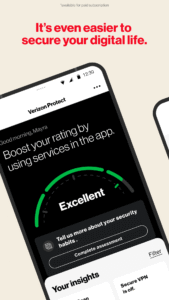
Verizon Protect is a comprehensive security app designed to enhance your mobile security and privacy protection. Whether browsing online, connecting to public Wi-Fi, or simply wanting an extra layer of device and identity security, Verizon Protect has you covered.
Here’s how Verizon Protect, the Verizon security app, keeps you protected:
• Safe Browsing: Avoid risky websites and potential online threats with our antivirus app features. Verizon Protect uses the AccessibilityService API to run in the background to read URLs of websites entered into third-party browsers, to help notify you of potential threats.
• Malware Scan: Identify and remove viruses, malware and other suspicious software in photos, media and other files on your device.
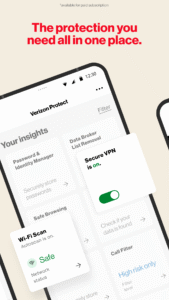
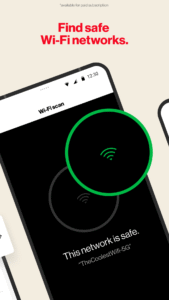
• Wi-Fi Scan: Scan any network with our built-in Wi-Fi scanner to ensure it’s encrypted and safe.
• Identity theft protection: Proactively safeguard your identity with dark web monitoring, data broker removal, and more.
With Digital Secure Premium*, you’ll get end-point security for your mobile devices, including:
• Secure VPN: Ensure your Wi-Fi connection is secure, your location is disguised and your personal information stays private.
• Dark Web Monitoring: Get alerted if your personal information is found on the dark web.
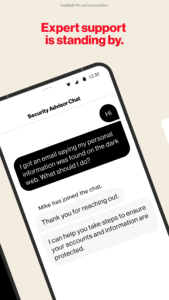
• Security Advisor: Chat with an expert 24/7 to get guidance and security tips.
• Protect More Devices: Stay protected with comprehensive digital security for Mac and Windows desktop computers.
With Identity Secure*, you’ll get tools and services to help reduce the likelihood of identity theft, including:
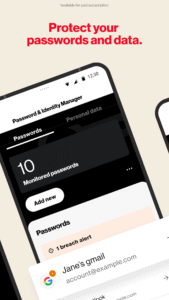
• Password and Identity Manager: Securely create and autofill your passwords across devices and operating systems.
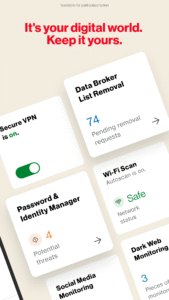
• Data Broker List Removal: Scan and request removal of your personal info from online databases that sell and trade data.
• Social Media Monitoring: Monitor and get alerted of potential account takeover or reputation risks.
• Locked Folder: Securely store your most important files with a 6-digit pin.
• Identity Restoration Services: 24/7 access to restoration experts in case of identity theft.
It’s your digital world. Keep it yours. Download Verizon Protect today!
*Digital Secure Premium services and Identity Secure services require paid subscriptions, which can be added via this app or My Verizon Online.
Here’s how Verizon Protect, the Verizon security app, keeps you protected:
• Safe Browsing: Avoid risky websites and potential online threats with our antivirus app features. Verizon Protect uses the AccessibilityService API to run in the background to read URLs of websites entered into third-party browsers, to help notify you of potential threats.
• Malware Scan: Identify and remove viruses, malware and other suspicious software in photos, media and other files on your device.
• Wi-Fi Scan: Scan any network with our built-in Wi-Fi scanner to ensure it’s encrypted and safe.
• Identity theft protection: Proactively safeguard your identity with dark web monitoring, data broker removal, and more.
With Digital Secure Premium*, you’ll get end-point security for your mobile devices, including:
• Secure VPN: Ensure your Wi-Fi connection is secure, your location is disguised and your personal information stays private.
• Dark Web Monitoring: Get alerted if your personal information is found on the dark web.
• Security Advisor: Chat with an expert 24/7 to get guidance and security tips.
• Protect More Devices: Stay protected with comprehensive digital security for Mac and Windows desktop computers.
With Identity Secure*, you’ll get tools and services to help reduce the likelihood of identity theft, including:
• Password and Identity Manager: Securely create and autofill your passwords across devices and operating systems.
• Data Broker List Removal: Scan and request removal of your personal info from online databases that sell and trade data.
• Social Media Monitoring: Monitor and get alerted of potential account takeover or reputation risks.
• Locked Folder: Securely store your most important files with a 6-digit pin.
• Identity Restoration Services: 24/7 access to restoration experts in case of identity theft.
It’s your digital world. Keep it yours. Download Verizon Protect today!
*Digital Secure Premium services and Identity Secure services require paid subscriptions, which can be added via this app or My Verizon Online.
Download Verizon Protect APK
Fast, free and safe download.
APK Permissions 51
- android.permission.ACCESS_ADSERVICES_AD_ID
- android.permission.ACCESS_ADSERVICES_ATTRIBUTION
- android.permission.ACCESS_BACKGROUND_LOCATION
- android.permission.ACCESS_COARSE_LOCATION
- android.permission.ACCESS_FINE_LOCATION
- android.permission.ACCESS_NETWORK_STATE
- android.permission.ACCESS_WIFI_STATE
- android.permission.CALL_PHONE
- android.permission.CAMERA
- android.permission.CHANGE_NETWORK_STATE
- android.permission.CHANGE_WIFI_STATE
- android.permission.CLEAR_APP_USER_DATA
- android.permission.DETECT_SCREEN_CAPTURE
- android.permission.FOREGROUND_SERVICE
- android.permission.FOREGROUND_SERVICE_DATA_SYNC
- android.permission.FOREGROUND_SERVICE_SPECIAL_USE
- android.permission.INTERNET
- android.permission.MANAGE_EXTERNAL_STORAGE
- android.permission.POST_NOTIFICATIONS
- android.permission.QUERY_ALL_PACKAGES
- android.permission.READ_CONTACTS
- android.permission.READ_EXTERNAL_STORAGE
- android.permission.READ_MEDIA_AUDIO
- android.permission.READ_MEDIA_IMAGES
- android.permission.READ_MEDIA_VIDEO
- android.permission.READ_MEDIA_VISUAL_USER_SELECTED
- android.permission.READ_PHONE_NUMBERS
- android.permission.READ_PHONE_STATE
- android.permission.READ_PRIVILEGED_PHONE_STATE
- android.permission.READ_SYNC_STATS
- android.permission.RECEIVE_BOOT_COMPLETED
- android.permission.REORDER_TASKS
- android.permission.REQUEST_DELETE_PACKAGES
- android.permission.SCHEDULE_EXACT_ALARM
- android.permission.SYSTEM_ALERT_WINDOW
- android.permission.USE_BIOMETRIC
- android.permission.USE_FINGERPRINT
- android.permission.VIBRATE
- android.permission.WAKE_LOCK
- android.permission.WRITE_EXTERNAL_STORAGE
- android.permission.WRITE_SYNC_SETTINGS
- com.android.browser.permission.READ_HISTORY_BOOKMARKS
- com.android.browser.permission.WRITE_HISTORY_BOOKMARKS
- com.google.android.c2dm.permission.RECEIVE
- com.google.android.finsky.permission.BIND_GET_INSTALL_REFERRER_SERVICE
- com.securityandprivacy.android.verizon.vms.DYNAMIC_RECEIVER_NOT_EXPORTED_PERMISSION
- com.securityandprivacy.android.verizon.vms.sync.permission.READ_WRITE_PROVIDERS
- com.synchronoss.android.sync.permission.provider
- com.synchronoss.verizon.lockedfolderapp.sync.permission.READ_WRITE_PROVIDERS
- com.verizon.api.ACCESS
- com.verizon.mips.services.COMPONENT_STATUS
APK Verified
The cryptographic signature guarantees that the file is safe to install and was not tampered with in any way.
Similar in Productivity


More by Verizon Consumer Group


Frequently Asked Questions about Verizon Protect APK
This variant is built for devices that report `arm64-v8a, armeabi-v7a, x86_64` as their primary ABI. If your device's CPU matches, this is the smallest, fastest version to install.
Yes — the APK's signature has been cryptographically verified against the publisher's signing key. The SHA-256 hash is shown in the File Information panel so you can independently confirm the file matches the original release.
Android 29 (API level 35) or newer. Older devices will refuse the install.
Install a free app like 'CPU-Z' or 'Droid Hardware Info' from the Play Store and look at the ABI / Instruction Set row. Most phones made after 2017 are arm64-v8a; if in doubt, download the universal variant.
All variants are functionally identical — same features, same version. They differ only in which CPU architectures the native code is compiled for, and (sometimes) which screen densities the included graphics target. Pick the one that matches your device for the smallest install size, or pick 'Universal' if you're unsure.