
This is the universal build of Verizon Family 8.85.15. It contains native libraries for every CPU architecture (arm64-v8a, armeabi-v7a, x86, x86_64), so it installs on any Android device. The trade-off is size — it's larger than per-architecture variants. Pick this one if you're unsure which CPU your phone has, or if you plan to share the APK with multiple devices.
File size: 118.9 MB • Min Android: 27 • Target Android: 35 • Version code: 88500015 • Framework: Native (Java/Kotlin) • Permissions: 62
Screenshots

File Information
| Package Name | com.verizon.familybase.parent |
|---|---|
| Version Name | 8.85.15 |
| Version Code | 88500015 |
| Architecture | Universal |
| Min Android Version | Android 27 (API 35) |
| Main Activity | com.verizon.familybase.MainActivity |
| Framework | Native (Java/Kotlin) |
| File Size | 118.91 MB |
| Signature (SHA1) | 25FF905A6642E53A58D600F23C01E58D2363B23F |
| File Hash (SHA256) | a61deb31e712b699be943e74ab4494642729ba1c013f6299ccc59eee4ea65528 |
What's New
This release of Verizon Family includes an exciting new feature for greater peace of mind:
- Call Only Mode: Now, when you pause the internet on your child's Android device, you have the option to enable Call Only Mode. This ensures they can still make and receive calls, so you can always stay in touch, even when all other apps are blocked. Available only for Android child devices.
- Call Only Mode: Now, when you pause the internet on your child's Android device, you have the option to enable Call Only Mode. This ensures they can still make and receive calls, so you can always stay in touch, even when all other apps are blocked. Available only for Android child devices.
App Description
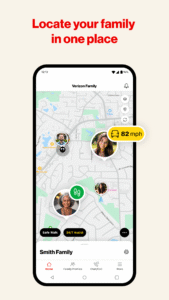
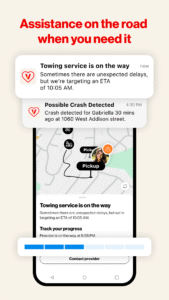
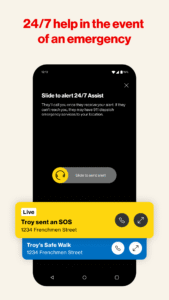
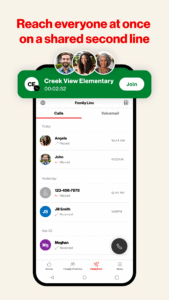
Help keep your family safe and connected on the go with Verizon Family. With features such as Location sharing, Parental Controls, Safe Walk with SOS, Crash Detection, Roadside Assistance, and Family Line all in one app.
From a single app, you can:
- Use content filtering
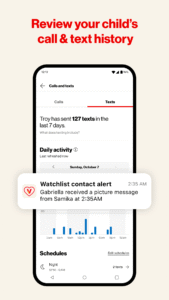
- Monitor and limit Verizon call and text activity on smartphones
- Limit Verizon data usage on smartphones or connected tablets
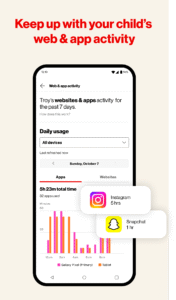
- Monitor web and app activity
- Manage screen time
- Pause internet
- Use location sharing, pick-me-up and check-in features
- Get location alerts
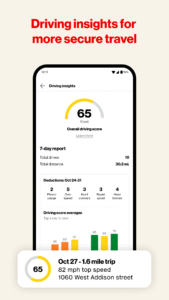
- View driving activity
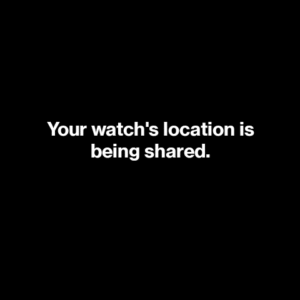
Basic location sharing is now available on your Smartwatch via Wear OS. Location services such as Safe Walk & 24/7 Assist are not available at this time.
Legal: To use the Verizon Family app, a Verizon standard monthly postpaid account on an eligible device or an invitation from a Verizon account is required. Verizon postpaid mobile plans include Verizon Family location sharing features at no add’l cost or upgrade to Verizon Family Plus ($14.99/mo until canceled) for location sharing and alerts, parental controls for calls, texts and online activity, driving insights and roadside assistance. Roadside assistance through Signature Motor Club, 4 events/yr. Verizon Family app download required. Service does not monitor calls or texts sent over the internet and does not contact 911 for crash or SOS alerts. Push notifications must be enabled to see when new members join family acct. Some alerts sent via text message. Msg & data rates apply.
See full terms and conditions at:
www.verizon.com/support/verizon-family-legal/
From a single app, you can:
- Use content filtering
- Monitor and limit Verizon call and text activity on smartphones
- Limit Verizon data usage on smartphones or connected tablets
- Monitor web and app activity
- Manage screen time
- Pause internet
- Use location sharing, pick-me-up and check-in features
- Get location alerts
- View driving activity
Basic location sharing is now available on your Smartwatch via Wear OS. Location services such as Safe Walk & 24/7 Assist are not available at this time.
Legal: To use the Verizon Family app, a Verizon standard monthly postpaid account on an eligible device or an invitation from a Verizon account is required. Verizon postpaid mobile plans include Verizon Family location sharing features at no add’l cost or upgrade to Verizon Family Plus ($14.99/mo until canceled) for location sharing and alerts, parental controls for calls, texts and online activity, driving insights and roadside assistance. Roadside assistance through Signature Motor Club, 4 events/yr. Verizon Family app download required. Service does not monitor calls or texts sent over the internet and does not contact 911 for crash or SOS alerts. Push notifications must be enabled to see when new members join family acct. Some alerts sent via text message. Msg & data rates apply.
See full terms and conditions at:
www.verizon.com/support/verizon-family-legal/
Download Verizon Family APK
Fast, free and safe download.
APK Permissions 62
- android.hardware.camera.autofocus
- android.permission.ACCESS_ADSERVICES_AD_ID
- android.permission.ACCESS_ADSERVICES_ATTRIBUTION
- android.permission.ACCESS_BACKGROUND_LOCATION
- android.permission.ACCESS_COARSE_LOCATION
- android.permission.ACCESS_FINE_LOCATION
- android.permission.ACCESS_NETWORK_STATE
- android.permission.ACCESS_WIFI_STATE
- android.permission.ACTIVITY_RECOGNITION
- android.permission.BLUETOOTH
- android.permission.BLUETOOTH_ADMIN
- android.permission.BLUETOOTH_CONNECT
- android.permission.BLUETOOTH_SCAN
- android.permission.BROADCAST_CLOSE_SYSTEM_DIALOGS
- android.permission.BROADCAST_STICKY
- android.permission.CALL_PHONE
- android.permission.CAMERA
- android.permission.CHANGE_NETWORK_STATE
- android.permission.CHANGE_WIFI_STATE
- android.permission.DETECT_SCREEN_CAPTURE
- android.permission.DISABLE_KEYGUARD
- android.permission.FOREGROUND_SERVICE
- android.permission.FOREGROUND_SERVICE_LOCATION
- android.permission.FOREGROUND_SERVICE_MICROPHONE
- android.permission.FOREGROUND_SERVICE_PHONE_CALL
- android.permission.GET_ACCOUNTS
- android.permission.INTERACT_ACROSS_USERS
- android.permission.INTERNET
- android.permission.KILL_BACKGROUND_PROCESSES
- android.permission.MANAGE_OWN_CALLS
- android.permission.MODIFY_AUDIO_SETTINGS
- android.permission.POST_NOTIFICATIONS
- android.permission.RAISED_THREAD_PRIORITY
- android.permission.READ_CONTACTS
- android.permission.READ_EXTERNAL_STORAGE
- android.permission.READ_PHONE_NUMBERS
- android.permission.READ_PHONE_STATE
- android.permission.READ_SYNC_SETTINGS
- android.permission.READ_SYNC_STATS
- android.permission.RECEIVE_BOOT_COMPLETED
- android.permission.RECORD_AUDIO
- android.permission.REQUEST_IGNORE_BATTERY_OPTIMIZATIONS
- android.permission.SYSTEM_ALERT_WINDOW
- android.permission.USE_BIOMETRIC
- android.permission.USE_FINGERPRINT
- android.permission.USE_FULL_SCREEN_INTENT
- android.permission.VIBRATE
- android.permission.WAKE_LOCK
- android.permission.WRITE_CONTACTS
- android.permission.WRITE_EXTERNAL_STORAGE
- android.permission.WRITE_INTERNAL_STORAGE
- android.permission.WRITE_SYNC_SETTINGS
- com.android.launcher.permission.INSTALL_SHORTCUT
- com.android.launcher.permission.UNINSTALL_SHORTCUT
- com.google.android.c2dm.permission.RECEIVE
- com.google.android.finsky.permission.BIND_GET_INSTALL_REFERRER_SERVICE
- com.google.android.gms.permission.ACTIVITY_RECOGNITION
- com.google.android.gms.permission.AD_ID
- com.sec.android.provider.badge.permission.READ
- com.sec.android.provider.badge.permission.WRITE
- com.summit.familysdk.ACCESS_BEAM
- com.verizon.familybase.parent.DYNAMIC_RECEIVER_NOT_EXPORTED_PERMISSION
APK Verified
The cryptographic signature guarantees that the file is safe to install and was not tampered with in any way.
Similar in Lifestyle


More by Verizon Consumer Group


Frequently Asked Questions about Verizon Family APK
This is the universal variant — a single APK that contains native libraries for every CPU architecture. It installs on any Android device but is larger than per-architecture variants.
Yes — the APK's signature has been cryptographically verified against the publisher's signing key. The SHA-256 hash is shown in the File Information panel so you can independently confirm the file matches the original release.
Android 27 (API level 35) or newer. Older devices will refuse the install.
Install a free app like 'CPU-Z' or 'Droid Hardware Info' from the Play Store and look at the ABI / Instruction Set row. Most phones made after 2017 are arm64-v8a; if in doubt, download the universal variant.
All variants are functionally identical — same features, same version. They differ only in which CPU architectures the native code is compiled for, and (sometimes) which screen densities the included graphics target. Pick the one that matches your device for the smallest install size, or pick 'Universal' if you're unsure.