
Download Philips Air+ APK 3.15.0 arm64-v8a, armeabi-v7a, x86, x86_64 · Android 26+
Download APK
Verified Safe
This is the arm64-v8a, armeabi-v7a, x86, x86_64 build of Philips Air+ 3.15.0. Pick this build if your device's primary ABI matches.
File size: 71.6 MB • Min Android: 26 • Target Android: 36 • Version code: 102 • Framework: Native (Java/Kotlin) • Permissions: 29
Screenshots
File Information
| Package Name | com.philips.ph.homecare |
|---|---|
| Version Name | 3.15.0 |
| Version Code | 102 |
| Architecture | arm64-v8a, armeabi-v7a, x86, x86_64 |
| Min Android Version | Android 26 (API 36) |
| Main Activity | com.philips.ph.homecare.MainActivity |
| Framework | Native (Java/Kotlin) |
| File Size | 71.57 MB |
| Signature (SHA1) | 943CC25474C1CDF50461E0A1DD170C123E8F276D |
| File Hash (SHA256) | 50b9866db4c2502941079a537b05ee01664624ec89bedff83aff354faccb4cfd |
What's New
We regularly update our Air+ app to improve it and enhance your experience. In this version, we've fixed one bug to make the app more stable and reliable. Thank you for using Air+ and for your continued support.
App Description
Together with your connected Philips Air device, Air+ provides a smart experience that ensures you breathe clean and healthy air.
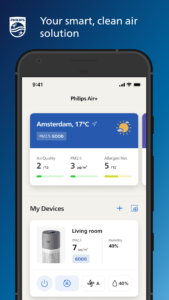
The app keeps track of all indoor and outdoor pollutants and automatically adjust your device’s performance, so you don’t have to. Air+ keeps you in control, at home or away, with a device remote and notifications about all your air concerns including pollutants, allergies and gas. And by staying in the know with insights into your air quality data from past to present, you are in full control of breathing the clean, healthy air you deserve.
Auto Plus mode - the smartest way to clean air
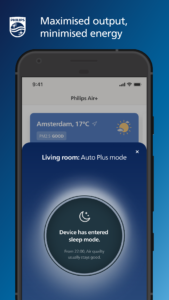
Once you activate Auto Plus mode in the Air+ app, your indoor air will automatically be cleaned to keep pollutants at bay. This Self-adaptive Technology, powered by Artificial Intelligence, considers the readings of the smart sensors, room size, outdoor data and behavioral patterns to maximize
performance.
Disclaimer: Auto Plus mode will be released in winter 2022 for most Philips Air devices.
Get to the core of air quality
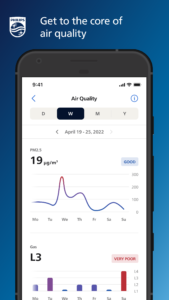
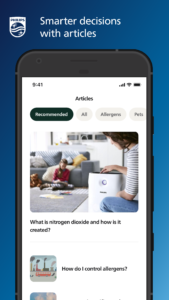
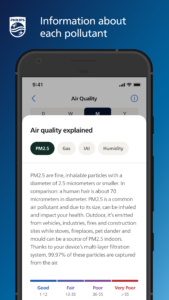
Thanks to the smart device sensors, Air+ provides you with real-time, indoor air quality data. Ranging from high-level snapshots to detailed views, all data is available to you up until a year ago. More information about each pollutant and their causes are included so you can make well informed decisions about your indoor air.
In full control of your air, at home or away
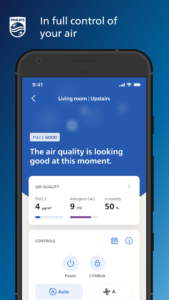
Air+ features a built-in remote so you are in full control of your device’s performance. Seamlessly switch between different modes, fan speeds and other features to tailor the device settings to your needs. Great for turning your device off when you’re away or on when you’re heading home, or to make changes without being near your Air device.
Easy upkeep for maximized output
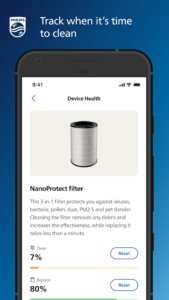
Air+ tracks when it’s time to clean or replace certain parts of you Air device to make sure it runs at peak performance. Messaging and notifications alert you when the low-effort maintenance should be taken care of, and Air+ has step-by-step instructions handy if you need them. Plus, in most cases, you can buy new filters straight from the app.
A holistic air quality experience with outdoor data
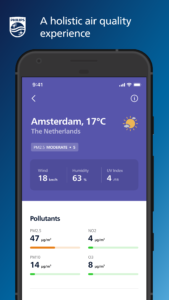
As outdoor air quality can have a big impact on the indoor levels, Air+ includes a comprehensive overview of real-time outdoor readings. Additionally, Air+ provides a quick snapshot of the current weather at each location. You can add up to five cities to keep you in the know about the air quality conditions near and far.
Air+ also supports a smarter experience with Philips Robot Vacuum Cleaners.
The app keeps track of all indoor and outdoor pollutants and automatically adjust your device’s performance, so you don’t have to. Air+ keeps you in control, at home or away, with a device remote and notifications about all your air concerns including pollutants, allergies and gas. And by staying in the know with insights into your air quality data from past to present, you are in full control of breathing the clean, healthy air you deserve.
Auto Plus mode - the smartest way to clean air
Once you activate Auto Plus mode in the Air+ app, your indoor air will automatically be cleaned to keep pollutants at bay. This Self-adaptive Technology, powered by Artificial Intelligence, considers the readings of the smart sensors, room size, outdoor data and behavioral patterns to maximize
performance.
Disclaimer: Auto Plus mode will be released in winter 2022 for most Philips Air devices.
Get to the core of air quality
Thanks to the smart device sensors, Air+ provides you with real-time, indoor air quality data. Ranging from high-level snapshots to detailed views, all data is available to you up until a year ago. More information about each pollutant and their causes are included so you can make well informed decisions about your indoor air.
In full control of your air, at home or away
Air+ features a built-in remote so you are in full control of your device’s performance. Seamlessly switch between different modes, fan speeds and other features to tailor the device settings to your needs. Great for turning your device off when you’re away or on when you’re heading home, or to make changes without being near your Air device.
Easy upkeep for maximized output
Air+ tracks when it’s time to clean or replace certain parts of you Air device to make sure it runs at peak performance. Messaging and notifications alert you when the low-effort maintenance should be taken care of, and Air+ has step-by-step instructions handy if you need them. Plus, in most cases, you can buy new filters straight from the app.
A holistic air quality experience with outdoor data
As outdoor air quality can have a big impact on the indoor levels, Air+ includes a comprehensive overview of real-time outdoor readings. Additionally, Air+ provides a quick snapshot of the current weather at each location. You can add up to five cities to keep you in the know about the air quality conditions near and far.
Air+ also supports a smarter experience with Philips Robot Vacuum Cleaners.
Download Philips Air+ APK
Fast, free and safe download.
APK Permissions 29
- android.permission.ACCESS_ADSERVICES_AD_ID
- android.permission.ACCESS_ADSERVICES_ATTRIBUTION
- android.permission.ACCESS_COARSE_LOCATION
- android.permission.ACCESS_FINE_LOCATION
- android.permission.ACCESS_NETWORK_STATE
- android.permission.ACCESS_WIFI_STATE
- android.permission.BLUETOOTH
- android.permission.BLUETOOTH_ADMIN
- android.permission.BLUETOOTH_ADVERTISE
- android.permission.BLUETOOTH_CONNECT
- android.permission.BLUETOOTH_SCAN
- android.permission.CAMERA
- android.permission.CHANGE_NETWORK_STATE
- android.permission.CHANGE_WIFI_MULTICAST_STATE
- android.permission.CHANGE_WIFI_STATE
- android.permission.FOREGROUND_SERVICE
- android.permission.FOREGROUND_SERVICE_CONNECTED_DEVICE
- android.permission.FOREGROUND_SERVICE_DATA_SYNC
- android.permission.FOREGROUND_SERVICE_LOCATION
- android.permission.INTERNET
- android.permission.NEARBY_WIFI_DEVICES
- android.permission.POST_NOTIFICATIONS
- android.permission.REORDER_TASKS
- android.permission.WAKE_LOCK
- com.google.android.c2dm.permission.RECEIVE
- com.google.android.finsky.permission.BIND_GET_INSTALL_REFERRER_SERVICE
- com.google.android.gms.permission.AD_ID
- com.philips.ph.homecare.DYNAMIC_RECEIVER_NOT_EXPORTED_PERMISSION
- com.philips.ph.homecare.permission.JPUSH_MESSAGE
APK Verified
The cryptographic signature guarantees that the file is safe to install and was not tampered with in any way.
Similar in Lifestyle


More by Versuni Netherlands B.V.

Frequently Asked Questions about Philips Air+ APK
This variant is built for devices that report `arm64-v8a, armeabi-v7a, x86, x86_64` as their primary ABI. If your device's CPU matches, this is the smallest, fastest version to install.
Yes — the APK's signature has been cryptographically verified against the publisher's signing key. The SHA-256 hash is shown in the File Information panel so you can independently confirm the file matches the original release.
Android 26 (API level 36) or newer. Older devices will refuse the install.
Install a free app like 'CPU-Z' or 'Droid Hardware Info' from the Play Store and look at the ABI / Instruction Set row. Most phones made after 2017 are arm64-v8a; if in doubt, download the universal variant.
All variants are functionally identical — same features, same version. They differ only in which CPU architectures the native code is compiled for, and (sometimes) which screen densities the included graphics target. Pick the one that matches your device for the smallest install size, or pick 'Universal' if you're unsure.