
This is the universal build of Vimeo 11.9.1. It contains native libraries for every CPU architecture (arm64-v8a, armeabi-v7a, x86, x86_64), so it installs on any Android device. The trade-off is size — it's larger than per-architecture variants. Pick this one if you're unsure which CPU your phone has, or if you plan to share the APK with multiple devices.
File size: 60.4 MB • Min Android: 26 • Target Android: 35 • Version code: 3697461 • Framework: Native (Java/Kotlin) • Permissions: 34
Screenshots
File Information
| Package Name | com.vimeo.android.videoapp |
|---|---|
| Version Name | 11.9.1 |
| Version Code | 3697461 |
| Architecture | Universal |
| Min Android Version | Android 26 (API 35) |
| Main Activity | com.vimeo.android.videoapp.launch.LaunchActivity |
| Framework | Native (Java/Kotlin) |
| File Size | 60.38 MB |
| Signature (SHA1) | 0A616FE0A21CEBCBD873E4BBECFCC1037924060F |
| File Hash (SHA256) | c9160baae38e834c0a0042440f42a485a858f20f523f87f3ff9dbcb5b71e20e7 |
What's New
Introducing powerful new tools for one-take video creation.
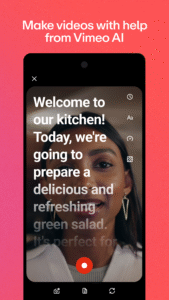
• AI script generator: Develop scripts in seconds by inputting an idea into our AI-powered script generator.
• Record with built-in teleprompter: Keep your script on-screen while you record your video, so you can speak naturally to the camera
• Text-based video editing: Edit errors, "ums," and long pauses out of your videos by simply editing your video transcript.
• AI script generator: Develop scripts in seconds by inputting an idea into our AI-powered script generator.
• Record with built-in teleprompter: Keep your script on-screen while you record your video, so you can speak naturally to the camera
• Text-based video editing: Edit errors, "ums," and long pauses out of your videos by simply editing your video transcript.
App Description
Watch videos in HD plus all the video tools you need, and no ads: upload, screen record, live stream, edit, collaborate, share, and manage your videos.
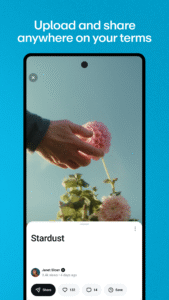
Upload gorgeous, ad-free videos HD, follow the world’s best creators, and discover amazing videos each and every day. No time to watch? Save videos for offline viewing. Wanna share on the go? Upload videos in the highest quality possible, right from your Android device.
AI-powered video tools for one-take video creation: Create savvy scripts in seconds with AI script generation, capture content right from your Android device with a built-in teleprompter, and do it all in one take, thanks to video editing that’s as simple as editing text.
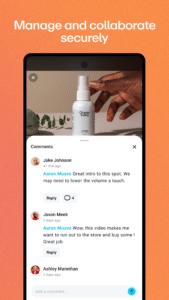
Engage your deskless workforce, wherever they are: create high-quality video content for just-in-time micro learning, collaborate with your teams, and manage all of your company’s content from the convenience of your Android device
Easily upload, create, manage, and share videos
• Upload videos right from your phone or tablet
• Record a perfect performance with our built-in teleprompter
• Record your screen
• Edit and trim videos
• Stream live events
• Privately share videos with passwords and private links
AI-powered video tools
• Generate scripts from scratch with AI in seconds
• Edit videos like you edit text to get rid of ‘ums’ and pauses
Engage your deskless workforce
• Browse and search Video Library using titles, tags, and spoken words
• Watch live events, or go live from your iPhone or iPad
• Record, edit, and share high-quality training videos
• Manage team permissions, privacy, and security
Watch videos in gorgeous ad-free HD
• Stream videos in full 1080p HD
• Enjoy ad-free playback
• Download videos to watch offline
• Chromecast videos to bigger screens
Discover videos and creators you love
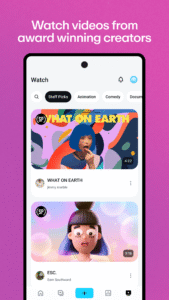
• Delight in a fresh batch of Staff Picks, hand-selected by our team
• Follow creators to customize your feed
• Explore the newest mind-melting videos and artists
• Dive into curated categories like Animation, Documentary, and beyond
Some features may not be available in all regions.
Have feedback for us? Vimeo is full of actual humans who’d love to listen. Go to vimeo.com/help/contact to get in touch.
Upload gorgeous, ad-free videos HD, follow the world’s best creators, and discover amazing videos each and every day. No time to watch? Save videos for offline viewing. Wanna share on the go? Upload videos in the highest quality possible, right from your Android device.
AI-powered video tools for one-take video creation: Create savvy scripts in seconds with AI script generation, capture content right from your Android device with a built-in teleprompter, and do it all in one take, thanks to video editing that’s as simple as editing text.
Engage your deskless workforce, wherever they are: create high-quality video content for just-in-time micro learning, collaborate with your teams, and manage all of your company’s content from the convenience of your Android device
Easily upload, create, manage, and share videos
• Upload videos right from your phone or tablet
• Record a perfect performance with our built-in teleprompter
• Record your screen
• Edit and trim videos
• Stream live events
• Privately share videos with passwords and private links
AI-powered video tools
• Generate scripts from scratch with AI in seconds
• Edit videos like you edit text to get rid of ‘ums’ and pauses
Engage your deskless workforce
• Browse and search Video Library using titles, tags, and spoken words
• Watch live events, or go live from your iPhone or iPad
• Record, edit, and share high-quality training videos
• Manage team permissions, privacy, and security
Watch videos in gorgeous ad-free HD
• Stream videos in full 1080p HD
• Enjoy ad-free playback
• Download videos to watch offline
• Chromecast videos to bigger screens
Discover videos and creators you love
• Delight in a fresh batch of Staff Picks, hand-selected by our team
• Follow creators to customize your feed
• Explore the newest mind-melting videos and artists
• Dive into curated categories like Animation, Documentary, and beyond
Some features may not be available in all regions.
Have feedback for us? Vimeo is full of actual humans who’d love to listen. Go to vimeo.com/help/contact to get in touch.
Download Vimeo APK
Fast, free and safe download.
APK Permissions 34
- android.permission.ACCESS_ADSERVICES_AD_ID
- android.permission.ACCESS_ADSERVICES_ATTRIBUTION
- android.permission.ACCESS_ADSERVICES_CUSTOM_AUDIENCE
- android.permission.ACCESS_ADSERVICES_TOPICS
- android.permission.ACCESS_NETWORK_STATE
- android.permission.ACCESS_WIFI_STATE
- android.permission.CAMERA
- android.permission.CHANGE_WIFI_STATE
- android.permission.FOREGROUND_SERVICE
- android.permission.FOREGROUND_SERVICE_DATA_SYNC
- android.permission.FOREGROUND_SERVICE_MEDIA_PLAYBACK
- android.permission.GET_TASKS
- android.permission.INTERNET
- android.permission.POST_NOTIFICATIONS
- android.permission.READ_EXTERNAL_STORAGE
- android.permission.READ_MEDIA_AUDIO
- android.permission.READ_MEDIA_IMAGES
- android.permission.READ_MEDIA_VIDEO
- android.permission.READ_MEDIA_VISUAL_USER_SELECTED
- android.permission.RECEIVE_BOOT_COMPLETED
- android.permission.RECORD_AUDIO
- android.permission.USE_BIOMETRIC
- android.permission.USE_FINGERPRINT
- android.permission.VIBRATE
- android.permission.WAKE_LOCK
- android.permission.WRITE_EXTERNAL_STORAGE
- com.android.vending.BILLING
- com.google.android.c2dm.permission.RECEIVE
- com.google.android.finsky.permission.BIND_GET_INSTALL_REFERRER_SERVICE
- com.google.android.gms.permission.AD_ID
- com.google.android.providers.gsf.permission.READ_GSERVICES
- com.huawei.appmarket.service.commondata.permission.GET_COMMON_DATA
- com.samsung.android.mapsagent.permission.READ_APP_INFO
- com.vimeo.android.videoapp.DYNAMIC_RECEIVER_NOT_EXPORTED_PERMISSION
APK Verified
The cryptographic signature guarantees that the file is safe to install and was not tampered with in any way.


Frequently Asked Questions about Vimeo APK
This is the universal variant — a single APK that contains native libraries for every CPU architecture. It installs on any Android device but is larger than per-architecture variants.
Yes — the APK's signature has been cryptographically verified against the publisher's signing key. The SHA-256 hash is shown in the File Information panel so you can independently confirm the file matches the original release.
Android 26 (API level 35) or newer. Older devices will refuse the install.
Install a free app like 'CPU-Z' or 'Droid Hardware Info' from the Play Store and look at the ABI / Instruction Set row. Most phones made after 2017 are arm64-v8a; if in doubt, download the universal variant.
All variants are functionally identical — same features, same version. They differ only in which CPU architectures the native code is compiled for, and (sometimes) which screen densities the included graphics target. Pick the one that matches your device for the smallest install size, or pick 'Universal' if you're unsure.