
Download VK WorkSpace APK 25.3.1(250322466) arm64-v8a, armeabi-v7a · Android 29+
Download APK
Verified Safe
This is the arm64-v8a, armeabi-v7a build of VK WorkSpace 25.3.1(250322466). Pick this build if your device's primary ABI matches.
File size: 141.7 MB • Min Android: 29 • Target Android: 34 • Version code: 250322466 • Framework: Native (Java/Kotlin) • Permissions: 72
Screenshots
File Information
| Package Name | ru.mail.biz.avocado |
|---|---|
| Version Name | 25.3.1(250322466) |
| Version Code | 250322466 |
| Architecture | arm64-v8a, armeabi-v7a |
| Min Android Version | Android 29 (API 34) |
| Main Activity | ru.mail.instantmessanger.flat.main.MainActivity |
| Framework | Native (Java/Kotlin) |
| File Size | 141.67 MB |
| Signature (SHA1) | DAA4E5D1B055CDCE8CDF297E412238A3476E70CF |
| File Hash (SHA256) | aa82da9cb9d90160d3e55ecad66f51cc727cacca563b6a8dabecdba035b1b3ad |
What's New
From version
25.2.10(250321578)
:
— You can now mute chat notifications for up to 12 months — perfect for temporarily inactive groups.
— It's now possible to reorder pinned chats within folders and the archive.
— The notification counter no longer miscounts and now accurately shows the number of chats with new messages.
— When joining a call with a Bluetooth headset, audio is now automatically routed to it instead of staying on the speaker.
— When loading chat history, the conversation now loads fully without limitations.
25.2.10(250321578)
:
— You can now mute chat notifications for up to 12 months — perfect for temporarily inactive groups.
— It's now possible to reorder pinned chats within folders and the archive.
— The notification counter no longer miscounts and now accurately shows the number of chats with new messages.
— When joining a call with a Bluetooth headset, audio is now automatically routed to it instead of staying on the speaker.
— When loading chat history, the conversation now loads fully without limitations.
App Description
VK Teams is a secure collaboration tool that supports access to VK WorkSpace services from any device. The app access is granted by the administrator who maintains corporate software in your company. If your company uses VK Teams, contact your IT support.
Messenger
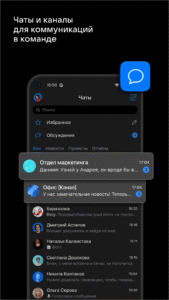
Communicate in group and private chats, subscribe to news channels. Format your text as bulleted and numbered lists, quotes, and hyperlinks. React to messages, send emojis, stickers, and locations. Transcribe voice messages and create polls.
Chat Features
Schedule delayed messages, react, and use Quote & Reply to reply to a part of the message. Optimize photos and videos or send full-size files up to 4 GB. Create folders with dialogs, channels, and groups, archive inactive chats, and pin important ones to have them at hand. Disable notifications in chats and channels you will read later — for a time or forever.
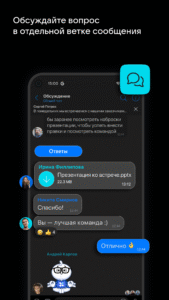
Discussions — separate threads within chat
Use discussions to quickly find information without distracting your colleagues not involved in a specific question.
Videoconferencing
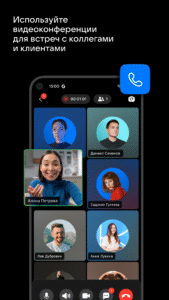
Call your colleagues one-on-one, schedule group online meetings, and host webinars for up to 300 users. Invite external users. Mute microphones, confirm or reject user participation, remove participants from the call. Communicate and assign tasks in the meeting chat. Share call recordings with participants.
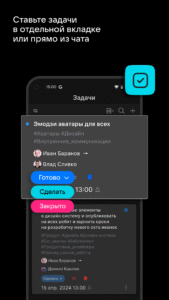
Tasks
Set tasks in a separate tab or from a chat, track completion notifications. Set deadlines, add tags, and mark tasks with flags. Exchange opinions in Discussions — separate chats to task cards.
Mail
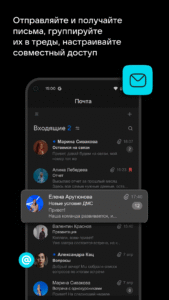
Corporate mail with your domain. Send and receive emails, group them into threads, create filters, and set up shared access to folders and mailboxes.
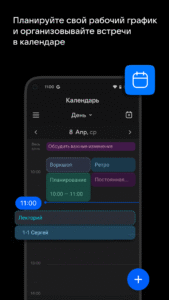
Calendar
Schedule your work through a single entry point — the corporate calendar. Schedule meetings, attach files, and create call links. Customize notifications and share calendar access with your colleagues.
Contacts
Find colleagues in the Contacts, the address book that contains only your company's employees. Help newcomers with onboarding — you can quickly find any colleague by full name, email, or position. Add and remove users, synchronize with Active Directory to manage accounts.
Chatbots and Corporate Applications
Create bots to quickly receive notifications from corporate systems. Create and integrate mini applications that deliver useful information to employees and accept requests to corporate systems, such as vacation or payroll requests.
Advantages
Flexible administrator settings. Manage user actions, block dismissed colleagues, create accounts with secure passwords for new employees, and remotely enable two-factor authentication for them.
Servers in Russia. TLS1.2/1.3 protection protocol. AES encryption algorithm. End-to-end encryption of calls. Built-in antivirus, anti-spam, and anti-phishing.
The application enables access to VK WorkSpace services. You can use services in the cloud (SaaS) or deploy them on the company's server (On-premises). The functionality and number of services may vary depending on the pricing and installation.
More information on the website:
biz.mail.ru/teams/
Pricing:
biz.mail.ru/tariffs/
VK Teams is a secure collaboration tool that supports access to VK WorkSpace services from any device. The access to the application is granted by the administrator who maintains corporate software in your company. If your company uses VK Teams, contact your IT support.
Messenger
Communicate in group and private chats, subscribe to news channels. Format your text as bulleted and numbered lists, quotes, and hyperlinks. React to messages, send emojis, stickers, and locations. Transcribe voice messages and create polls.
Chat Features
Schedule delayed messages, react, and use Quote & Reply to reply to a part of the message. Optimize photos and videos or send full-size files up to 4 GB. Create folders with dialogs, channels, and groups, archive inactive chats, and pin important ones to have them at hand. Disable notifications in chats and channels you will read later — for a time or forever.
Discussions — separate threads within chat
Use discussions to quickly find information without distracting your colleagues not involved in a specific question.
Videoconferencing
Call your colleagues one-on-one, schedule group online meetings, and host webinars for up to 300 users. Invite external users. Mute microphones, confirm or reject user participation, remove participants from the call. Communicate and assign tasks in the meeting chat. Share call recordings with participants.
Tasks
Set tasks in a separate tab or from a chat, track completion notifications. Set deadlines, add tags, and mark tasks with flags. Exchange opinions in Discussions — separate chats to task cards.
Corporate mail with your domain. Send and receive emails, group them into threads, create filters, and set up shared access to folders and mailboxes.
Calendar
Schedule your work through a single entry point — the corporate calendar. Schedule meetings, attach files, and create call links. Customize notifications and share calendar access with your colleagues.
Contacts
Find colleagues in the Contacts, the address book that contains only your company's employees. Help newcomers with onboarding — you can quickly find any colleague by full name, email, or position. Add and remove users, synchronize with Active Directory to manage accounts.
Chatbots and Corporate Applications
Create bots to quickly receive notifications from corporate systems. Create and integrate mini applications that deliver useful information to employees and accept requests to corporate systems, such as vacation or payroll requests.
Advantages
Flexible administrator settings. Manage user actions, block dismissed colleagues, create accounts with secure passwords for new employees, and remotely enable two-factor authentication for them.
Servers in Russia. TLS1.2/1.3 protection protocol. AES encryption algorithm. End-to-end encryption of calls. Built-in antivirus, anti-spam, and anti-phishing.
The application enables access to VK WorkSpace services. You can use services in the cloud (SaaS) or deploy them on the company's server (On-premises). The functionality and number of services may vary depending on the pricing and installation.
More information on the website:
biz.mail.ru/teams/
Pricing:
biz.mail.ru/tariffs/
VK Teams is a secure collaboration tool that supports access to VK WorkSpace services from any device. The access to the application is granted by the administrator who maintains corporate software in your company. If your company uses VK Teams, contact your IT support.
Download VK WorkSpace APK
Fast, free and safe download.
APK Permissions 72
- android.permission.ACCESS_COARSE_LOCATION
- android.permission.ACCESS_FINE_LOCATION
- android.permission.ACCESS_NETWORK_STATE
- android.permission.ACCESS_WIFI_STATE
- android.permission.AUTHENTICATE_ACCOUNTS
- android.permission.BLUETOOTH
- android.permission.BLUETOOTH_CONNECT
- android.permission.CALL_PHONE
- android.permission.CAMERA
- android.permission.CHANGE_NETWORK_STATE
- android.permission.CHANGE_WIFI_STATE
- android.permission.DETECT_SCREEN_CAPTURE
- android.permission.DISABLE_KEYGUARD
- android.permission.FOREGROUND_SERVICE
- android.permission.FOREGROUND_SERVICE_DATA_SYNC
- android.permission.FOREGROUND_SERVICE_MICROPHONE
- android.permission.FOREGROUND_SERVICE_PHONE_CALL
- android.permission.GET_ACCOUNTS
- android.permission.INTERNET
- android.permission.MANAGE_ACCOUNTS
- android.permission.MANAGE_OWN_CALLS
- android.permission.MODIFY_AUDIO_SETTINGS
- android.permission.PACKAGE_USAGE_STATS
- android.permission.POST_NOTIFICATIONS
- android.permission.READ_APP_BADGE
- android.permission.READ_CONTACTS
- android.permission.READ_EXTERNAL_STORAGE
- android.permission.READ_MEDIA_AUDIO
- android.permission.READ_MEDIA_IMAGES
- android.permission.READ_MEDIA_VIDEO
- android.permission.READ_PHONE_NUMBERS
- android.permission.READ_PHONE_STATE
- android.permission.READ_PROFILE
- android.permission.READ_SYNC_SETTINGS
- android.permission.RECEIVE_BOOT_COMPLETED
- android.permission.RECORD_AUDIO
- android.permission.REQUEST_INSTALL_PACKAGES
- android.permission.USE_BIOMETRIC
- android.permission.USE_FINGERPRINT
- android.permission.USE_FULL_SCREEN_INTENT
- android.permission.VIBRATE
- android.permission.WAKE_LOCK
- android.permission.WRITE_CONTACTS
- android.permission.WRITE_EXTERNAL_STORAGE
- android.permission.WRITE_SYNC_SETTINGS
- android.provider.Telephony.SMS_RECEIVED
- com.anddoes.launcher.permission.UPDATE_COUNT
- com.android.launcher.permission.INSTALL_SHORTCUT
- com.android.vending.BILLING
- com.google.android.c2dm.permission.RECEIVE
- com.google.android.finsky.permission.BIND_GET_INSTALL_REFERRER_SERVICE
- com.google.android.gms.permission.AD_ID
- com.google.android.providers.gsf.permission.READ_GSERVICES
- com.htc.launcher.permission.READ_SETTINGS
- com.htc.launcher.permission.UPDATE_SHORTCUT
- com.huawei.android.launcher.permission.CHANGE_BADGE
- com.huawei.android.launcher.permission.READ_SETTINGS
- com.huawei.android.launcher.permission.WRITE_SETTINGS
- com.majeur.launcher.permission.UPDATE_BADGE
- com.oppo.launcher.permission.READ_SETTINGS
- com.oppo.launcher.permission.WRITE_SETTINGS
- com.sec.android.provider.badge.permission.READ
- com.sec.android.provider.badge.permission.WRITE
- com.sonyericsson.home.permission.BROADCAST_BADGE
- com.sonymobile.home.permission.PROVIDER_INSERT_BADGE
- me.everything.badger.permission.BADGE_COUNT_READ
- me.everything.badger.permission.BADGE_COUNT_WRITE
- ru.mail.biz.avocado.DYNAMIC_RECEIVER_NOT_EXPORTED_PERMISSION
- ru.mail.biz.avocado.permission.COPY_LOGS
- ru.mail.biz.avocado.permission.GET_SETTINGS
- ru.mail.biz.avocado.permission.PROCESS_PUSH_MSG
- ru.mail.biz.avocado.permission.PUSH_PROVIDER
APK Verified
The cryptographic signature guarantees that the file is safe to install and was not tampered with in any way.


Frequently Asked Questions about VK WorkSpace APK
This variant is built for devices that report `arm64-v8a, armeabi-v7a` as their primary ABI. If your device's CPU matches, this is the smallest, fastest version to install.
Yes — the APK's signature has been cryptographically verified against the publisher's signing key. The SHA-256 hash is shown in the File Information panel so you can independently confirm the file matches the original release.
Android 29 (API level 34) or newer. Older devices will refuse the install.
Install a free app like 'CPU-Z' or 'Droid Hardware Info' from the Play Store and look at the ABI / Instruction Set row. Most phones made after 2017 are arm64-v8a; if in doubt, download the universal variant.
All variants are functionally identical — same features, same version. They differ only in which CPU architectures the native code is compiled for, and (sometimes) which screen densities the included graphics target. Pick the one that matches your device for the smallest install size, or pick 'Universal' if you're unsure.