
This is the universal build of WiFi Analyzer (open-source) 3.2.1. It contains native libraries for every CPU architecture (arm64-v8a, armeabi-v7a, x86, x86_64), so it installs on any Android device. The trade-off is size — it's larger than per-architecture variants. Pick this one if you're unsure which CPU your phone has, or if you plan to share the APK with multiple devices.
File size: 2.4 MB • Min Android: 24 • Target Android: 35 • Version code: 70 • Framework: Native (Java/Kotlin) • Permissions: 6
Screenshots
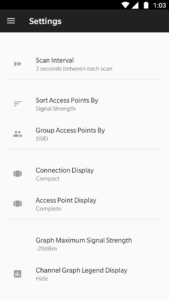
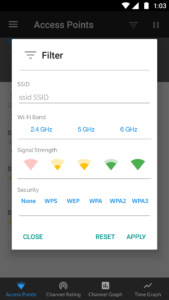
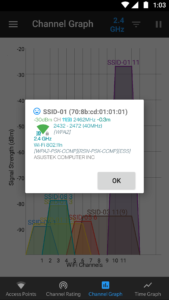
File Information
| Package Name | com.vrem.wifianalyzer |
|---|---|
| Version Name | 3.2.1 |
| Version Code | 70 |
| Architecture | Universal |
| Min Android Version | Android 24 (API 35) |
| Main Activity | com.vrem.wifianalyzer.MainActivity |
| Framework | Native (Java/Kotlin) |
| File Size | 2.44 MB |
| Signature (SHA1) | 80FEF5CDF5E32CB007174D9D2C57900CEC1A8137 |
| File Hash (SHA256) | a19d5fb6a7f569187187f824a79854d3b5cfbeaa5c441f6ec90de2406bda151a |
What's New
- Android 15 (Vanilla Ice Cream) - API 35 Support
- OUI DB update
- Dependencies update
- Bug fixes, performance and UI improvements
- OUI DB update
- Dependencies update
- Bug fixes, performance and UI improvements
App Description
Optimize your WiFi network using WiFi Analyzer (open-source) by examining surrounding WiFi networks, measuring their signal strength as well as identifying crowded channels.
Users' privacy and security is a huge concern these days and WiFi Analyzer (open-source) is designed to use as few permissions as possible. It asks for just enough to perform the analysis. Plus, it is all open source so nothing is hidden! Most notably, this application does not require access to internet, so you can be sure it does not send any personal/device information to any other source and it does not receive any information from other sources.
WiFi Analyzer is under active development by volunteers.
WiFi Analyzer is free, has no-ads and does not collect any personal information.
WiFi Analyzer is not a WiFi password cracking or phishing tool.
Features:
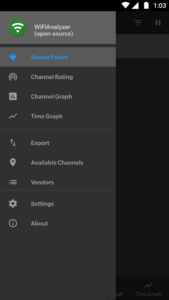
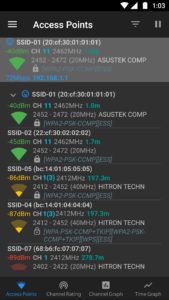
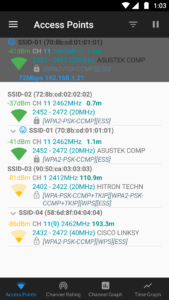
- Identify nearby Access Points
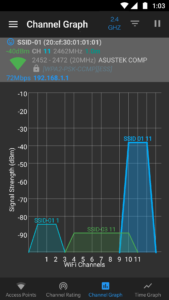
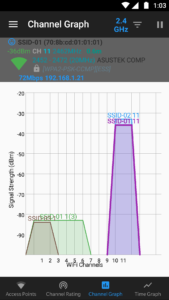
- Graph channels signal strength
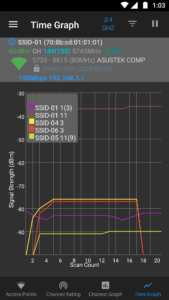
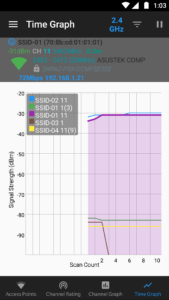
- Graph Access Point signal strength over time
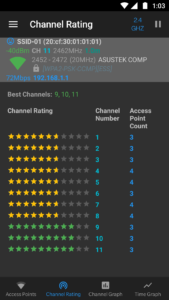
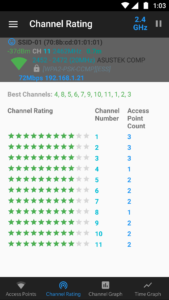
- Analyze WiFi networks to rate channels
- HT/VHT Detection - 40/80/160MHz (Requires Android OS 6+)
- 2.4 GHz, 5 GHz and 6 GHz WiFi bands (Requires hardware support)
- Access Point view complete or compact
- Estimated Distance to the Access Points
- Export access points details
- Dark, Light and System theme available
- Pause/Resume scanning
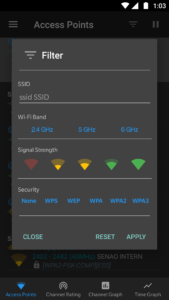
- Available filters: WiFi band, Signal strength, Security and SSID
- Vendor/OUI Database Lookup
- The application has too many features to mention them all
Please visit our website for more helpful information:
vremsoftwaredevelopment.github.io/WiFiAnalyzer
Notes:
- Android 9 introduced Wi-Fi scan throttling. Android 10 has a new developer option to toggle the throttling off under (Settings > Developer Options > Networking > Wi-Fi scan throttling).
- Android 9.0+ requires location permission and location services to perform a WiFi scan.
Features:
vremsoftwaredevelopment.github.io/WiFiAnalyzer/#features
Usage Tips:
vremsoftwaredevelopment.github.io/WiFiAnalyzer/#usage-tips
How-to:
vremsoftwaredevelopment.github.io/WiFiAnalyzer/#how-to
FAQ:
vremsoftwaredevelopment.github.io/WiFiAnalyzer/#faq
GitHub is the place to go for bug reports and code contributions:
vremsoftwaredevelopment.github.io/WiFiAnalyzer/#feedback
Users' privacy and security is a huge concern these days and WiFi Analyzer (open-source) is designed to use as few permissions as possible. It asks for just enough to perform the analysis. Plus, it is all open source so nothing is hidden! Most notably, this application does not require access to internet, so you can be sure it does not send any personal/device information to any other source and it does not receive any information from other sources.
WiFi Analyzer is under active development by volunteers.
WiFi Analyzer is free, has no-ads and does not collect any personal information.
WiFi Analyzer is not a WiFi password cracking or phishing tool.
Features:
- Identify nearby Access Points
- Graph channels signal strength
- Graph Access Point signal strength over time
- Analyze WiFi networks to rate channels
- HT/VHT Detection - 40/80/160MHz (Requires Android OS 6+)
- 2.4 GHz, 5 GHz and 6 GHz WiFi bands (Requires hardware support)
- Access Point view complete or compact
- Estimated Distance to the Access Points
- Export access points details
- Dark, Light and System theme available
- Pause/Resume scanning
- Available filters: WiFi band, Signal strength, Security and SSID
- Vendor/OUI Database Lookup
- The application has too many features to mention them all
Please visit our website for more helpful information:
vremsoftwaredevelopment.github.io/WiFiAnalyzer
Notes:
- Android 9 introduced Wi-Fi scan throttling. Android 10 has a new developer option to toggle the throttling off under (Settings > Developer Options > Networking > Wi-Fi scan throttling).
- Android 9.0+ requires location permission and location services to perform a WiFi scan.
Features:
vremsoftwaredevelopment.github.io/WiFiAnalyzer/#features
Usage Tips:
vremsoftwaredevelopment.github.io/WiFiAnalyzer/#usage-tips
How-to:
vremsoftwaredevelopment.github.io/WiFiAnalyzer/#how-to
FAQ:
vremsoftwaredevelopment.github.io/WiFiAnalyzer/#faq
GitHub is the place to go for bug reports and code contributions:
vremsoftwaredevelopment.github.io/WiFiAnalyzer/#feedback
Download WiFi Analyzer (open-source) APK
Fast, free and safe download.
APK Permissions 6
- android.permission.ACCESS_COARSE_LOCATION
- android.permission.ACCESS_FINE_LOCATION
- android.permission.ACCESS_WIFI_STATE
- android.permission.CHANGE_WIFI_STATE
- android.permission.NEARBY_WIFI_DEVICES
- com.vrem.wifianalyzer.DYNAMIC_RECEIVER_NOT_EXPORTED_PERMISSION
APK Verified
The cryptographic signature guarantees that the file is safe to install and was not tampered with in any way.


Frequently Asked Questions about WiFi Analyzer (open-source) APK
This is the universal variant — a single APK that contains native libraries for every CPU architecture. It installs on any Android device but is larger than per-architecture variants.
Yes — the APK's signature has been cryptographically verified against the publisher's signing key. The SHA-256 hash is shown in the File Information panel so you can independently confirm the file matches the original release.
Android 24 (API level 35) or newer. Older devices will refuse the install.
Install a free app like 'CPU-Z' or 'Droid Hardware Info' from the Play Store and look at the ABI / Instruction Set row. Most phones made after 2017 are arm64-v8a; if in doubt, download the universal variant.
All variants are functionally identical — same features, same version. They differ only in which CPU architectures the native code is compiled for, and (sometimes) which screen densities the included graphics target. Pick the one that matches your device for the smallest install size, or pick 'Universal' if you're unsure.