
Download ELEMNT APK 1.77.3.6 arm64-v8a, armeabi-v7a, x86, x86_64 · Android 28+
Download APK
Verified Safe
This is the arm64-v8a, armeabi-v7a, x86, x86_64 build of ELEMNT 1.77.3.6. Pick this build if your device's primary ABI matches.
File size: 134.7 MB • Min Android: 28 • Target Android: 35 • Version code: 17026 • Framework: Native (Java/Kotlin) • Permissions: 24
Screenshots
File Information
| Package Name | com.wahoofitness.boltcompanion |
|---|---|
| Version Name | 1.77.3.6 |
| Version Code | 17026 |
| Architecture | arm64-v8a, armeabi-v7a, x86, x86_64 |
| Min Android Version | Android 28 (API 35) |
| Main Activity | com.wahoofitness.boltcompanion.BCMainActivity |
| Framework | Native (Java/Kotlin) |
| File Size | 134.67 MB |
| Signature (SHA1) | 6671EBF8F58EF74D490BB786201F3DC70568C3CB |
| File Hash (SHA256) | adb750a817af2218ff53af95f9da836eae21a8e1330e13b17b4ba80e3f6ff76d |
What's New
Fixed: User interface bug which caused certain visual elements to be inaccessible.
App Description
Description
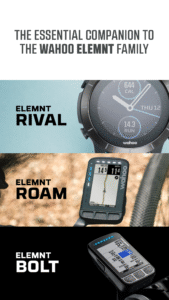
The Wahoo Fitness ELEMNT Companion App is the essential supplement for your new Wahoo ELEMNT Bike Computer. Wahoo has reinvented the way you setup and interact with your bike computer using the ELEMNT Companion App. Using the companion app, you automatically pair your ELEMNT or ELEMNT BOLT via a QR code and then you can set up sensors and configure all of your workout pages using the easy interface of your smartphone.
Simple Bike Computer Set Up
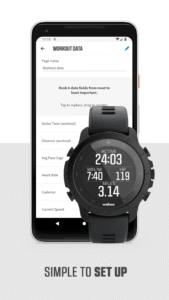
Automatically pair your ELEMNT or ELEMNT BOLT via QR code to your iPhone using the ELEMNT Companion App, and then use the easy interface of your smartphone to set up your profile, configure workout pages, and pair sensors faster than ever before. To build your personalized workout pages, simply drag and drop the order of your favorite data fields to suit your riding goals. Once you are configured, close the app and you are ready to ride!
Simple to Navigate
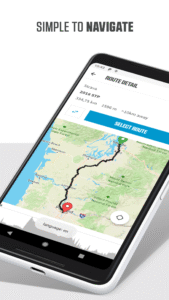
In the app, connect your Strava and Ride with GPS accounts so that your saved routes wirelessly download to your ELEMNT or ELEMNT BOLT GPS Bike Computer to keep you on track.
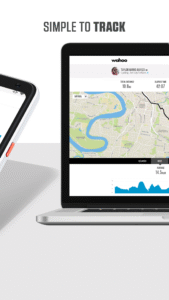
Simple to Track
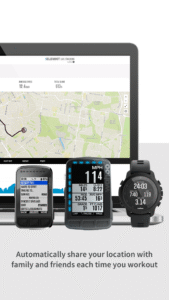
Use the app to send a link that corresponds to your GPS coordinates to friends and family so that they can track you in real time. Or, you can keep the app open to see other riders with a Wahoo ELEMNT bike computer on the road to find your friends.
Simple to Share
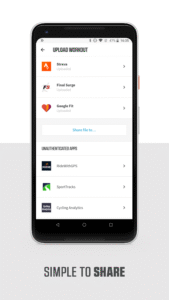
The Wahoo Fitness ELEMNT Companion App automatically backs up your workouts to the free Wahoo Fitness Cloud account for storage and sharing. Upload your workouts to all of your favorite training apps or websites. The Wahoo Fitness ELEMNT Companion App integrates with TrainingPeaks, Strava, RidewithGPS, Komoot, HealthKit, MapMyFitness and many others!
Visit
www.wahoofitness.com/devices/elemnt.html
for more information on the Wahoo Fitness ELEMNT bike computers.
Features:
Set up and configure your ELEMNT or ELEMNT BOLT Bike Computer
Receive messages, phone calls, emails on your ELEMNT or ELEMNT BOLT
Upload workouts to your favorite training websites including TrainingPeaks, Strava, RidewithGPS, Komoot, HealthKit and many more
Authorize Strava, RWGPS and Komoot to sync your routes to the ELEMNT or ELEMNT BOLT GPS Bike computers
Connect to wifi on ELEMNT or ELEMNT BOLT GPS Bike computers
Review workout data
Live track
Pair your ELEMNT or ELEMNT BOLT GPS Bike Computer with Wahoo Fitness devices including KICKR family, TICKR family, BlueSC, RPM, and more!
Pair your ELEMNT or ELEMNT BOLT GPS Bike Computer with other BTLE and ANT+™ heartrate and bike speed/cadence/power devices.
The Wahoo Fitness ELEMNT Companion App is the essential supplement for your new Wahoo ELEMNT Bike Computer. Wahoo has reinvented the way you setup and interact with your bike computer using the ELEMNT Companion App. Using the companion app, you automatically pair your ELEMNT or ELEMNT BOLT via a QR code and then you can set up sensors and configure all of your workout pages using the easy interface of your smartphone.
Simple Bike Computer Set Up
Automatically pair your ELEMNT or ELEMNT BOLT via QR code to your iPhone using the ELEMNT Companion App, and then use the easy interface of your smartphone to set up your profile, configure workout pages, and pair sensors faster than ever before. To build your personalized workout pages, simply drag and drop the order of your favorite data fields to suit your riding goals. Once you are configured, close the app and you are ready to ride!
Simple to Navigate
In the app, connect your Strava and Ride with GPS accounts so that your saved routes wirelessly download to your ELEMNT or ELEMNT BOLT GPS Bike Computer to keep you on track.
Simple to Track
Use the app to send a link that corresponds to your GPS coordinates to friends and family so that they can track you in real time. Or, you can keep the app open to see other riders with a Wahoo ELEMNT bike computer on the road to find your friends.
Simple to Share
The Wahoo Fitness ELEMNT Companion App automatically backs up your workouts to the free Wahoo Fitness Cloud account for storage and sharing. Upload your workouts to all of your favorite training apps or websites. The Wahoo Fitness ELEMNT Companion App integrates with TrainingPeaks, Strava, RidewithGPS, Komoot, HealthKit, MapMyFitness and many others!
Visit
www.wahoofitness.com/devices/elemnt.html
for more information on the Wahoo Fitness ELEMNT bike computers.
Features:
Set up and configure your ELEMNT or ELEMNT BOLT Bike Computer
Receive messages, phone calls, emails on your ELEMNT or ELEMNT BOLT
Upload workouts to your favorite training websites including TrainingPeaks, Strava, RidewithGPS, Komoot, HealthKit and many more
Authorize Strava, RWGPS and Komoot to sync your routes to the ELEMNT or ELEMNT BOLT GPS Bike computers
Connect to wifi on ELEMNT or ELEMNT BOLT GPS Bike computers
Review workout data
Live track
Pair your ELEMNT or ELEMNT BOLT GPS Bike Computer with Wahoo Fitness devices including KICKR family, TICKR family, BlueSC, RPM, and more!
Pair your ELEMNT or ELEMNT BOLT GPS Bike Computer with other BTLE and ANT+™ heartrate and bike speed/cadence/power devices.
Download ELEMNT APK
Fast, free and safe download.
APK Permissions 24
- android.permission.ACCESS_COARSE_LOCATION
- android.permission.ACCESS_FINE_LOCATION
- android.permission.ACCESS_NETWORK_STATE
- android.permission.ACCESS_WIFI_STATE
- android.permission.BLUETOOTH
- android.permission.BLUETOOTH_ADMIN
- android.permission.BLUETOOTH_CONNECT
- android.permission.BLUETOOTH_SCAN
- android.permission.BODY_SENSORS
- android.permission.CAMERA
- android.permission.FOREGROUND_SERVICE
- android.permission.INTERNET
- android.permission.POST_NOTIFICATIONS
- android.permission.READ_CALL_LOG
- android.permission.READ_CONTACTS
- android.permission.READ_EXTERNAL_STORAGE
- android.permission.READ_PHONE_STATE
- android.permission.RECEIVE_BOOT_COMPLETED
- android.permission.RECEIVE_SMS
- android.permission.REQUEST_IGNORE_BATTERY_OPTIMIZATIONS
- android.permission.VIBRATE
- android.permission.WAKE_LOCK
- com.google.android.finsky.permission.BIND_GET_INSTALL_REFERRER_SERVICE
- com.wahoofitness.boltcompanion.DYNAMIC_RECEIVER_NOT_EXPORTED_PERMISSION
APK Verified
The cryptographic signature guarantees that the file is safe to install and was not tampered with in any way.
Similar in Health & Fitness


More by Wahoo Fitness

Frequently Asked Questions about ELEMNT APK
This variant is built for devices that report `arm64-v8a, armeabi-v7a, x86, x86_64` as their primary ABI. If your device's CPU matches, this is the smallest, fastest version to install.
Yes — the APK's signature has been cryptographically verified against the publisher's signing key. The SHA-256 hash is shown in the File Information panel so you can independently confirm the file matches the original release.
Android 28 (API level 35) or newer. Older devices will refuse the install.
Install a free app like 'CPU-Z' or 'Droid Hardware Info' from the Play Store and look at the ABI / Instruction Set row. Most phones made after 2017 are arm64-v8a; if in doubt, download the universal variant.
All variants are functionally identical — same features, same version. They differ only in which CPU architectures the native code is compiled for, and (sometimes) which screen densities the included graphics target. Pick the one that matches your device for the smallest install size, or pick 'Universal' if you're unsure.