
This is the universal build of Drawify - Photo to Sketch 2.2.0. It contains native libraries for every CPU architecture (arm64-v8a, armeabi-v7a, x86, x86_64), so it installs on any Android device. The trade-off is size — it's larger than per-architecture variants. Pick this one if you're unsure which CPU your phone has, or if you plan to share the APK with multiple devices.
File size: 65.8 MB • Min Android: 26 • Target Android: 35 • Version code: 9 • Framework: Native (Java/Kotlin) • Permissions: 18
Screenshots
File Information
| Package Name | pencil.sketch.pencilsketch.pencilsketchphotoeditor.sketchpic |
|---|---|
| Version Name | 2.2.0 |
| Version Code | 9 |
| Architecture | Universal |
| Min Android Version | Android 26 (API 35) |
| Main Activity | pencil.sketch.pencilsketch.pencilsketchphotoeditor.sketchpic.MainActivity |
| Framework | Native (Java/Kotlin) |
| File Size | 65.80 MB |
| Signature (SHA1) | 6F9819279591F0F74D9E57CEB76E62D1DA157380 |
| File Hash (SHA256) | fdd5f3f8c812b214ad5fd894a985a10e541acc569fbe01a3b2948904ff2f6af5 |
What's New
- App design improvement
- Various bug fixes and improvements
- Various bug fixes and improvements
App Description
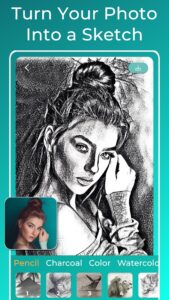
Embark on a mesmerizing artistic journey with Drawify, the ultimate Pencil Sketch Photo Editor that transforms your photos into stunning sketch drawings, right in the palm of your hand!
✨Discover Drawify:
► What is Drawify?
Welcome to Drawify, the ultimate pencil sketch photo editor designed to elevate your digital artistry. Whether you're fascinated by sketch drawing or photo editing, our advanced AI lets you turn pictures into drawings in seconds.
► Why should I choose Drawify?
Why settle for the ordinary when you can experience the extraordinary with Drawify? More than just a pencil sketch photo editor, Drawify is an intuitive and easy-to-use gateway to a universe of artistic possibilities. Enjoy instantaneous results as you create artwork that's solely yours and completely private, ready to save and share effortlessly across social platforms.
► How does it work?
Simply choose a photo and let our photo sketch maker magically transform it into a sketch drawing. Turn photos into drawings and explore a multitude of artistic styles. And the best part? Drawify operates entirely offline, ensuring your creativity is never restricted. Plus, rest assured that your generated images remain private, as all processing is done directly on your mobile device, without relying on external servers.
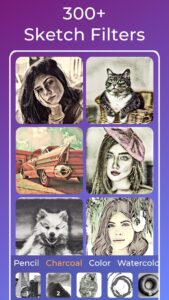
► +300 Pencil Sketch Filters
Step into a realm of unparalleled creative possibilities with Drawify's extensive library of over 300 pencil sketch filters. Moreover, these filters are meticulously organized into various categories to streamline your creative process. Here's a glimpse into what we offer:
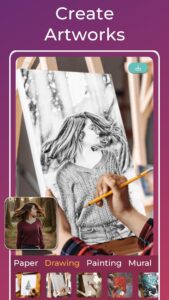
- Sketch Drawing: Obtain detailed sketch photo with our cutting-edge pencil sketch photo editor, perfect for the true artist in you.
- Charcoal Drawing: Immerse yourself in the intricate and captivating world of charcoal artistry, carefully crafted to reflect real-life charcoal effects.
- Color Sketch: Step beyond the monochrome and venture into the vibrant possibilities of color sketch photo editing.
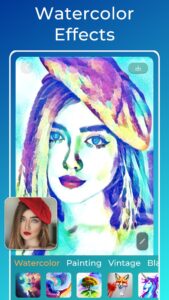
- Watercolor Effect: With our watercolor photo editing app, give your photographs a fluid, organic touch that only watercolor can provide.
- Painting Photo Editor: Walk the corridors of art history by turning your photos into iconic oil paintings.
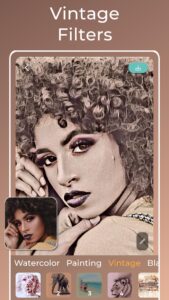
- Vintage Effect: Infuse your artwork with a timeless aesthetic using our vintage filters, adding a layer of nostalgia and charm to your creations.
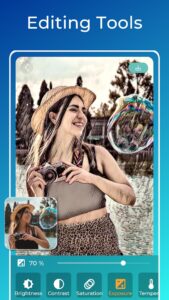
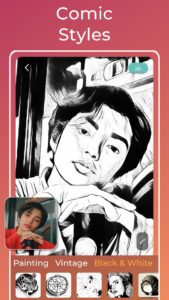
- Black and White Photo Editor: Turn photos into monochrome art. Further enhance the outlines of your sketch drawing with the integrated capabilities of our outline photo editor to add depth and drama.
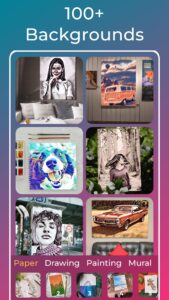
► Background Layering
Add another layer of creativity to your sketch drawing by seamlessly incorporating them into a variety of realistic layered backgrounds like framed canvases, blank sheets, among others.
🎨Create Your Masterpiece:
Your photo + Your style = Your Artwork.
Turn pictures into drawings, explore different art styles and backgrounds, or even sketch your imagination into existence.
Explore Drawify - Pencil Photo Sketch now and unleash your inner artist!
Terms of use:
waitos.github.io/drawify/terms
Privacy policy:
waitos.github.io/drawify/privacy
✨Discover Drawify:
► What is Drawify?
Welcome to Drawify, the ultimate pencil sketch photo editor designed to elevate your digital artistry. Whether you're fascinated by sketch drawing or photo editing, our advanced AI lets you turn pictures into drawings in seconds.
► Why should I choose Drawify?
Why settle for the ordinary when you can experience the extraordinary with Drawify? More than just a pencil sketch photo editor, Drawify is an intuitive and easy-to-use gateway to a universe of artistic possibilities. Enjoy instantaneous results as you create artwork that's solely yours and completely private, ready to save and share effortlessly across social platforms.
► How does it work?
Simply choose a photo and let our photo sketch maker magically transform it into a sketch drawing. Turn photos into drawings and explore a multitude of artistic styles. And the best part? Drawify operates entirely offline, ensuring your creativity is never restricted. Plus, rest assured that your generated images remain private, as all processing is done directly on your mobile device, without relying on external servers.
► +300 Pencil Sketch Filters
Step into a realm of unparalleled creative possibilities with Drawify's extensive library of over 300 pencil sketch filters. Moreover, these filters are meticulously organized into various categories to streamline your creative process. Here's a glimpse into what we offer:
- Sketch Drawing: Obtain detailed sketch photo with our cutting-edge pencil sketch photo editor, perfect for the true artist in you.
- Charcoal Drawing: Immerse yourself in the intricate and captivating world of charcoal artistry, carefully crafted to reflect real-life charcoal effects.
- Color Sketch: Step beyond the monochrome and venture into the vibrant possibilities of color sketch photo editing.
- Watercolor Effect: With our watercolor photo editing app, give your photographs a fluid, organic touch that only watercolor can provide.
- Painting Photo Editor: Walk the corridors of art history by turning your photos into iconic oil paintings.
- Vintage Effect: Infuse your artwork with a timeless aesthetic using our vintage filters, adding a layer of nostalgia and charm to your creations.
- Black and White Photo Editor: Turn photos into monochrome art. Further enhance the outlines of your sketch drawing with the integrated capabilities of our outline photo editor to add depth and drama.
► Background Layering
Add another layer of creativity to your sketch drawing by seamlessly incorporating them into a variety of realistic layered backgrounds like framed canvases, blank sheets, among others.
🎨Create Your Masterpiece:
Your photo + Your style = Your Artwork.
Turn pictures into drawings, explore different art styles and backgrounds, or even sketch your imagination into existence.
Explore Drawify - Pencil Photo Sketch now and unleash your inner artist!
Terms of use:
waitos.github.io/drawify/terms
Privacy policy:
waitos.github.io/drawify/privacy
Download Drawify - Photo to Sketch APK
Fast, free and safe download.
APK Permissions 18
- android.permission.ACCESS_ADSERVICES_AD_ID
- android.permission.ACCESS_ADSERVICES_ATTRIBUTION
- android.permission.ACCESS_ADSERVICES_TOPICS
- android.permission.ACCESS_NETWORK_STATE
- android.permission.CAMERA
- android.permission.FOREGROUND_SERVICE
- android.permission.INTERNET
- android.permission.POST_NOTIFICATIONS
- android.permission.READ_EXTERNAL_STORAGE
- android.permission.READ_MEDIA_IMAGES
- android.permission.READ_PHONE_STATE
- android.permission.WAKE_LOCK
- android.permission.WRITE_EXTERNAL_STORAGE
- com.android.vending.BILLING
- com.google.android.c2dm.permission.RECEIVE
- com.google.android.finsky.permission.BIND_GET_INSTALL_REFERRER_SERVICE
- com.google.android.gms.permission.AD_ID
- pencil.sketch.pencilsketch.pencilsketchphotoeditor.sketchpic.DYNAMIC_RECEIVER_NOT_EXPORTED_PERMISSION
APK Verified
The cryptographic signature guarantees that the file is safe to install and was not tampered with in any way.
Similar in Photography


More by Waitos AI

Frequently Asked Questions about Drawify - Photo to Sketch APK
This is the universal variant — a single APK that contains native libraries for every CPU architecture. It installs on any Android device but is larger than per-architecture variants.
Yes — the APK's signature has been cryptographically verified against the publisher's signing key. The SHA-256 hash is shown in the File Information panel so you can independently confirm the file matches the original release.
Android 26 (API level 35) or newer. Older devices will refuse the install.
Install a free app like 'CPU-Z' or 'Droid Hardware Info' from the Play Store and look at the ABI / Instruction Set row. Most phones made after 2017 are arm64-v8a; if in doubt, download the universal variant.
All variants are functionally identical — same features, same version. They differ only in which CPU architectures the native code is compiled for, and (sometimes) which screen densities the included graphics target. Pick the one that matches your device for the smallest install size, or pick 'Universal' if you're unsure.