
Download Wallet APK 3.0.12 arm64-v8a, armeabi-v7a, x86, x86_64 · Android 21+
Download APK
Verified Safe
This is the arm64-v8a, armeabi-v7a, x86, x86_64 build of Wallet 3.0.12. Pick this build if your device's primary ABI matches.
File size: 23.4 MB • Min Android: 21 • Target Android: 33 • Version code: 30012 • Framework: Native (Java/Kotlin) • Permissions: 11
Screenshots
File Information
| Package Name | com.walletunion.wallet |
|---|---|
| Version Name | 3.0.12 |
| Version Code | 30012 |
| Architecture | arm64-v8a, armeabi-v7a, x86, x86_64 |
| Min Android Version | Android 21 (API 33) |
| Main Activity | com.walletunion.wallet.SplashActivity |
| Framework | Native (Java/Kotlin) |
| File Size | 23.41 MB |
| Signature (SHA1) | 176E8B9732AB38A961E6DB77710A5E80EB1F70AF |
| File Hash (SHA256) | 44caf0e5f070f1a9c63110c9ccee7c2ef7f6c33058f62a79300e1eb03e70bc2f |
What's New
- Small bug fixes and performance improvements
App Description
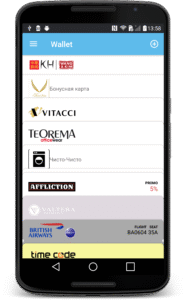
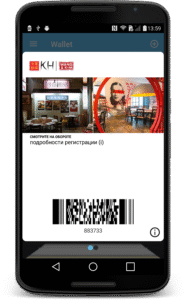
With Wallet you can enjoy full benefits of electronic cards, passes, tickets, coupons and boarding passes on Android. Designed to fully support iOS Passbook and Wallet standards, now you can manage all your passes in your phone.
This application does not support scanning of plastic loyalty cards or paper tickets and converting them into electronic wallet forms.
Main features
* Full compatibility with passes issued for iOS Passbook and Wallet platforms
* Automatic pass update
* Clear change notifications on any updates
* Visual highlights of changed fields
* Allows publishing of native app on the pass
* Notifications based on geo position, iBeacon and relevant time
* Support for QR, PDF417, Aztec and Code 128 barcodes
* One-click installation and pass import
* Built-in QR scanner to import passes
* Backup and restore via Google Drive
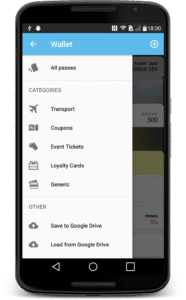
* Pass grouping by pass type and issuer
* Card stack arrangements via Drag & Drop
* Pass import via email and file system
* Pass export to email and MMS
Please note that this application is not intended for scanning plastic loyalty cards or paper tickets and converting such plastic or paper into electronic wallet forms. To install electronic loyalty cards and/or electronic tickets, please scan dedicated QR codes leading to electronic versions of the tickets/loyalty cards/boarding passes etc, or look for "Install into Wallet" links/buttons. Those QR/links are created and published by electronic passes' issuers such as retail shops, airlines, event organisers etc.
This application does not support scanning of plastic loyalty cards or paper tickets and converting them into electronic wallet forms.
Main features
* Full compatibility with passes issued for iOS Passbook and Wallet platforms
* Automatic pass update
* Clear change notifications on any updates
* Visual highlights of changed fields
* Allows publishing of native app on the pass
* Notifications based on geo position, iBeacon and relevant time
* Support for QR, PDF417, Aztec and Code 128 barcodes
* One-click installation and pass import
* Built-in QR scanner to import passes
* Backup and restore via Google Drive
* Pass grouping by pass type and issuer
* Card stack arrangements via Drag & Drop
* Pass import via email and file system
* Pass export to email and MMS
Please note that this application is not intended for scanning plastic loyalty cards or paper tickets and converting such plastic or paper into electronic wallet forms. To install electronic loyalty cards and/or electronic tickets, please scan dedicated QR codes leading to electronic versions of the tickets/loyalty cards/boarding passes etc, or look for "Install into Wallet" links/buttons. Those QR/links are created and published by electronic passes' issuers such as retail shops, airlines, event organisers etc.
Download Wallet APK
Fast, free and safe download.
APK Permissions 11
- android.permission.ACCESS_NETWORK_STATE
- android.permission.CAMERA
- android.permission.FOREGROUND_SERVICE
- android.permission.INTERNET
- android.permission.POST_NOTIFICATIONS
- android.permission.RECEIVE_BOOT_COMPLETED
- android.permission.VIBRATE
- android.permission.WAKE_LOCK
- com.google.android.c2dm.permission.RECEIVE
- com.google.android.finsky.permission.BIND_GET_INSTALL_REFERRER_SERVICE
- com.walletunion.wallet.DYNAMIC_RECEIVER_NOT_EXPORTED_PERMISSION
APK Verified
The cryptographic signature guarantees that the file is safe to install and was not tampered with in any way.
Similar in Travel & Local


Frequently Asked Questions about Wallet APK
This variant is built for devices that report `arm64-v8a, armeabi-v7a, x86, x86_64` as their primary ABI. If your device's CPU matches, this is the smallest, fastest version to install.
Yes — the APK's signature has been cryptographically verified against the publisher's signing key. The SHA-256 hash is shown in the File Information panel so you can independently confirm the file matches the original release.
Android 21 (API level 33) or newer. Older devices will refuse the install.
Install a free app like 'CPU-Z' or 'Droid Hardware Info' from the Play Store and look at the ABI / Instruction Set row. Most phones made after 2017 are arm64-v8a; if in doubt, download the universal variant.
All variants are functionally identical — same features, same version. They differ only in which CPU architectures the native code is compiled for, and (sometimes) which screen densities the included graphics target. Pick the one that matches your device for the smallest install size, or pick 'Universal' if you're unsure.