
Download WiFi Map・Internet & Speed Test APK 8.5.1 Universal · Android 24+
Download APK
Verified Safe
This is the universal build of WiFi Map・Internet & Speed Test 8.5.1. It contains native libraries for every CPU architecture (arm64-v8a, armeabi-v7a, x86, x86_64), so it installs on any Android device. The trade-off is size — it's larger than per-architecture variants. Pick this one if you're unsure which CPU your phone has, or if you plan to share the APK with multiple devices.
File size: 131.4 MB • Min Android: 24 • Target Android: 35 • Version code: 9207 • Framework: Native (Java/Kotlin) • Permissions: 31
Screenshots







File Information
| Package Name | io.wifimap.wifimap |
|---|---|
| Version Name | 8.5.1 |
| Version Code | 9207 |
| Architecture | Universal |
| Min Android Version | Android 24 (API 35) |
| Main Activity | io.wifimap.wifimap.main.splash.SplashActivity |
| Framework | Native (Java/Kotlin) |
| File Size | 131.42 MB |
| Signature (SHA1) | D498F7188BBE0099368CFA47E68BC6EAF3BE6B6F |
| File Hash (SHA256) | 17ae938e89a6cb64785b00a7d460d9b2d3f689463f1dd8e181c718eb3e5a62b1 |
What's New
We've fixed bugs, improved stability, and optimized performance to ensure a smoother and more reliable experience.
Thanks for your support! Together, we're making essential amenities more accessible for everyone.
Thanks for your support! Together, we're making essential amenities more accessible for everyone.
App Description
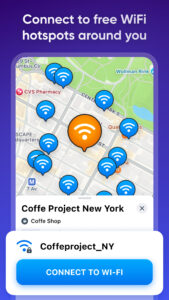
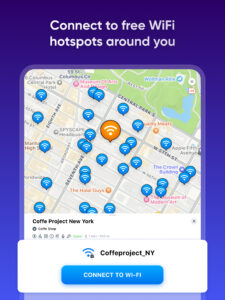
WiFi Map® has more than 150 million WiFi hotspots available worldwide, and the number is growing daily thanks to our community. With the app, you can connect to WiFi hotspots for free, get actual passwords, and make updates together with millions of WiFi Map users! Use the built-in wifi analyzer free tool to optimize your connection and check wi-fi signal strength for the best performance. Additionally, run a wifi speed test to ensure fast and stable internet access. Also, use offline maps to find toilets, bathrooms, drinking fountains, and more!
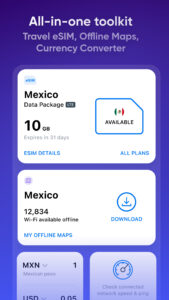
Get our eSIM now and access the internet wherever you go
• Internet in 70+ countries
• 30 days validity
• 1GB, 3GB, 5GB and 10GB available packages
• fast refill
• High speed 4G and LTE networks
• no contract
• activation in a few taps
Detailed offline maps to find the internet everywhere
It’s always difficult to stay without an internet connection when you are traveling or simply out of carrier service. This is where the offline WiFi password map will help. Download the map of the whole region with the complete hotspot data to make sure you’re able to connect to the internet.
Benefit from a WiFi Map community and support it
Use a Wi Fi scanner to look for nearby Wi-Fi networks, speed test them, and connect to the fastest ones. At the same time, you’re contributing to the WiFi Map community by sharing hotspot data and performance details. Thanks to our users you will always get actual information on hotspots around.
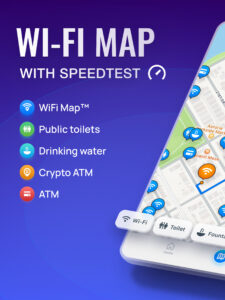
Sneak peek of WiFi Map main features
- Find the internet all over the world with WiFi Map
- Access internet for FREE when you connect to WiFi
- Millions of WiFi hotspots are available worldwide
- Genuine WiFi passwords and useful tips
- Use map navigation to find the local hotspots
- Apply filters to find out the nearest Wi Fi around you
- Smart search on the WiFi Map
- Add WiFi hotspots around you to the map
- Download offline maps when you travel
- Share WiFis on Facebook, Instagram, and Twitter with your friends
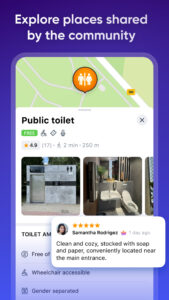
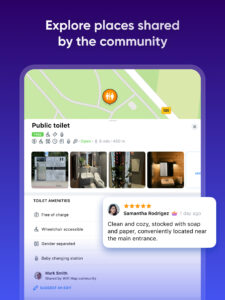
- Toilet finder and map (restroom), clean bathroom finder using offline maps
- Free tools for internet speed analysis: wifi analyzer and network speed tester
- Handy travel tools: currency converter, world clock, and tip calculator
Stay Connected and Travel Smarter with WiFi Map
WiFi Map is more than just a tool to find free Wi-Fi hotspots—it’s your ultimate travel companion. The app offers a range of useful features like a currency converter, tip calculator, and world clocks to make your trips easier. But that’s not all! With the free internet speed test, you can quickly check your connection’s performance, ensuring you stay online without interruptions. Use the wifi analyzer to check your connection quality and the wi fi signal strength meter to find the best signal spots. Whether you’re running a speedtest or exploring new places, WiFi Map has everything you need to stay connected and travel smarter.
How to get connected?
1. Open the WiFi Map app.
2. Find an available WiFi hotspot around you.
3. Connect to the WiFi hotspot using the information in the app.
4. Enjoy fast, FREE and reliable internet access!
=====================
Help Center and FAQ:
intercom.help/wifi-map-help-center/
Twitter:
twitter.com/wifimapapp
Discord:
discord.gg/pVyvsFbsD5
Facebook:
www.facebook.com/wifimap.io
Instagram:
www.instagram.com/wifimap/
Telegram:
t.me/wifimap_io
Website:
www.wifimap.io/
Email:
support@wifimap.io
Get our eSIM now and access the internet wherever you go
• Internet in 70+ countries
• 30 days validity
• 1GB, 3GB, 5GB and 10GB available packages
• fast refill
• High speed 4G and LTE networks
• no contract
• activation in a few taps
Detailed offline maps to find the internet everywhere
It’s always difficult to stay without an internet connection when you are traveling or simply out of carrier service. This is where the offline WiFi password map will help. Download the map of the whole region with the complete hotspot data to make sure you’re able to connect to the internet.
Benefit from a WiFi Map community and support it
Use a Wi Fi scanner to look for nearby Wi-Fi networks, speed test them, and connect to the fastest ones. At the same time, you’re contributing to the WiFi Map community by sharing hotspot data and performance details. Thanks to our users you will always get actual information on hotspots around.
Sneak peek of WiFi Map main features
- Find the internet all over the world with WiFi Map
- Access internet for FREE when you connect to WiFi
- Millions of WiFi hotspots are available worldwide
- Genuine WiFi passwords and useful tips
- Use map navigation to find the local hotspots
- Apply filters to find out the nearest Wi Fi around you
- Smart search on the WiFi Map
- Add WiFi hotspots around you to the map
- Download offline maps when you travel
- Share WiFis on Facebook, Instagram, and Twitter with your friends
- Toilet finder and map (restroom), clean bathroom finder using offline maps
- Free tools for internet speed analysis: wifi analyzer and network speed tester
- Handy travel tools: currency converter, world clock, and tip calculator
Stay Connected and Travel Smarter with WiFi Map
WiFi Map is more than just a tool to find free Wi-Fi hotspots—it’s your ultimate travel companion. The app offers a range of useful features like a currency converter, tip calculator, and world clocks to make your trips easier. But that’s not all! With the free internet speed test, you can quickly check your connection’s performance, ensuring you stay online without interruptions. Use the wifi analyzer to check your connection quality and the wi fi signal strength meter to find the best signal spots. Whether you’re running a speedtest or exploring new places, WiFi Map has everything you need to stay connected and travel smarter.
How to get connected?
1. Open the WiFi Map app.
2. Find an available WiFi hotspot around you.
3. Connect to the WiFi hotspot using the information in the app.
4. Enjoy fast, FREE and reliable internet access!
=====================
Help Center and FAQ:
intercom.help/wifi-map-help-center/
Twitter:
twitter.com/wifimapapp
Discord:
discord.gg/pVyvsFbsD5
Facebook:
www.facebook.com/wifimap.io
Instagram:
www.instagram.com/wifimap/
Telegram:
t.me/wifimap_io
Website:
www.wifimap.io/
Email:
support@wifimap.io
Download WiFi Map・Internet & Speed Test APK
Fast, free and safe download.
APK Permissions 31
- android.permission.ACCESS_ADSERVICES_AD_ID
- android.permission.ACCESS_ADSERVICES_ATTRIBUTION
- android.permission.ACCESS_ADSERVICES_TOPICS
- android.permission.ACCESS_BACKGROUND_LOCATION
- android.permission.ACCESS_COARSE_LOCATION
- android.permission.ACCESS_FINE_LOCATION
- android.permission.ACCESS_NETWORK_STATE
- android.permission.ACCESS_WIFI_STATE
- android.permission.CAMERA
- android.permission.CHANGE_WIFI_STATE
- android.permission.FLASHLIGHT
- android.permission.FOREGROUND_SERVICE
- android.permission.FOREGROUND_SERVICE_SPECIAL_USE
- android.permission.GET_ACCOUNTS
- android.permission.INTERNET
- android.permission.POST_NOTIFICATIONS
- android.permission.READ_EXTERNAL_STORAGE
- android.permission.READ_PHONE_STATE
- android.permission.RECORD_AUDIO
- android.permission.VIBRATE
- android.permission.WAKE_LOCK
- android.permission.WRITE_EMBEDDED_SUBSCRIPTIONS
- android.permission.WRITE_EXTERNAL_STORAGE
- com.android.vending.BILLING
- com.google.android.c2dm.permission.RECEIVE
- com.google.android.finsky.permission.BIND_GET_INSTALL_REFERRER_SERVICE
- com.google.android.gms.permission.AD_ID
- com.google.android.providers.gsf.permission.READ_GSERVICES
- com.huawei.appmarket.service.commondata.permission.GET_COMMON_DATA
- com.samsung.android.mapsagent.permission.READ_APP_INFO
- io.wifimap.wifimap.DYNAMIC_RECEIVER_NOT_EXPORTED_PERMISSION
APK Verified
The cryptographic signature guarantees that the file is safe to install and was not tampered with in any way.


Frequently Asked Questions about WiFi Map・Internet & Speed Test APK
This is the universal variant — a single APK that contains native libraries for every CPU architecture. It installs on any Android device but is larger than per-architecture variants.
Yes — the APK's signature has been cryptographically verified against the publisher's signing key. The SHA-256 hash is shown in the File Information panel so you can independently confirm the file matches the original release.
Android 24 (API level 35) or newer. Older devices will refuse the install.
Install a free app like 'CPU-Z' or 'Droid Hardware Info' from the Play Store and look at the ABI / Instruction Set row. Most phones made after 2017 are arm64-v8a; if in doubt, download the universal variant.
All variants are functionally identical — same features, same version. They differ only in which CPU architectures the native code is compiled for, and (sometimes) which screen densities the included graphics target. Pick the one that matches your device for the smallest install size, or pick 'Universal' if you're unsure.