
Download Wikipedia 50561-r-2025-12-03 (120-640dpi) (Android APK 2.7.50545-samsung-2025-08-18 arm64-v8a, armeabi-v7a, x86, x86_64 · Android 21+
Download APK
Verified Safe
This is the arm64-v8a, armeabi-v7a, x86, x86_64 build of Wikipedia 50561-r-2025-12-03 (120-640dpi) (Android 2.7.50545-samsung-2025-08-18. Pick this build if your device's primary ABI matches.
File size: 46.0 MB • Min Android: 21 • Target Android: 35 • Version code: 50545 • Framework: Native (Java/Kotlin) • Permissions: 17
Screenshots
File Information
| Package Name | org.wikipedia |
|---|---|
| Version Name | 2.7.50545-samsung-2025-08-18 |
| Version Code | 50545 |
| Architecture | arm64-v8a, armeabi-v7a, x86, x86_64 |
| Min Android Version | Android 21 (API 35) |
| Main Activity | org.wikipedia.main.MainActivity |
| Framework | Native (Java/Kotlin) |
| File Size | 45.95 MB |
| Signature (SHA1) | D21A6A91AA75C937C4253770A8F7025C6C2A8319 |
| File Hash (SHA256) | 6573b5a9e47fccf1219c2af2e14f87e46a90943ef2ea5c1cbb411e1c8d67d2b6 |
What's New
- General bug fixes and enhancements.
App Description
The best Wikipedia experience on your Mobile device. Ad-free and free of charge, forever. With the official Wikipedia app, you can search and explore 40+ million articles in 300+ languages, no matter where you are.
== Why you'll love the this app ==
1. It's free and open
Wikipedia is the encyclopedia that anyone can edit. Articles on Wikipedia are freely licensed and the app code is 100% open source. The heart and soul of Wikipedia is a community of people working to bring you unlimited access to free, reliable and neutral information.
2. No ads
Wikipedia is a place to learn, not a place for advertising. This app is made by the Wikimedia Foundation, a nonprofit organization that supports and operates Wikipedia. We provide this service in the pursuit of open knowledge that’s always ad-free and never tracks your data.
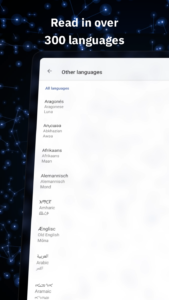
3. Read in your language
Search 40 million articles in over 300 languages in the world’s largest source of information. Set your preferred languages in the app and easily switch between them when browsing or reading.
4. Use it offline
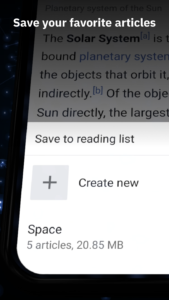
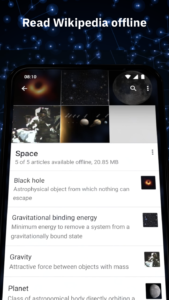
Save your favorite articles and read Wikipedia offline with “My lists“. Name lists as you like and collect articles across different languages. Saved articles and reading lists are synced across all your devices and are available even when you do not have internet connectivity.
5. Attention to detail and night mode
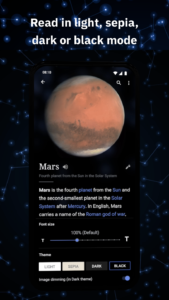
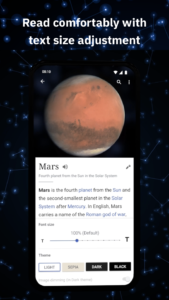
The app embraces Wikipedia’s simplicity and adds delight to it. A beautiful and distraction-free interface lets you focus on the essential: reading articles. With text size adjustment and themes in pure black, dark, sepia or light, you can choose the most pleasant reading experience for you.
== Broaden your horizon with these features ==
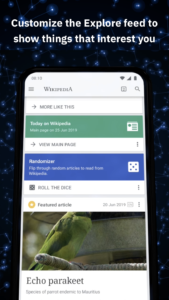
1. Customize your Explore feed
"Explore" lets you see recommended Wikipedia content including current events, popular articles, captivating freely-licensed photos, events on this day in history, suggested articles based on your reading history, and more.
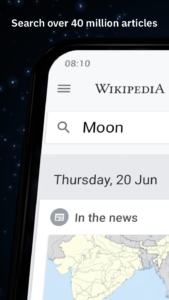
2. Find and search
Quickly find what you're looking for by searching within articles or with the search bar at the top of the app. You can even search using your favorite emojis or voice-enabled search.
== We'd love your feedback ==
1. To send feedback from the app:
In the menu, press "Settings", then, in the "About" section, tap "Send app feedback".
2. If you have experience with Java and the Android SDK, then we look forward to your contributions! More info:
mediawiki.org/wiki/Wikimedia_Apps/Team/Android/App_hacking
3. Explanation of permissions needed by the app:
mediawiki.org/wiki/Wikimedia_Apps/Android_FAQ#Security_and_Permissions
4. Privacy policy:
m.wikimediafoundation.org/wiki/Privacy_policy
5. Terms of Use:
m.wikimediafoundation.org/wiki/Terms_of_Use
6. About the Wikimedia Foundation:
The Wikimedia Foundation is a charitable nonprofit organization that supports and operates Wikipedia and the other Wiki projects. It is funded mainly through donations. For more information, please visit our website:
wikimediafoundation.org/
== Why you'll love the this app ==
1. It's free and open
Wikipedia is the encyclopedia that anyone can edit. Articles on Wikipedia are freely licensed and the app code is 100% open source. The heart and soul of Wikipedia is a community of people working to bring you unlimited access to free, reliable and neutral information.
2. No ads
Wikipedia is a place to learn, not a place for advertising. This app is made by the Wikimedia Foundation, a nonprofit organization that supports and operates Wikipedia. We provide this service in the pursuit of open knowledge that’s always ad-free and never tracks your data.
3. Read in your language
Search 40 million articles in over 300 languages in the world’s largest source of information. Set your preferred languages in the app and easily switch between them when browsing or reading.
4. Use it offline
Save your favorite articles and read Wikipedia offline with “My lists“. Name lists as you like and collect articles across different languages. Saved articles and reading lists are synced across all your devices and are available even when you do not have internet connectivity.
5. Attention to detail and night mode
The app embraces Wikipedia’s simplicity and adds delight to it. A beautiful and distraction-free interface lets you focus on the essential: reading articles. With text size adjustment and themes in pure black, dark, sepia or light, you can choose the most pleasant reading experience for you.
== Broaden your horizon with these features ==
1. Customize your Explore feed
"Explore" lets you see recommended Wikipedia content including current events, popular articles, captivating freely-licensed photos, events on this day in history, suggested articles based on your reading history, and more.
2. Find and search
Quickly find what you're looking for by searching within articles or with the search bar at the top of the app. You can even search using your favorite emojis or voice-enabled search.
== We'd love your feedback ==
1. To send feedback from the app:
In the menu, press "Settings", then, in the "About" section, tap "Send app feedback".
2. If you have experience with Java and the Android SDK, then we look forward to your contributions! More info:
mediawiki.org/wiki/Wikimedia_Apps/Team/Android/App_hacking
3. Explanation of permissions needed by the app:
mediawiki.org/wiki/Wikimedia_Apps/Android_FAQ#Security_and_Permissions
4. Privacy policy:
m.wikimediafoundation.org/wiki/Privacy_policy
5. Terms of Use:
m.wikimediafoundation.org/wiki/Terms_of_Use
6. About the Wikimedia Foundation:
The Wikimedia Foundation is a charitable nonprofit organization that supports and operates Wikipedia and the other Wiki projects. It is funded mainly through donations. For more information, please visit our website:
wikimediafoundation.org/
Download Wikipedia 50561-r-2025-12-03 (120-640dpi) (Android APK
Fast, free and safe download.
APK Permissions 17
- android.permission.ACCESS_COARSE_LOCATION
- android.permission.ACCESS_FINE_LOCATION
- android.permission.ACCESS_NETWORK_STATE
- android.permission.ACCESS_WIFI_STATE
- android.permission.AUTHENTICATE_ACCOUNTS
- android.permission.FOREGROUND_SERVICE
- android.permission.GET_ACCOUNTS
- android.permission.INTERNET
- android.permission.MANAGE_ACCOUNTS
- android.permission.POST_NOTIFICATIONS
- android.permission.RECEIVE_BOOT_COMPLETED
- android.permission.VIBRATE
- android.permission.WAKE_LOCK
- android.permission.WRITE_EXTERNAL_STORAGE
- com.google.android.c2dm.permission.RECEIVE
- com.google.android.finsky.permission.BIND_GET_INSTALL_REFERRER_SERVICE
- org.wikipedia.DYNAMIC_RECEIVER_NOT_EXPORTED_PERMISSION
APK Verified
The cryptographic signature guarantees that the file is safe to install and was not tampered with in any way.
Similar in Books & Reference


More by Wikimedia Foundation


Frequently Asked Questions about Wikipedia 50561-r-2025-12-03 (120-640dpi) (Android APK
This variant is built for devices that report `arm64-v8a, armeabi-v7a, x86, x86_64` as their primary ABI. If your device's CPU matches, this is the smallest, fastest version to install.
Yes — the APK's signature has been cryptographically verified against the publisher's signing key. The SHA-256 hash is shown in the File Information panel so you can independently confirm the file matches the original release.
Android 21 (API level 35) or newer. Older devices will refuse the install.
Install a free app like 'CPU-Z' or 'Droid Hardware Info' from the Play Store and look at the ABI / Instruction Set row. Most phones made after 2017 are arm64-v8a; if in doubt, download the universal variant.
All variants are functionally identical — same features, same version. They differ only in which CPU architectures the native code is compiled for, and (sometimes) which screen densities the included graphics target. Pick the one that matches your device for the smallest install size, or pick 'Universal' if you're unsure.