
Download Wikipedia 50561-r-2025-12-03 (120-640dpi) (Android APK r/2.7.50540-r-2025-07-08 arm64-v8a, armeabi-v7a, x86, x86_64 · Android 21+
Download APK
Verified Safe
This is the arm64-v8a, armeabi-v7a, x86, x86_64 build of Wikipedia 50561-r-2025-12-03 (120-640dpi) (Android r/2.7.50540-r-2025-07-08. Pick this build if your device's primary ABI matches.
File size: 40.1 MB • Min Android: 21 • Target Android: 35 • Version code: 50540 • Framework: Native (Java/Kotlin) • Permissions: 15
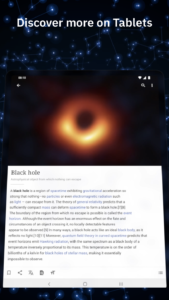
Screenshots
File Information
| Package Name | org.wikipedia |
|---|---|
| Version Name | r/2.7.50540-r-2025-07-08 |
| Version Code | 50540 |
| Architecture | arm64-v8a, armeabi-v7a, x86, x86_64 |
| Min Android Version | Android 21 (API 35) |
| Main Activity | org.wikipedia.main.MainActivity |
| Framework | Native (Java/Kotlin) |
| File Size | 40.07 MB |
| Signature (SHA1) | 0A2ED9FAD0A1578B9531E4E61F9C0169159733AA |
| File Hash (SHA256) | 614e872e6a1c15378e343a8744c67903e1e6266e7765f678a0b7aaf935e55390 |
What's New
From version
r/2.7.50460-r-2023-11-21
:
- General bug fixes and enhancements.
r/2.7.50460-r-2023-11-21
:
- General bug fixes and enhancements.
App Description
The official Wikipedia Android app is designed to help you find, discover, and explore knowledge on Wikipedia. Settle a bet with a friend by doing a quick search through the app, or dive into featured articles, images, recommended articles, and more using the explore feed. With more than 39 million articles in nearly 300 languages, your favorite free online encyclopedia is now at your fingertips.
Features:
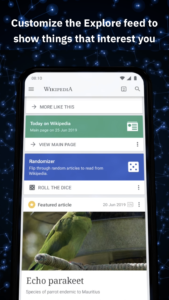
Explore feed - The new ‘explore feed’ offers recommended and constantly updating Wikipedia content right on the home screen, including trending articles, current events, suggested reading, and more.
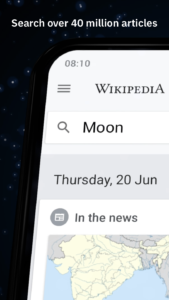
Voice-integrated search - Easily find what you’re looking for with a prominent search bar at the top of the app, including voice-enabled search on your device.
Nearby - Learn more about what’s around you by selecting points on an interactive map to see articles related to your current and nearby location.
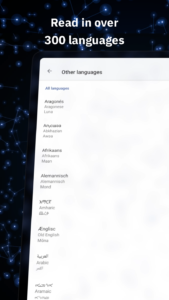
Language support - Seamlessly switch to reading any language-supported Wikipedia, either by changing the language of the current article, or changing your preferred search language while searching.
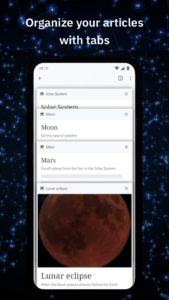
Link previews - Tap on an article to preview it, without losing your place in what you’re currently reading. Press and hold a link to open it in a new tab, allowing you to keep reading the current article without losing your place, and switch to the new tab when you're ready.
Table of contents - swipe left on any article to bring up the table of contents, which lets you jump to article sections easily.
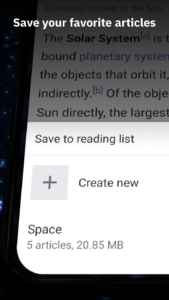
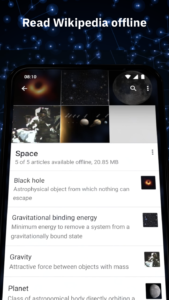
Reading lists - Organize the articles you browse into reading lists, which you can access even when you're offline. Create as many lists as you like, give them custom names and descriptions, and populate them with articles from any language wiki.
Image gallery - Tap on an image to view the image full-screen in high resolution, with options to swipe for browsing additional images.
Definitions from Wiktionary - Tap-and-hold to highlight a word, then tap the "Define" button to see a definition of the word from Wiktionary.
Wikipedia Zero - Access Wikipedia for Android free of data charges for participating mobile operators. (link to participating operators).
Send us your feedback about the app! In the menu, press "Settings", then "About the Wikipedia app", then "Send app feedback".
The code is 100% open source. If you have experience with Java and the Android SDK, then we look forward to your contributions!
github.com/wikimedia/apps-android-wikipedia
Explanation of permissions needed by the app:
www.mediawiki.org/wiki/Wikimedia_Apps/Android_FAQ#Security_and_Permissions
Privacy policy:
m.wikimediafoundation.org/wiki/Privacy_policy
Terms of Use:
m.wikimediafoundation.org/wiki/Terms_of_Use
About the Wikimedia Foundation
The Wikimedia Foundation is the nonprofit organization that supports Wikipedia and the other Wikimedia projects. The Wikimedia Foundation is a charitable organization funded mainly through donations. For more information, please visit our website:
wikimediafoundation.org/wiki/Home
.
Author: Wikimedia
License:
Apache License 2.0
Website
Issue Tracker
Translation
Source Code
Changelog
Build Metadata
Reproducibility Status
Features:
Explore feed - The new ‘explore feed’ offers recommended and constantly updating Wikipedia content right on the home screen, including trending articles, current events, suggested reading, and more.
Voice-integrated search - Easily find what you’re looking for with a prominent search bar at the top of the app, including voice-enabled search on your device.
Nearby - Learn more about what’s around you by selecting points on an interactive map to see articles related to your current and nearby location.
Language support - Seamlessly switch to reading any language-supported Wikipedia, either by changing the language of the current article, or changing your preferred search language while searching.
Link previews - Tap on an article to preview it, without losing your place in what you’re currently reading. Press and hold a link to open it in a new tab, allowing you to keep reading the current article without losing your place, and switch to the new tab when you're ready.
Table of contents - swipe left on any article to bring up the table of contents, which lets you jump to article sections easily.
Reading lists - Organize the articles you browse into reading lists, which you can access even when you're offline. Create as many lists as you like, give them custom names and descriptions, and populate them with articles from any language wiki.
Image gallery - Tap on an image to view the image full-screen in high resolution, with options to swipe for browsing additional images.
Definitions from Wiktionary - Tap-and-hold to highlight a word, then tap the "Define" button to see a definition of the word from Wiktionary.
Wikipedia Zero - Access Wikipedia for Android free of data charges for participating mobile operators. (link to participating operators).
Send us your feedback about the app! In the menu, press "Settings", then "About the Wikipedia app", then "Send app feedback".
The code is 100% open source. If you have experience with Java and the Android SDK, then we look forward to your contributions!
github.com/wikimedia/apps-android-wikipedia
Explanation of permissions needed by the app:
www.mediawiki.org/wiki/Wikimedia_Apps/Android_FAQ#Security_and_Permissions
Privacy policy:
m.wikimediafoundation.org/wiki/Privacy_policy
Terms of Use:
m.wikimediafoundation.org/wiki/Terms_of_Use
About the Wikimedia Foundation
The Wikimedia Foundation is the nonprofit organization that supports Wikipedia and the other Wikimedia projects. The Wikimedia Foundation is a charitable organization funded mainly through donations. For more information, please visit our website:
wikimediafoundation.org/wiki/Home
.
Author: Wikimedia
License:
Apache License 2.0
Website
Issue Tracker
Translation
Source Code
Changelog
Build Metadata
Reproducibility Status
Download Wikipedia 50561-r-2025-12-03 (120-640dpi) (Android APK
Fast, free and safe download.
APK Permissions 15
- android.permission.ACCESS_COARSE_LOCATION
- android.permission.ACCESS_FINE_LOCATION
- android.permission.ACCESS_NETWORK_STATE
- android.permission.ACCESS_WIFI_STATE
- android.permission.AUTHENTICATE_ACCOUNTS
- android.permission.FOREGROUND_SERVICE
- android.permission.GET_ACCOUNTS
- android.permission.INTERNET
- android.permission.MANAGE_ACCOUNTS
- android.permission.POST_NOTIFICATIONS
- android.permission.RECEIVE_BOOT_COMPLETED
- android.permission.VIBRATE
- android.permission.WAKE_LOCK
- android.permission.WRITE_EXTERNAL_STORAGE
- org.wikipedia.DYNAMIC_RECEIVER_NOT_EXPORTED_PERMISSION
APK Verified
The cryptographic signature guarantees that the file is safe to install and was not tampered with in any way.
Similar in Books & Reference


More by Wikimedia Foundation


Frequently Asked Questions about Wikipedia 50561-r-2025-12-03 (120-640dpi) (Android APK
This variant is built for devices that report `arm64-v8a, armeabi-v7a, x86, x86_64` as their primary ABI. If your device's CPU matches, this is the smallest, fastest version to install.
Yes — the APK's signature has been cryptographically verified against the publisher's signing key. The SHA-256 hash is shown in the File Information panel so you can independently confirm the file matches the original release.
Android 21 (API level 35) or newer. Older devices will refuse the install.
Install a free app like 'CPU-Z' or 'Droid Hardware Info' from the Play Store and look at the ABI / Instruction Set row. Most phones made after 2017 are arm64-v8a; if in doubt, download the universal variant.
All variants are functionally identical — same features, same version. They differ only in which CPU architectures the native code is compiled for, and (sometimes) which screen densities the included graphics target. Pick the one that matches your device for the smallest install size, or pick 'Universal' if you're unsure.