
Download Shizuku APK 13.6.0.r1086.2650830c arm64-v8a, armeabi-v7a, x86, x86_64 · Android 24+
Download APK
Verified Safe
This is the arm64-v8a, armeabi-v7a, x86, x86_64 build of Shizuku 13.6.0.r1086.2650830c. Pick this build if your device's primary ABI matches.
File size: 2.5 MB • Min Android: 24 • Target Android: 36 • Version code: 1086 • Framework: Native (Java/Kotlin) • Permissions: 6
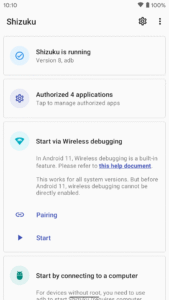
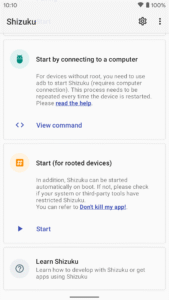
Screenshots
File Information
| Package Name | moe.shizuku.privileged.api |
|---|---|
| Version Name | 13.6.0.r1086.2650830c |
| Version Code | 1086 |
| Architecture | arm64-v8a, armeabi-v7a, x86, x86_64 |
| Min Android Version | Android 24 (API 36) |
| Main Activity | moe.shizuku.manager.MainActivity |
| Framework | Native (Java/Kotlin) |
| File Size | 2.45 MB |
| Signature (SHA1) | 2900B8E762737549D63C41056906B5CDAEEF6E18 |
| File Hash (SHA256) | 6e273ab0e991c4e79bc8b1bbb9b9dd739ccac1a8712a541a214078886b7b790f |
What's New
What's Changed
Support Android16 QPR1
Update the start command. You can copy this file to any executable location, such as /data/local/tmp/shizuku
Support auto start without root on Android13+ when connected to a trusted WLAN
Full Changelog
:
v13.5.4...v13.6.0
Support Android16 QPR1
Update the start command. You can copy this file to any executable location, such as /data/local/tmp/shizuku
Support auto start without root on Android13+ when connected to a trusted WLAN
Full Changelog
:
v13.5.4...v13.6.0
App Description
Shizuku
Background
When developing apps that requires root, the most common method is to run some commands in the su shell. For example, there is an app that uses the
pm enable/disable
command to enable/disable components.
This method has very big disadvantages:
Extremely slow
(Multiple process creation)
Needs to process texts (
Super unreliable
)
The possibility is limited to available commands
Even if ADB has sufficient permissions, the app requires root privileges to run
Shizuku uses a completely different way. See detailed description below.
User guide & Download
https://shizuku.rikka.app/
How does Shizuku work?
First, we need to talk about how app use system APIs. For example, if the app wants to get installed apps, we all know we should use
PackageManager#getInstalledPackages()
. This is actually an interprocess communication (IPC) process of the app process and system server process, just the Android framework did the inner works for us.
Android uses
binder
to do this type of IPC.
Binder
allows the server-side to learn the uid and pid of the client-side, so that the system server can check if the app has the permission to do the operation.
Usually, if there is a "manager" (e.g.,
PackageManager
) for apps to use, there should be a "service" (e.g.,
PackageManagerService
) in the system server process. We can simply think if the app holds the
binder
of the "service", it can communicate with the "service". The app process will receive binders of system services on start.
Shizuku guides users to run a process, Shizuku server, with root or ADB first. When the app starts, the
binder
to Shizuku server will also be sent to the app.
The most important feature Shizuku provides is something like be a middle man to receive requests from the app, sent them to the system server, and send back the results. You can see the
transactRemote
method in
rikka.shizuku.server.ShizukuService
class, and
moe.shizuku.api.ShizukuBinderWrapper
class for the detail.
So, we reached our goal, to use system APIs with higher permission. And to the app, it is almost identical to the use of system APIs directly.
Developer guide
API & sample
https://github.com/RikkaApps/Shizuku-API
Migrating from pre-v11
Existing applications still works, of course.
https://github.com/RikkaApps/Shizuku-API#migration-guide-for-existing-applications-use-shizuku-pre-v11
Attention
ADB permissions are limited
ADB has limited permissions and different on various system versions. You can see permissions granted to ADB
here
.
Before calling the API, you can use
ShizukuService#getUid
to check if Shizuku is running user ADB, or use
ShizukuService#checkPermission
to check if the server has sufficient permissions.
Hidden API limitation from Android 9
As of Android 9, the usage of the hidden APIs is limited for normal apps. Please use other methods (such as
https://github.com/LSPosed/AndroidHiddenApiBypass
).
Android 8.0 & ADB
At present, the way Shizuku service gets the app process is to combine
IActivityManager#registerProcessObserver
and
IActivityManager#registerUidObserver
(26+) to ensure that the app process will be sent when the app starts. However, on API 26, ADB lacks permissions to use
registerUidObserver
, so if you need to use Shizuku in a process that might not be started by an Activity, it is recommended to trigger the send binder by starting a transparent activity.
Direct use of
transactRemote
requires attention
The API may be different under different Android versions, please be sure to check it carefully. Also, the
android.app.IActivityManager
has the aidl form in API 26 and later, and
android.app.IActivityManager$Stub
exists only on API 26.
SystemServiceHelper.getTransactionCode
may not get the correct transaction code, such as
android.content.pm.IPackageManager$Stub.TRANSACTION_getInstalledPackages
does not exist on API 25 and there is
android.content.pm.IPackageManager$Stub.TRANSACTION_getInstalledPackages_47
(this situation has been dealt with, but it is not excluded that there may be other circumstances). This problem is not encountered with the
ShizukuBinderWrapper
method.
Developing Shizuku itself
Build
Clone with
git clone --recurse-submodules
Run gradle task
:manager:assembleDebug
or
:manager:assembleRelease
The
:manager:assembleDebug
task generates a debuggable server. You can attach a debugger to
shizuku_server
to debug the server. Be aware that, in Android Studio, "Run/Debug configurations" - "Always install with package manager" should be checked, so that the server will use the latest code.
License
The code for this project is available under the Apache-2.0 license.
Exceptions
You are
FORBIDDEN
to use image files listed below in any way (unless for displaying Shizuku itself).
manager/src/main/res/mipmap-hdpi/ic_launcher.png manager/src/main/res/mipmap-hdpi/ic_launcher_background.png manager/src/main/res/mipmap-hdpi/ic_launcher_foreground.png manager/src/main/res/mipmap-xhdpi/ic_launcher.png manager/src/main/res/mipmap-xhdpi/ic_launcher_background.png manager/src/main/res/mipmap-xhdpi/ic_launcher_foreground.png manager/src/main/res/mipmap-xxhdpi/ic_launcher.png manager/src/main/res/mipmap-xxhdpi/ic_launcher_background.png manager/src/main/res/mipmap-xxhdpi/ic_launcher_foreground.png manager/src/main/res/mipmap-xxxhdpi/ic_launcher.png manager/src/main/res/mipmap-xxxhdpi/ic_launcher_background.png manager/src/main/res/mipmap-xxxhdpi/ic_launcher_foreground.png
For the project as a whole, it is not free. You are
FORBIDDEN
to distribute the apk compiled by
you
(including modified, e.g., rename app name "Shizuku" to something else) to any store (IBNLT Google Play Store, F-Droid, Amazon Appstore etc.).
Background
When developing apps that requires root, the most common method is to run some commands in the su shell. For example, there is an app that uses the
pm enable/disable
command to enable/disable components.
This method has very big disadvantages:
Extremely slow
(Multiple process creation)
Needs to process texts (
Super unreliable
)
The possibility is limited to available commands
Even if ADB has sufficient permissions, the app requires root privileges to run
Shizuku uses a completely different way. See detailed description below.
User guide & Download
https://shizuku.rikka.app/
How does Shizuku work?
First, we need to talk about how app use system APIs. For example, if the app wants to get installed apps, we all know we should use
PackageManager#getInstalledPackages()
. This is actually an interprocess communication (IPC) process of the app process and system server process, just the Android framework did the inner works for us.
Android uses
binder
to do this type of IPC.
Binder
allows the server-side to learn the uid and pid of the client-side, so that the system server can check if the app has the permission to do the operation.
Usually, if there is a "manager" (e.g.,
PackageManager
) for apps to use, there should be a "service" (e.g.,
PackageManagerService
) in the system server process. We can simply think if the app holds the
binder
of the "service", it can communicate with the "service". The app process will receive binders of system services on start.
Shizuku guides users to run a process, Shizuku server, with root or ADB first. When the app starts, the
binder
to Shizuku server will also be sent to the app.
The most important feature Shizuku provides is something like be a middle man to receive requests from the app, sent them to the system server, and send back the results. You can see the
transactRemote
method in
rikka.shizuku.server.ShizukuService
class, and
moe.shizuku.api.ShizukuBinderWrapper
class for the detail.
So, we reached our goal, to use system APIs with higher permission. And to the app, it is almost identical to the use of system APIs directly.
Developer guide
API & sample
https://github.com/RikkaApps/Shizuku-API
Migrating from pre-v11
Existing applications still works, of course.
https://github.com/RikkaApps/Shizuku-API#migration-guide-for-existing-applications-use-shizuku-pre-v11
Attention
ADB permissions are limited
ADB has limited permissions and different on various system versions. You can see permissions granted to ADB
here
.
Before calling the API, you can use
ShizukuService#getUid
to check if Shizuku is running user ADB, or use
ShizukuService#checkPermission
to check if the server has sufficient permissions.
Hidden API limitation from Android 9
As of Android 9, the usage of the hidden APIs is limited for normal apps. Please use other methods (such as
https://github.com/LSPosed/AndroidHiddenApiBypass
).
Android 8.0 & ADB
At present, the way Shizuku service gets the app process is to combine
IActivityManager#registerProcessObserver
and
IActivityManager#registerUidObserver
(26+) to ensure that the app process will be sent when the app starts. However, on API 26, ADB lacks permissions to use
registerUidObserver
, so if you need to use Shizuku in a process that might not be started by an Activity, it is recommended to trigger the send binder by starting a transparent activity.
Direct use of
transactRemote
requires attention
The API may be different under different Android versions, please be sure to check it carefully. Also, the
android.app.IActivityManager
has the aidl form in API 26 and later, and
android.app.IActivityManager$Stub
exists only on API 26.
SystemServiceHelper.getTransactionCode
may not get the correct transaction code, such as
android.content.pm.IPackageManager$Stub.TRANSACTION_getInstalledPackages
does not exist on API 25 and there is
android.content.pm.IPackageManager$Stub.TRANSACTION_getInstalledPackages_47
(this situation has been dealt with, but it is not excluded that there may be other circumstances). This problem is not encountered with the
ShizukuBinderWrapper
method.
Developing Shizuku itself
Build
Clone with
git clone --recurse-submodules
Run gradle task
:manager:assembleDebug
or
:manager:assembleRelease
The
:manager:assembleDebug
task generates a debuggable server. You can attach a debugger to
shizuku_server
to debug the server. Be aware that, in Android Studio, "Run/Debug configurations" - "Always install with package manager" should be checked, so that the server will use the latest code.
License
The code for this project is available under the Apache-2.0 license.
Exceptions
You are
FORBIDDEN
to use image files listed below in any way (unless for displaying Shizuku itself).
manager/src/main/res/mipmap-hdpi/ic_launcher.png manager/src/main/res/mipmap-hdpi/ic_launcher_background.png manager/src/main/res/mipmap-hdpi/ic_launcher_foreground.png manager/src/main/res/mipmap-xhdpi/ic_launcher.png manager/src/main/res/mipmap-xhdpi/ic_launcher_background.png manager/src/main/res/mipmap-xhdpi/ic_launcher_foreground.png manager/src/main/res/mipmap-xxhdpi/ic_launcher.png manager/src/main/res/mipmap-xxhdpi/ic_launcher_background.png manager/src/main/res/mipmap-xxhdpi/ic_launcher_foreground.png manager/src/main/res/mipmap-xxxhdpi/ic_launcher.png manager/src/main/res/mipmap-xxxhdpi/ic_launcher_background.png manager/src/main/res/mipmap-xxxhdpi/ic_launcher_foreground.png
For the project as a whole, it is not free. You are
FORBIDDEN
to distribute the apk compiled by
you
(including modified, e.g., rename app name "Shizuku" to something else) to any store (IBNLT Google Play Store, F-Droid, Amazon Appstore etc.).
Download Shizuku APK
Fast, free and safe download.
APK Permissions 6
- android.permission.FOREGROUND_SERVICE
- android.permission.INTERNET
- android.permission.POST_NOTIFICATIONS
- android.permission.RECEIVE_BOOT_COMPLETED
- android.permission.WRITE_SECURE_SETTINGS
- moe.shizuku.manager.permission.MANAGER
APK Verified
The cryptographic signature guarantees that the file is safe to install and was not tampered with in any way.


Frequently Asked Questions about Shizuku APK
This variant is built for devices that report `arm64-v8a, armeabi-v7a, x86, x86_64` as their primary ABI. If your device's CPU matches, this is the smallest, fastest version to install.
Yes — the APK's signature has been cryptographically verified against the publisher's signing key. The SHA-256 hash is shown in the File Information panel so you can independently confirm the file matches the original release.
Android 24 (API level 36) or newer. Older devices will refuse the install.
Install a free app like 'CPU-Z' or 'Droid Hardware Info' from the Play Store and look at the ABI / Instruction Set row. Most phones made after 2017 are arm64-v8a; if in doubt, download the universal variant.
All variants are functionally identical — same features, same version. They differ only in which CPU architectures the native code is compiled for, and (sometimes) which screen densities the included graphics target. Pick the one that matches your device for the smallest install size, or pick 'Universal' if you're unsure.