
This is the universal build of Stream Vision 2 1.5.1. It contains native libraries for every CPU architecture (arm64-v8a, armeabi-v7a, x86, x86_64), so it installs on any Android device. The trade-off is size — it's larger than per-architecture variants. Pick this one if you're unsure which CPU your phone has, or if you plan to share the APK with multiple devices.
File size: 44.4 MB • Min Android: 24 • Target Android: 34 • Version code: 292 • Framework: Native (Java/Kotlin) • Permissions: 28
Screenshots
File Information
| Package Name | com.yukon.streamvision2 |
|---|---|
| Version Name | 1.5.1 |
| Version Code | 292 |
| Architecture | Universal |
| Min Android Version | Android 24 (API 34) |
| Main Activity | by.orangesoft.streamvision.ui.MainActivity |
| Framework | Native (Java/Kotlin) |
| File Size | 44.36 MB |
| Signature (SHA1) | 24238D5789ECDD488194636502208792F9747A08 |
| File Hash (SHA256) | 9324a358437c8ba94b59b3020d7ff8a224541b87e3dde2310188729ba824c8c9 |
What's New
Stability improvements
App Description
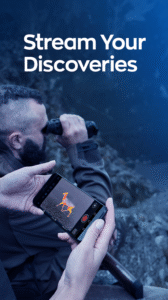
The free Stream Vision 2 mobile application is a powerful mobile client expanding the features and use scenarios of thermal imaging, digital night vision and multispectral electro-optic devices from PULSAR and YUKON. The application enriches the functionality of electro-optic devices by allowing them to work in combination with smartphones using Android or iOS platforms. Linking the electro-optic device via a Wi-Fi connection with a smartphone enables the smartphone to act as a file browser, viewfinder for direct unit-to-phone image streaming, remote control for changing unit’s settings on-the-go, firmware update platform, and offers many more functions. After registration in the application, the user gets free space in the Stream Vision 2 Cloud for storage of both photos and videos. Stream Vision 2 gives an opportunity to receive the latest news about technologies and happenings in the world of night vision and thermal imaging.
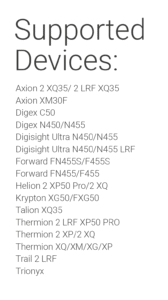
List of supported electro-optic devices:
www.pulsar-nv.com/glo/compatible-with-stream-vision-1-and-stream-vision-2/
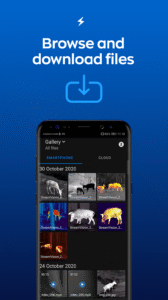
• Photo and video browser
Browse all photos and videos recorded in on your thermal or digital night vision device. Download the files to your smartphone and share them with your friends.
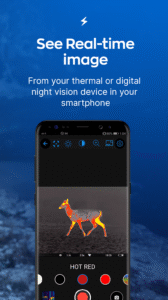
• Remote real-time image viewing
See a real-time image from your electro-optic device in the screen of your smartphone, allowing you to record footage and take photos.
• Remote control
Control and adjust the settings of your thermal imaging or digital night vision device in the Stream Vision 2 App. See all changes in real-time in the viewfinder and make necessary corrections on-the-go.
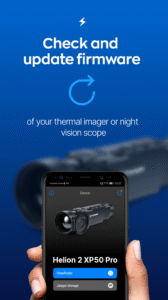
• Firmware update
Keep your Pulsar or Yukon optic device up-to-date and receive all the latest features and firmware enhancements. Use your Stream Vision 2 App to check and download the latest firmware for your device. Update your unit with downloaded firmware and enjoy new features.
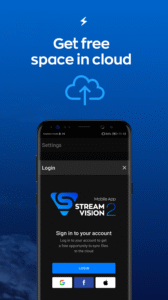
• Free space in the Stream Vision 2 Cloud Storage
Sign in with your Facebook or Google account to get free space in Stream Vision 2 Cloud for your best memorable outdoor videos and photos. Synchronise your files with the cloud and open them on any phone, tablet or in your PC browser.
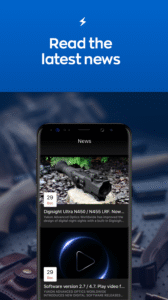
• Newsfeed
Stay updated and keep your hand on the pulse of the latest technology. Get the latest news from the night vision market together with important news from PULSAR and YUKON. Learn about the newest products before anyone else.
Note: Certain features of Stream Vision 2 application are available only when an observation device is connected to a smartphone via Wi-Fi.
List of supported electro-optic devices:
www.pulsar-nv.com/glo/compatible-with-stream-vision-1-and-stream-vision-2/
• Photo and video browser
Browse all photos and videos recorded in on your thermal or digital night vision device. Download the files to your smartphone and share them with your friends.
• Remote real-time image viewing
See a real-time image from your electro-optic device in the screen of your smartphone, allowing you to record footage and take photos.
• Remote control
Control and adjust the settings of your thermal imaging or digital night vision device in the Stream Vision 2 App. See all changes in real-time in the viewfinder and make necessary corrections on-the-go.
• Firmware update
Keep your Pulsar or Yukon optic device up-to-date and receive all the latest features and firmware enhancements. Use your Stream Vision 2 App to check and download the latest firmware for your device. Update your unit with downloaded firmware and enjoy new features.
• Free space in the Stream Vision 2 Cloud Storage
Sign in with your Facebook or Google account to get free space in Stream Vision 2 Cloud for your best memorable outdoor videos and photos. Synchronise your files with the cloud and open them on any phone, tablet or in your PC browser.
• Newsfeed
Stay updated and keep your hand on the pulse of the latest technology. Get the latest news from the night vision market together with important news from PULSAR and YUKON. Learn about the newest products before anyone else.
Note: Certain features of Stream Vision 2 application are available only when an observation device is connected to a smartphone via Wi-Fi.
Download Stream Vision 2 APK
Fast, free and safe download.
APK Permissions 28
- android.permission.ACCESS_ADSERVICES_AD_ID
- android.permission.ACCESS_ADSERVICES_ATTRIBUTION
- android.permission.ACCESS_ADSERVICES_CUSTOM_AUDIENCE
- android.permission.ACCESS_ADSERVICES_TOPICS
- android.permission.ACCESS_COARSE_LOCATION
- android.permission.ACCESS_FINE_LOCATION
- android.permission.ACCESS_NETWORK_STATE
- android.permission.ACCESS_WIFI_STATE
- android.permission.CHANGE_NETWORK_STATE
- android.permission.FOREGROUND_SERVICE
- android.permission.FOREGROUND_SERVICE_CONNECTED_DEVICE
- android.permission.INTERNET
- android.permission.POST_NOTIFICATIONS
- android.permission.READ_EXTERNAL_STORAGE
- android.permission.READ_MEDIA_IMAGES
- android.permission.READ_MEDIA_VIDEO
- android.permission.RECEIVE_BOOT_COMPLETED
- android.permission.RECORD_AUDIO
- android.permission.REORDER_TASKS
- android.permission.VIBRATE
- android.permission.WAKE_LOCK
- android.permission.WRITE_EXTERNAL_STORAGE
- by.orangesoft.ballisticcalculator.provider.vendor.VENDOR_ID
- com.google.android.c2dm.permission.RECEIVE
- com.google.android.finsky.permission.BIND_GET_INSTALL_REFERRER_SERVICE
- com.google.android.gms.permission.AD_ID
- com.google.android.providers.gsf.permission.READ_GSERVICES
- com.yukon.streamvision2.DYNAMIC_RECEIVER_NOT_EXPORTED_PERMISSION
APK Verified
The cryptographic signature guarantees that the file is safe to install and was not tampered with in any way.


Frequently Asked Questions about Stream Vision 2 APK
This is the universal variant — a single APK that contains native libraries for every CPU architecture. It installs on any Android device but is larger than per-architecture variants.
Yes — the APK's signature has been cryptographically verified against the publisher's signing key. The SHA-256 hash is shown in the File Information panel so you can independently confirm the file matches the original release.
Android 24 (API level 34) or newer. Older devices will refuse the install.
Install a free app like 'CPU-Z' or 'Droid Hardware Info' from the Play Store and look at the ABI / Instruction Set row. Most phones made after 2017 are arm64-v8a; if in doubt, download the universal variant.
All variants are functionally identical — same features, same version. They differ only in which CPU architectures the native code is compiled for, and (sometimes) which screen densities the included graphics target. Pick the one that matches your device for the smallest install size, or pick 'Universal' if you're unsure.