
Download WG Tunnel APK 3.9.5 arm64-v8a, armeabi-v7a, x86, x86_64 · Android 26+
Download APK
Verified Safe
This is the arm64-v8a, armeabi-v7a, x86, x86_64 build of WG Tunnel 3.9.5. Pick this build if your device's primary ABI matches.
File size: 33.2 MB • Min Android: 26 • Target Android: 35 • Version code: 39500 • Framework: Native (Java/Kotlin) • Permissions: 18
Screenshots
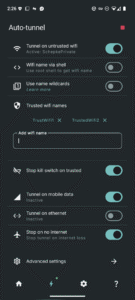
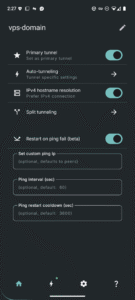
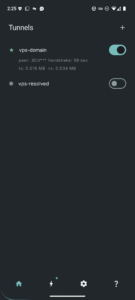
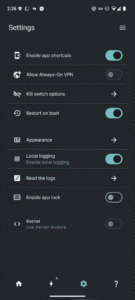
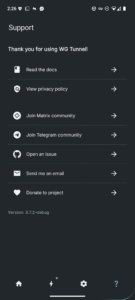
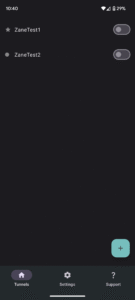
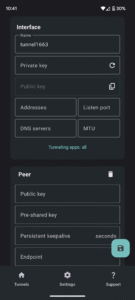
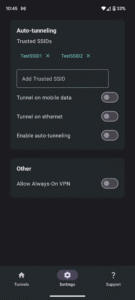
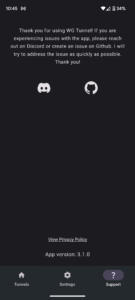
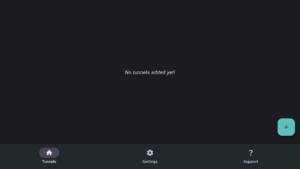
File Information
| Package Name | com.zaneschepke.wireguardautotunnel |
|---|---|
| Version Name | 3.9.5 |
| Version Code | 39500 |
| Architecture | arm64-v8a, armeabi-v7a, x86, x86_64 |
| Min Android Version | Android 26 (API 35) |
| Main Activity | com.zaneschepke.wireguardautotunnel.MainActivity |
| Framework | Native (Java/Kotlin) |
| File Size | 33.19 MB |
| Signature (SHA1) | 65A7DE22ED0ACCEA0FCDD754180760F53D0FBC0F |
| File Hash (SHA256) | 41598f4b11f37a7217182ba253dd0f3612f7448b1409268e0ea18b705dbf0c3e |
What's New
New in version 3.9.5
What's new:
- Fix for tunnel sort bug
- Improved location permissions flow
- Location permission detection and notifications
- Fix for AndroidTV apps detection for split tunneling
- Improved tunnel monitoring and reboot recovery
- Fix tunnel slow reconnect from sleep
What's new:
- Fix for tunnel sort bug
- Improved location permissions flow
- Location permission detection and notifications
- Fix for AndroidTV apps detection for split tunneling
- Improved tunnel monitoring and reboot recovery
- Fix tunnel slow reconnect from sleep
App Description
Features
- Add tunnels via .conf file, zip, manual entry, or QR code
- Auto connect to VPN based on Wi-Fi SSID, ethernet, or mobile data
- Split tunneling by application with search
- WireGuard support for kernel and userspace modes
- Amnezia support for userspace mode for DPI/censorship protection
- Always-On VPN support
- Export Amnezia and WireGuard tunnels to zip
- Quick tile support for VPN toggling
- Static shortcuts support for primary tunnel for automation integration
- Intent automation support for all tunnels
- Automatic service restart after reboot
- Battery preservation measures
Author:
Zane Schepke
License:
MIT License
Issue Tracker
Translation
Source Code
Changelog
Build Metadata
Reproducibility Status
- Add tunnels via .conf file, zip, manual entry, or QR code
- Auto connect to VPN based on Wi-Fi SSID, ethernet, or mobile data
- Split tunneling by application with search
- WireGuard support for kernel and userspace modes
- Amnezia support for userspace mode for DPI/censorship protection
- Always-On VPN support
- Export Amnezia and WireGuard tunnels to zip
- Quick tile support for VPN toggling
- Static shortcuts support for primary tunnel for automation integration
- Intent automation support for all tunnels
- Automatic service restart after reboot
- Battery preservation measures
Author:
Zane Schepke
License:
MIT License
Issue Tracker
Translation
Source Code
Changelog
Build Metadata
Reproducibility Status
Download WG Tunnel APK
Fast, free and safe download.
APK Permissions 18
- android.permission.ACCESS_BACKGROUND_LOCATION
- android.permission.ACCESS_COARSE_LOCATION
- android.permission.ACCESS_FINE_LOCATION
- android.permission.ACCESS_NETWORK_STATE
- android.permission.ACCESS_WIFI_STATE
- android.permission.CAMERA
- android.permission.FOREGROUND_SERVICE
- android.permission.FOREGROUND_SERVICE_SYSTEM_EXEMPTED
- android.permission.INTERNET
- android.permission.POST_NOTIFICATIONS
- android.permission.RECEIVE_BOOT_COMPLETED
- android.permission.REQUEST_IGNORE_BATTERY_OPTIMIZATIONS
- android.permission.SCHEDULE_EXACT_ALARM
- android.permission.USE_BIOMETRIC
- android.permission.USE_FINGERPRINT
- android.permission.WAKE_LOCK
- com.zaneschepke.wireguardautotunnel.DYNAMIC_RECEIVER_NOT_EXPORTED_PERMISSION
- moe.shizuku.manager.permission.API_V23
APK Verified
The cryptographic signature guarantees that the file is safe to install and was not tampered with in any way.


Frequently Asked Questions about WG Tunnel APK
This variant is built for devices that report `arm64-v8a, armeabi-v7a, x86, x86_64` as their primary ABI. If your device's CPU matches, this is the smallest, fastest version to install.
Yes — the APK's signature has been cryptographically verified against the publisher's signing key. The SHA-256 hash is shown in the File Information panel so you can independently confirm the file matches the original release.
Android 26 (API level 35) or newer. Older devices will refuse the install.
Install a free app like 'CPU-Z' or 'Droid Hardware Info' from the Play Store and look at the ABI / Instruction Set row. Most phones made after 2017 are arm64-v8a; if in doubt, download the universal variant.
All variants are functionally identical — same features, same version. They differ only in which CPU architectures the native code is compiled for, and (sometimes) which screen densities the included graphics target. Pick the one that matches your device for the smallest install size, or pick 'Universal' if you're unsure.