
This is the x86 build of Zello PTT Walkie Talkie 1.40. Intel-architecture builds are useful for Android emulators (BlueStacks, NoxPlayer, Android Studio AVD), Chromebooks running ARC, and the small number of Intel-CPU Android phones. Most physical Android phones should download the ARM variant instead.
File size: 2.6 MB • Min Android: 3 • Target Android: 16 • Version code: 42 • Framework: Native (Java/Kotlin) • Permissions: 15
Screenshots


File Information
| Package Name | com.loudtalks |
|---|---|
| Version Name | 1.40 |
| Version Code | 42 |
| Architecture | x86 |
| Min Android Version | Android 3 (API 16) |
| Main Activity | com.loudtalks.client.ui.App |
| Framework | Native (Java/Kotlin) |
| File Size | 2.57 MB |
| Signature (SHA1) | EE43B6559DFF2F9F199DB041FA9BF925BACF530E |
| File Hash (SHA256) | 084b3dadd34a49fad7ae980322967b1b2ef5f413cc969d97dd17b61eff32bca6 |
What's New
In this release, we fixed several small issues.
App Description
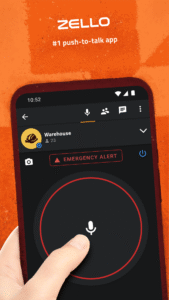
Turn your phone or tablet into a walkie talkie with this lightning fast free PTT (Push-To-Talk) radio app. Talk to your contacts privately or join public channels to engage in a hot debate.
Zello features:
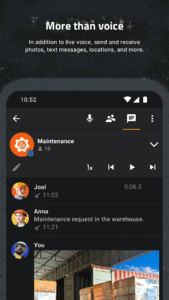
• Real-time streaming, high-quality voice
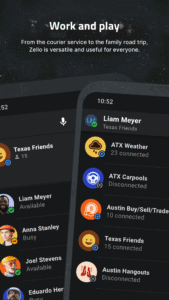
• Contacts availability and text status
• Public and private channels for up to 6000 users
• Option to map hardware PTT (Push-To-Talk) button
• Bluetooth headset support (selected phones)
• Voice history
• Call alert
• Images
• Push notifications
• Live location tracking (available with Zello Work service only)
• Works over WiFi, 2G, 3G, or 4G mobile data
Zello uses proprietary low-latency push-to-talk protocol and is not interoperable with Voxer, Sprint Direct Connect or AT&T Enhanced PTT. Zello Android client supports free public service, ZelloWork cloud service, and private Zello Enterprise Server.
We are working hard to improve the app so please expect frequent updates. If you have questions or issues send us an email at
support@zello.com
► Visit our website
zello.com/
to get Zello Walkie Talkie for your PC or different platform
► Connect with other Zello users on Facebook:
facebook.com/ZelloMe
► Follow us on Twitter:
twitter.com/zello
Zello features:
• Real-time streaming, high-quality voice
• Contacts availability and text status
• Public and private channels for up to 6000 users
• Option to map hardware PTT (Push-To-Talk) button
• Bluetooth headset support (selected phones)
• Voice history
• Call alert
• Images
• Push notifications
• Live location tracking (available with Zello Work service only)
• Works over WiFi, 2G, 3G, or 4G mobile data
Zello uses proprietary low-latency push-to-talk protocol and is not interoperable with Voxer, Sprint Direct Connect or AT&T Enhanced PTT. Zello Android client supports free public service, ZelloWork cloud service, and private Zello Enterprise Server.
We are working hard to improve the app so please expect frequent updates. If you have questions or issues send us an email at
support@zello.com
► Visit our website
zello.com/
to get Zello Walkie Talkie for your PC or different platform
► Connect with other Zello users on Facebook:
facebook.com/ZelloMe
► Follow us on Twitter:
twitter.com/zello
Download Zello PTT Walkie Talkie APK
Fast, free and safe download.
APK Permissions 15
- android.permission.ACCESS_NETWORK_STATE
- android.permission.ACCESS_WIFI_STATE
- android.permission.BLUETOOTH
- android.permission.BROADCAST_STICKY
- android.permission.INTERNET
- android.permission.MODIFY_AUDIO_SETTINGS
- android.permission.READ_CONTACTS
- android.permission.READ_PHONE_STATE
- android.permission.RECEIVE_BOOT_COMPLETED
- android.permission.RECORD_AUDIO
- android.permission.VIBRATE
- android.permission.WAKE_LOCK
- android.permission.WRITE_EXTERNAL_STORAGE
- com.google.android.c2dm.permission.RECEIVE
- com.loudtalks.permission.C2D_MESSAGE
APK Verified
The cryptographic signature guarantees that the file is safe to install and was not tampered with in any way.
Similar in Communication


Frequently Asked Questions about Zello PTT Walkie Talkie APK
This variant is built for 32-bit Intel (older Chromebooks, some Android emulators). If your device's CPU matches, this is the smallest, fastest version to install.
Yes — the APK's signature has been cryptographically verified against the publisher's signing key. The SHA-256 hash is shown in the File Information panel so you can independently confirm the file matches the original release.
Android 3 (API level 16) or newer. Older devices will refuse the install.
Install a free app like 'CPU-Z' or 'Droid Hardware Info' from the Play Store and look at the ABI / Instruction Set row. Most phones made after 2017 are arm64-v8a; if in doubt, download the universal variant.
All variants are functionally identical — same features, same version. They differ only in which CPU architectures the native code is compiled for, and (sometimes) which screen densities the included graphics target. Pick the one that matches your device for the smallest install size, or pick 'Universal' if you're unsure.