
Download ApowerMirror- Screen Mirroring APK 1.8.27 Universal · Android 21+
Download APK
Verified Safe
This is the universal build of ApowerMirror- Screen Mirroring 1.8.27. It contains native libraries for every CPU architecture (arm64-v8a, armeabi-v7a, x86, x86_64), so it installs on any Android device. The trade-off is size — it's larger than per-architecture variants. Pick this one if you're unsure which CPU your phone has, or if you plan to share the APK with multiple devices.
File size: 60.0 MB • Min Android: 21 • Target Android: 34 • Version code: 1938 • Framework: Native (Java/Kotlin) • Permissions: 40
Screenshots
File Information
| Package Name | com.apowersoft.mirror |
|---|---|
| Version Name | 1.8.27 |
| Version Code | 1938 |
| Architecture | Universal |
| Min Android Version | Android 21 (API 34) |
| Main Activity | com.apowersoft.mirror.ui.activity.WelcomeActivity |
| Framework | Native (Java/Kotlin) |
| File Size | 60.02 MB |
| Signature (SHA1) | 95797CB839A75DE0362C2E3E3D9C0B93815A050B |
| File Hash (SHA256) | cf410be2ee5351a6341a4890c4421b032225cae241ed530b1d2d079a11b45f25 |
What's New
1. The functional page has been completely revamped: simpler interaction and smoother screen mirroring experience.
2. Other issues optimization and repair
2. Other issues optimization and repair
App Description
ApowerMirror is a wireless screen mirroring app that can be used to cast Android phone to PC, Mac, Smart TV (TV box) with AUDIO.
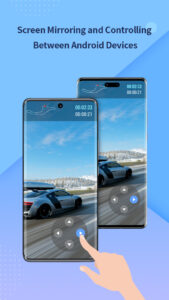
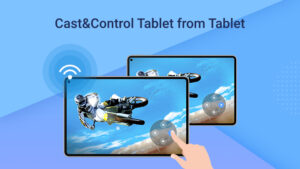
It allows you to mirror&control one Android device to another Android device freely, and you can remotely control Android from PC or Mac with your mouse and keyboard. Besides, streaming the mirrored screen to applications like OBS Studio or Zoom becomes easier.
The app needs to be used with the desktop program. Get ApowerMirror Desktop Program here:
www.apowersoft.com/phone-mirror
Key Features:
🏆
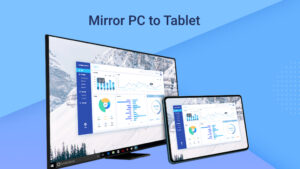
Mirror Android to PC and Vice Versa
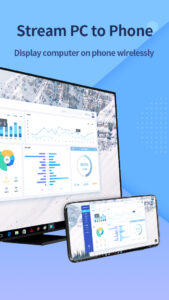
ApowerMirror allows you to cast Android to PC with audio. No need for an AUX cable, it can truly achieve audio and video synchronization while screen mirroring. Using this, you can freely stream videos, display apps, share meeting contents, or play Android games from PC or Mac in full-screen mode. Besides, you can display your PC screen on your phone and control it from your phone. With that, you can access all files on your computer and even use PC programs on your phone with no hassle.
🏆
Mirror&Control Phone from Phone
ApowerMirror is also a good screen mirroring app to mirror phone to phone or tablet. You can also share your screen with another phone using ApowerMirror to watch videos and movies with your friends and share your files with your audience easily.
🏆
Accessibility APl
ApowerMirror requires "Accessibility" permission to help you use the reverse control feature. This feature allows you to better help your family and friends debug their phones, and in corporate meetings, you can control your phone for demonstrations efficiently. Denying the accessibility permission will prevent you from using the reverse control-related functions, and will not affect the use of other features.
🏆
Cast Phone to TV
This screencasting app also does well in screen mirroring Android to TV. Whether you want to stream movies, watch videos, share photos or play games right on the big screen, it just takes a few taps to mirror your phone's display to your TV. It supports TVs like Sony TV, LG TV, Philips TV, Sharp TV, Hisense TV, Xiaomi MI TV, and other TVs running Android OS.
🏆
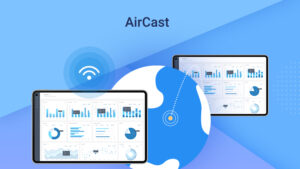
AirCast - Screen Mirror Between Different Networks
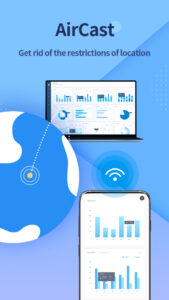
This advanced feature allows screen mirroring between devices that cannot be connected to the same network. If you use this feature, even if you are located in different places and on different network connections, you can share the screen with each other. This can be used to mirror phone to phone, cast phone to PC, and stream PC to phone.
🏆
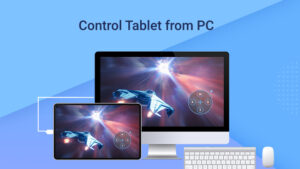
Control Android from PC/Mac
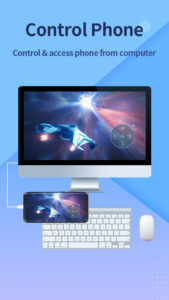
When screen mirroring Android to PC/Mac, you can take full control of the screen with your mouse and keyboard. Therefore, you are able to share PPT to your colleagues, enjoy movies on a bigger screen, or play phone games such as Mobile Legends, PUBG Mobile, Fortnite, Minecraft, and other games on the computer.
🏆
Multi-screens on One Computer
ApowerMirror supports mirroring 4 devices simultaneously without delay, which greatly improves the efficiency of your daily life. With this tool, you can enjoy different screens at the same time and stop switching from one app to another.
Suitable for Various Screen Mirroring Occasions:
*Personal use☑️
*Business meeting☑️
*Online class /Education☑️
*Live streaming for mobile games☑️
*Movies/Sports video mirroring☑️
*Presentation☑️
*Work from home☑️
……
👇
Supported Devices:
1. Windows & Mac
2. Android & iOS
3. Smart TV: Sony, Sharp, Philips, Hisense, Skyworth, Xiaomi, LG etc.
4. Devices with built-in DLNA or AirPlay protocol. Some projectors and car screens.
📢
Feedback:
1. Contact us at
support@apowersoft.com
2. Send feedback from "Settings" > "Feedback" on the ApowerMirror desktop program.
Official Website:
www.apowersoft.com/phone-mirror
Discord:
discord.gg/dK7y8Sf3Re
It allows you to mirror&control one Android device to another Android device freely, and you can remotely control Android from PC or Mac with your mouse and keyboard. Besides, streaming the mirrored screen to applications like OBS Studio or Zoom becomes easier.
The app needs to be used with the desktop program. Get ApowerMirror Desktop Program here:
www.apowersoft.com/phone-mirror
Key Features:
🏆
Mirror Android to PC and Vice Versa
ApowerMirror allows you to cast Android to PC with audio. No need for an AUX cable, it can truly achieve audio and video synchronization while screen mirroring. Using this, you can freely stream videos, display apps, share meeting contents, or play Android games from PC or Mac in full-screen mode. Besides, you can display your PC screen on your phone and control it from your phone. With that, you can access all files on your computer and even use PC programs on your phone with no hassle.
🏆
Mirror&Control Phone from Phone
ApowerMirror is also a good screen mirroring app to mirror phone to phone or tablet. You can also share your screen with another phone using ApowerMirror to watch videos and movies with your friends and share your files with your audience easily.
🏆
Accessibility APl
ApowerMirror requires "Accessibility" permission to help you use the reverse control feature. This feature allows you to better help your family and friends debug their phones, and in corporate meetings, you can control your phone for demonstrations efficiently. Denying the accessibility permission will prevent you from using the reverse control-related functions, and will not affect the use of other features.
🏆
Cast Phone to TV
This screencasting app also does well in screen mirroring Android to TV. Whether you want to stream movies, watch videos, share photos or play games right on the big screen, it just takes a few taps to mirror your phone's display to your TV. It supports TVs like Sony TV, LG TV, Philips TV, Sharp TV, Hisense TV, Xiaomi MI TV, and other TVs running Android OS.
🏆
AirCast - Screen Mirror Between Different Networks
This advanced feature allows screen mirroring between devices that cannot be connected to the same network. If you use this feature, even if you are located in different places and on different network connections, you can share the screen with each other. This can be used to mirror phone to phone, cast phone to PC, and stream PC to phone.
🏆
Control Android from PC/Mac
When screen mirroring Android to PC/Mac, you can take full control of the screen with your mouse and keyboard. Therefore, you are able to share PPT to your colleagues, enjoy movies on a bigger screen, or play phone games such as Mobile Legends, PUBG Mobile, Fortnite, Minecraft, and other games on the computer.
🏆
Multi-screens on One Computer
ApowerMirror supports mirroring 4 devices simultaneously without delay, which greatly improves the efficiency of your daily life. With this tool, you can enjoy different screens at the same time and stop switching from one app to another.
Suitable for Various Screen Mirroring Occasions:
*Personal use☑️
*Business meeting☑️
*Online class /Education☑️
*Live streaming for mobile games☑️
*Movies/Sports video mirroring☑️
*Presentation☑️
*Work from home☑️
……
👇
Supported Devices:
1. Windows & Mac
2. Android & iOS
3. Smart TV: Sony, Sharp, Philips, Hisense, Skyworth, Xiaomi, LG etc.
4. Devices with built-in DLNA or AirPlay protocol. Some projectors and car screens.
📢
Feedback:
1. Contact us at
support@apowersoft.com
2. Send feedback from "Settings" > "Feedback" on the ApowerMirror desktop program.
Official Website:
www.apowersoft.com/phone-mirror
Discord:
discord.gg/dK7y8Sf3Re
Download ApowerMirror- Screen Mirroring APK
Fast, free and safe download.
APK Permissions 40
- android.permission.ACCESS_FINE_LOCATION
- android.permission.ACCESS_NETWORK_STATE
- android.permission.ACCESS_WIFI_STATE
- android.permission.CAMERA
- android.permission.CHANGE_NETWORK_STATE
- android.permission.CHANGE_WIFI_MULTICAST_STATE
- android.permission.CHANGE_WIFI_STATE
- android.permission.DEVICE_POWER
- android.permission.DISABLE_KEYGUARD
- android.permission.FLASHLIGHT
- android.permission.FOREGROUND_SERVICE
- android.permission.FOREGROUND_SERVICE_CONNECTED_DEVICE
- android.permission.FOREGROUND_SERVICE_MEDIA_PROJECTION
- android.permission.FOREGROUND_SERVICE_MICROPHONE
- android.permission.INTERNET
- android.permission.MANAGE_EXTERNAL_STORAGE
- android.permission.MODIFY_AUDIO_SETTINGS
- android.permission.POST_NOTIFICATIONS
- android.permission.READ_EXTERNAL_STORAGE
- android.permission.READ_INTERNAL_STORAGE
- android.permission.READ_MEDIA_AUDIO
- android.permission.READ_MEDIA_IMAGES
- android.permission.READ_MEDIA_VIDEO
- android.permission.READ_PHONE_STATE
- android.permission.RECORD_AUDIO
- android.permission.REQUEST_IGNORE_BATTERY_OPTIMIZATIONS
- android.permission.SYSTEM_ALERT_WINDOW
- android.permission.SYSTEM_OVERLAY_WINDOW
- android.permission.VIBRATE
- android.permission.WAKE_LOCK
- android.permission.WIFI
- android.permission.WRITE_EXTERNAL_STORAGE
- android.permission.WRITE_INTERNAL_STORAGE
- android.permission.WRITE_SECURE_SETTINGS
- com.android.launcher.permission.INSTALL_SHORTCUT
- com.android.vending.BILLING
- com.apowersoft.mirror.DYNAMIC_RECEIVER_NOT_EXPORTED_PERMISSION
- com.asus.msa.SupplementaryDID.ACCESS
- com.google.android.finsky.permission.BIND_GET_INSTALL_REFERRER_SERVICE
- freemme.permission.msa
APK Verified
The cryptographic signature guarantees that the file is safe to install and was not tampered with in any way.
Similar in Tools


Frequently Asked Questions about ApowerMirror- Screen Mirroring APK
This is the universal variant — a single APK that contains native libraries for every CPU architecture. It installs on any Android device but is larger than per-architecture variants.
Yes — the APK's signature has been cryptographically verified against the publisher's signing key. The SHA-256 hash is shown in the File Information panel so you can independently confirm the file matches the original release.
Android 21 (API level 34) or newer. Older devices will refuse the install.
Install a free app like 'CPU-Z' or 'Droid Hardware Info' from the Play Store and look at the ABI / Instruction Set row. Most phones made after 2017 are arm64-v8a; if in doubt, download the universal variant.
All variants are functionally identical — same features, same version. They differ only in which CPU architectures the native code is compiled for, and (sometimes) which screen densities the included graphics target. Pick the one that matches your device for the smallest install size, or pick 'Universal' if you're unsure.