
Screenshots
File Information
| Package Name | com.artpoldev.kidsee |
|---|---|
| Version Name | 8.4 |
| Version Code | 123 |
| Architecture | Universal |
| Min Android Version | Android 24 (API 36) |
| Main Activity | com.artpoldev.kidsee.screen.MainActivity |
| Framework | Native (Java/Kotlin) |
| File Size | 48.49 MB |
| Signature (SHA1) | CA4F9FED4E3D353D4A52D03331C8554F70E33154 |
| File Hash (SHA256) | 554f53f1f5ca764e00af07500a7e0942033f61714956a555211641197136ef6d |
What's New
Bug fixes, minor improvements, and more.
App Description
Kidsee Parental Control – Family Safety, Screen Time & GPS Tracking
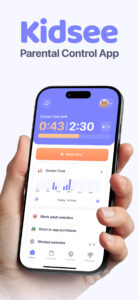
Kidsee is a powerful parental control solution that helps families build healthy screen habits, manage app usage, and stay connected with their kids.
With flexible screen time limits, instant app blocking, and real-time GPS tracking, Kidsee empowers parents to support digital wellbeing while keeping their child safe.
Control screen time & apps remotely
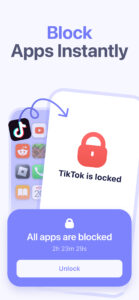
✔ Instantly lock apps on your child's phone when needed
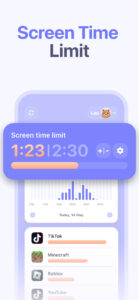
✔ Set daily time limits for screen use or specific apps
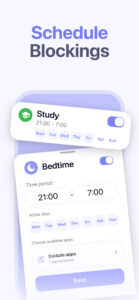
✔ Create custom schedules by day of the week – for school, bedtime, or weekends
✔ Block games, social media, or any distracting apps
✔ Exclude useful or educational apps from limits
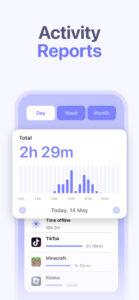
✔ Track app usage by hour and day
✔ Supports Android and iPhone / iPad child devices
GPS tracker & phone monitor
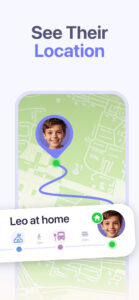
✔ See your child's real-time GPS location
✔ Check location history to know where your child has been
✔ View battery level on the child's smartphone – avoid lost connection
✔ Monitor phone usage from the parent's device anytime
Keep your child safe online
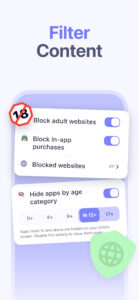
✔ Automatically block 18+ and adult content
✔ Add custom websites to block manually
✔ Block in-app purchases and prevent accidental payments
✔ Promote digital wellbeing and reduce screen overuse
Made for families
✔ Manage multiple kids from one parent account
✔ Control up to 10 child devices
✔ Easy to install and manage from the parent's phone
✔ Works on Android phones, tablets, and iOS devices
Why parents choose Kidsee
✔ All-in-one family solution to guide kids, support healthy screen habits, and keep them safe
✔ Helps prevent phone addiction and improve focus
✔ Gives parents confidence, control, and peace of mind
Start with a 3 day free trial
Explore all premium features with no obligation.
No ads. Just full control for your family.
Need support? Reach us at
support@kidsee.app
—
Important info:
– Requires internet connection
– Uses AccessibilityService API to block apps and monitor screen time
– GPS features require location permission on child's device
– Kidsee does not share data with third parties
Learn more at:
kidsee.app
Kidsee is a powerful parental control solution that helps families build healthy screen habits, manage app usage, and stay connected with their kids.
With flexible screen time limits, instant app blocking, and real-time GPS tracking, Kidsee empowers parents to support digital wellbeing while keeping their child safe.
Control screen time & apps remotely
✔ Instantly lock apps on your child's phone when needed
✔ Set daily time limits for screen use or specific apps
✔ Create custom schedules by day of the week – for school, bedtime, or weekends
✔ Block games, social media, or any distracting apps
✔ Exclude useful or educational apps from limits
✔ Track app usage by hour and day
✔ Supports Android and iPhone / iPad child devices
GPS tracker & phone monitor
✔ See your child's real-time GPS location
✔ Check location history to know where your child has been
✔ View battery level on the child's smartphone – avoid lost connection
✔ Monitor phone usage from the parent's device anytime
Keep your child safe online
✔ Automatically block 18+ and adult content
✔ Add custom websites to block manually
✔ Block in-app purchases and prevent accidental payments
✔ Promote digital wellbeing and reduce screen overuse
Made for families
✔ Manage multiple kids from one parent account
✔ Control up to 10 child devices
✔ Easy to install and manage from the parent's phone
✔ Works on Android phones, tablets, and iOS devices
Why parents choose Kidsee
✔ All-in-one family solution to guide kids, support healthy screen habits, and keep them safe
✔ Helps prevent phone addiction and improve focus
✔ Gives parents confidence, control, and peace of mind
Start with a 3 day free trial
Explore all premium features with no obligation.
No ads. Just full control for your family.
Need support? Reach us at
support@kidsee.app
—
Important info:
– Requires internet connection
– Uses AccessibilityService API to block apps and monitor screen time
– GPS features require location permission on child's device
– Kidsee does not share data with third parties
Learn more at:
kidsee.app
Download Parental Control App - Kidsee v7.2 APK
Fast, free and safe download.
APK Permissions 25
- android.permission.ACCESS_ADSERVICES_AD_ID
- android.permission.ACCESS_ADSERVICES_ATTRIBUTION
- android.permission.ACCESS_BACKGROUND_LOCATION
- android.permission.ACCESS_COARSE_LOCATION
- android.permission.ACCESS_FINE_LOCATION
- android.permission.ACCESS_NETWORK_STATE
- android.permission.ACCESS_WIFI_STATE
- android.permission.FOREGROUND_SERVICE
- android.permission.INTERNET
- android.permission.PACKAGE_USAGE_STATS
- android.permission.POST_NOTIFICATIONS
- android.permission.QUERY_ALL_PACKAGES
- android.permission.READ_EXTERNAL_STORAGE
- android.permission.RECEIVE_BOOT_COMPLETED
- android.permission.SYSTEM_ALERT_WINDOW
- android.permission.WAKE_LOCK
- android.permission.WRITE_EXTERNAL_STORAGE
- com.android.vending.BILLING
- com.android.vending.CHECK_LICENSE
- com.artpoldev.kidsee.DYNAMIC_RECEIVER_NOT_EXPORTED_PERMISSION
- com.google.android.finsky.permission.BIND_GET_INSTALL_REFERRER_SERVICE
- com.google.android.gms.permission.AD_ID
- com.google.android.providers.gsf.permission.READ_GSERVICES
- com.huawei.appmarket.service.commondata.permission.GET_COMMON_DATA
- com.samsung.android.mapsagent.permission.READ_APP_INFO
APK Verified
The cryptographic signature guarantees that the file is safe to install and was not tampered with in any way.


