
This is the universal build of CapCut - Video Editor 14.7.0. It contains native libraries for every CPU architecture (arm64-v8a, armeabi-v7a, x86, x86_64), so it installs on any Android device. The trade-off is size — it's larger than per-architecture variants. Pick this one if you're unsure which CPU your phone has, or if you plan to share the APK with multiple devices.
File size: 262.9 MB • Min Android: 21 • Target Android: 34 • Version code: 14701600 • Framework: Native (Java/Kotlin) • Permissions: 55
Screenshots
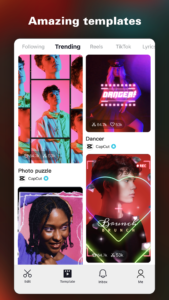
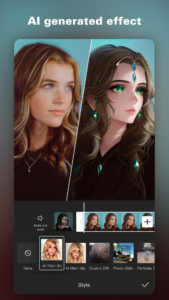

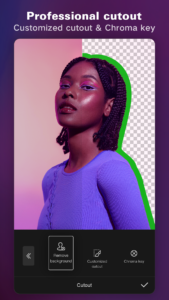
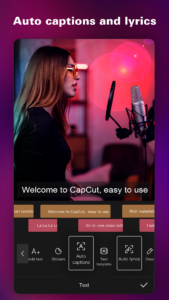



File Information
| Package Name | com.lemon.lvoverseas |
|---|---|
| Version Name | 14.7.0 |
| Version Code | 14701600 |
| Architecture | Universal |
| Min Android Version | Android 21 (API 34) |
| Main Activity | com.vega.main.MainActivity |
| Framework | Native (Java/Kotlin) |
| File Size | 262.91 MB |
| Signature (SHA1) | 52CD573EF0AAFF4C188A726D37401A73DF7EB06D |
| File Hash (SHA256) | 56b8da3096447fc6de57b2a217bda4993a9e3206ccefcc6234aad41ae91a1386 |
What's New
We thank you for supporting CapCut and look forward to creating beautiful moments together."
App Description
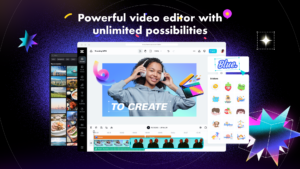
Offering both app and online version, CapCut satisfies all video production needs. Beyond fundamental video editing, styling and music, it includes advanced features like keyframe animation, buttery smooth slow-motion, smart stabilization, cloud storage, and multi-member editing - all free of charge.
Create stunning, easy to share videos with CapCut's unique features: trending styles, auto captions, text-to-speech, motion tracking, and background remover. Reveal your uniqueness and become a hit on TikTok, YouTube, Instagram, WhatsApp, and Facebook!
FEATURES(available on both app and online versions):
Basic Video Editing
- Trim, split, and merge videos with ease
- Control video speed, rewind, or play in reverse
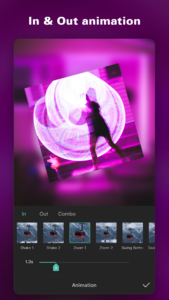
- Infuse life into video clips with dynamic transitions and effects
- Access unlimited creative video and audio assets
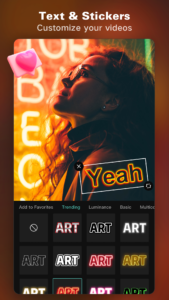
- Personalize videos with diverse fonts, styles, and text templates
Advanced Video Editing
- Animate videos with keyframe animation
- Achieve smooth slow-motion effects for your videos
- Use Chroma key to eliminate specific video colors
- Layer and splice videos using Picture-in-Picture (PIP)
- Ensure smooth, steady footage with smart stabilization
Special Features
- Auto captions: Automate video subtitles with speech recognition
- Background removal: Automatically exclude people from videos
- Choose from thousands of templates for quick video output
Trending Effects & Filters
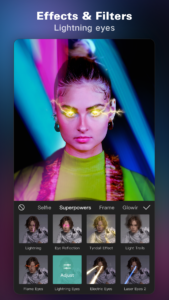
- Apply hundreds of trending effects to your videos, including Glitch, Blur, 3D, and more
- Enhance your videos with cinematic filters and color adjustments
Music & Sound Effects
- Enrich videos with a vast library of music clips and sound effects
- Sync your favorite TikTok music by signing in
- Extract audio from video clips and recordings
Effortless Sharing & Collaboration
- Chromebook users can edit videos seamlessly with the online version, or use the app for editing on-the-go
- Export custom resolution videos, including 4K 60fps and smart HDR
- Adjust format for easy video sharing on TikTok and other platforms
- Enable online multi-member editing for collaborative video projects
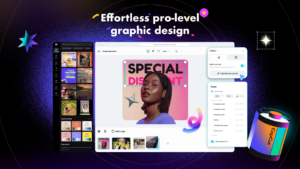
The Graphic Design Tool
- Edit business visuals, commercial graphics, and social media thumbnails with ease
- Leverage pro-level templates and AI-powered features for graphic design purposes
Cloud Storage
- Easy backup and storage for various video and audio formats
- Upgrade your plan for additional storage space, as needed
CapCut is a free, all-in-one video editing app. It has everything you need to create stunning and high-quality videos. Offering both app and online version, CapCut satisfies all video production needs. Beyond fundamental editing, styling and music, it includes advanced features like keyframe animation, buttery smooth slow-motion, chroma key, Picture-in-Picture (PIP), and stabilization - all free of charge.
Any questions about CapCut (Video Maker with Music & Video Editing app)? Please contact us at
capcut.support@bytedance.com
.
Facebook:
CapCut
Instagram:
CapCut
YouTube:
CapCut
TikTok:
CapCut
Fast, free and safe download.
APK Permissions 55
- android.permission.ACCESS_ADSERVICES_AD_ID
- android.permission.ACCESS_ADSERVICES_ATTRIBUTION
- android.permission.ACCESS_ADSERVICES_TOPICS
- android.permission.ACCESS_MEDIA_LOCATION
- android.permission.ACCESS_NETWORK_STATE
- android.permission.ACCESS_WIFI_STATE
- android.permission.CAMERA
- android.permission.CHANGE_NETWORK_STATE
- android.permission.FOREGROUND_SERVICE
- android.permission.FOREGROUND_SERVICE_DATA_SYNC
- android.permission.HIGH_SAMPLING_RATE_SENSORS
- android.permission.INTERNET
- android.permission.KILL_BACKGROUND_PROCESSES
- android.permission.POST_NOTIFICATIONS
- android.permission.READ_APP_BADGE
- android.permission.READ_EXTERNAL_STORAGE
- android.permission.READ_MEDIA_AUDIO
- android.permission.READ_MEDIA_IMAGES
- android.permission.READ_MEDIA_VIDEO
- android.permission.READ_MEDIA_VISUAL_USER_SELECTED
- android.permission.RECORD_AUDIO
- android.permission.UPDATE_APP_BADGE
- android.permission.USE_CREDENTIALS
- android.permission.VIBRATE
- android.permission.WAKE_LOCK
- android.permission.WRITE_EXTERNAL_STORAGE
- android.permission.WRITE_SYNC_SETTINGS
- com.anddoes.launcher.permission.UPDATE_COUNT
- com.android.launcher.permission.INSTALL_SHORTCUT
- com.android.launcher.permission.READ_SETTINGS
- com.android.launcher.permission.UNINSTALL_SHORTCUT
- com.android.launcher.permission.WRITE_SETTINGS
- com.android.vending.BILLING
- com.applovin.array.apphub.permission.BIND_APPHUB_SERVICE
- com.google.android.c2dm.permission.RECEIVE
- com.google.android.finsky.permission.BIND_GET_INSTALL_REFERRER_SERVICE
- com.google.android.gms.permission.AD_ID
- com.hihonor.android.launcher.permission.CHANGE_BADGE
- com.htc.launcher.permission.READ_SETTINGS
- com.htc.launcher.permission.UPDATE_SHORTCUT
- com.huawei.android.launcher.permission.CHANGE_BADGE
- com.huawei.android.launcher.permission.READ_SETTINGS
- com.huawei.android.launcher.permission.WRITE_SETTINGS
- com.lemon.lvoverseas.DYNAMIC_RECEIVER_NOT_EXPORTED_PERMISSION
- com.majeur.launcher.permission.UPDATE_BADGE
- com.oppo.launcher.permission.READ_SETTINGS
- com.oppo.launcher.permission.WRITE_SETTINGS
- com.sec.android.provider.badge.permission.READ
- com.sec.android.provider.badge.permission.WRITE
- com.sonyericsson.home.permission.BROADCAST_BADGE
- com.sonymobile.home.permission.PROVIDER_INSERT_BADGE
- com.vivo.abe.permission.launcher.notification.num
- com.vivo.notification.permission.BADGE_ICON
- me.everything.badger.permission.BADGE_COUNT_READ
- me.everything.badger.permission.BADGE_COUNT_WRITE
APK Verified
The cryptographic signature guarantees that the file is safe to install and was not tampered with in any way.
Other Variants
This release has multiple variants (e.g. diff architectures).
arm64-v8a, armeabi-v7a arm64-v8a, armeabi-v7a arm64-v8a, armeabi-v7a arm64-v8a, armeabi-v7a arm64-v8a, armeabi-v7a Universal Universal Universal Universal


