
This is the arm64-v8a build of ColorOS Clock 15.10.7 — the modern 64-bit ARM build that runs on virtually every Android phone released since 2017. It's smaller and faster than the universal variant because Android only loads the native code your CPU actually needs. If your phone is from the last 8 years, this is the right pick.
File size: 36.1 MB • Min Android: 28 • Target Android: 35 • Version code: 15010007 • Framework: Native (Java/Kotlin) • Permissions: 58
Screenshots
File Information
| Package Name | com.coloros.alarmclock |
|---|---|
| Version Name | 15.10.7 |
| Version Code | 15010007 |
| Architecture | arm64-v8a |
| Min Android Version | Android 28 (API 35) |
| Main Activity | com.oplus.alarmclock.AlarmClock |
| Framework | Native (Java/Kotlin) |
| File Size | 36.11 MB |
| Signature (SHA1) | 16ECBD5BFA0C9601D5D469DC2AE49939C5406CFC |
| File Hash (SHA256) | 52c242dc8bee731688f48af80a175f2b2032f1a6ae43bba617532c6852aebdfb |
What's New
Fixes some known issues.
App Description
The Clock app helps you manage your time with alarms, world clock, stopwatch, and timers.
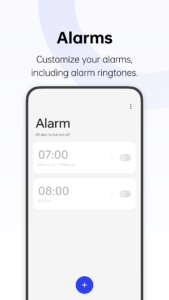
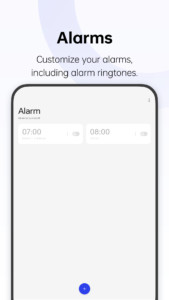
- You can customize alarm settings, including ringtones.
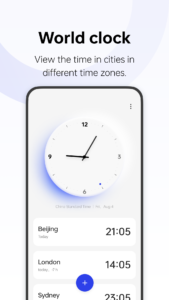
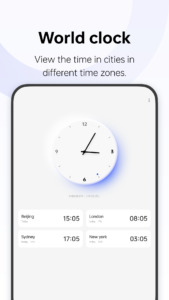
- Add cities in different time zones to view local times at a glance.
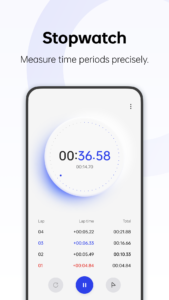
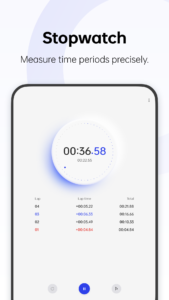
- The stopwatch helps you precisely measure time periods.
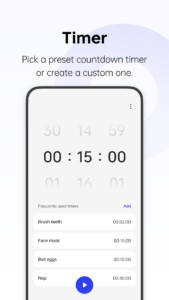
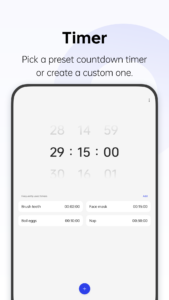
- Preset timers for some daily tasks are provided. You can also create custom timers.
- You can customize alarm settings, including ringtones.
- Add cities in different time zones to view local times at a glance.
- The stopwatch helps you precisely measure time periods.
- Preset timers for some daily tasks are provided. You can also create custom timers.
Download ColorOS Clock APK
Fast, free and safe download.
APK Permissions 58
- android.permission.ACCESS_KEYGUARD_SECURE_STORAGE
- android.permission.ACCESS_NETWORK_STATE
- android.permission.ACCESS_WIFI_STATE
- android.permission.EXPAND_STATUS_BAR
- android.permission.FOREGROUND_SERVICE
- android.permission.FOREGROUND_SERVICE_MEDIA_PLAYBACK
- android.permission.INJECT_EVENTS
- android.permission.INTERACT_ACROSS_USERS
- android.permission.INTERACT_ACROSS_USERS_FULL
- android.permission.INTERNAL_SYSTEM_WINDOW
- android.permission.INTERNET
- android.permission.MANAGE_USERS
- android.permission.POST_NOTIFICATIONS
- android.permission.READ_EXTERNAL_STORAGE
- android.permission.READ_MEDIA_AUDIO
- android.permission.RECEIVE_BOOT_COMPLETED
- android.permission.SCHEDULE_EXACT_ALARM
- android.permission.STATUS_BAR
- android.permission.STATUS_BAR_SERVICE
- android.permission.STOP_APP_SWITCHES
- android.permission.SYSTEM_ALERT_WINDOW
- android.permission.TURN_SCREEN_ON
- android.permission.USE_EXACT_ALARM
- android.permission.VIBRATE
- android.permission.WAKE_LOCK
- android.permission.WRITE_SECURE_SETTINGS
- android.permission.WRITE_SETTINGS
- com.android.launcher.permission.READ_SETTINGS
- com.android.launcher.permission.WRITE_SETTINGS
- com.coloros.alarmclock.DYNAMIC_RECEIVER_NOT_EXPORTED_PERMISSION
- com.coloros.alarmclock.permission.ACCESS_CLOCK_RECEIVER_PLATFORM
- com.oplus.alarmclock.permission.ACCESS_CLOCK_RECEIVER_PLATFORM
- com.oplus.alarmclock.permission.DATA_BACKUP_SAFE
- com.oplus.flashback.permission.FLASH_VIEWS_SERVICE
- com.oplus.metis.factdata.permission.DATABASE
- com.oplus.permission.safe.AI_APP
- com.oplus.permission.safe.ASSISTANT
- com.oplus.permission.safe.LOG
- com.oplus.permission.safe.PROTECT
- com.oplus.permission.safe.SAFE_MANAGER
- com.oplus.permission.safe.SAU
- com.oplus.permission.safe.SECURITY
- com.oplus.permission.safe.SENSOR
- com.oplus.permission.safe.SETTINGS
- com.oplus.permission.safe.WINDOW
- com.oplus.speechassist.permission.SPEECH_SERVICE
- com.oppo.launcher.permission.READ_SETTINGS
- com.oppo.launcher.permission.WRITE_SETTINGS
- com.oppo.permission.safe.IOT
- com.oppo.permission.safe.PRIVATE
- com.oppo.permission.safe.SAFE_MANAGER
- com.oppo.permission.safe.SAU
- com.oppo.permission.safe.SECURITY
- com.oppo.speechassist.permission.SPEECH_SERVICE
- heytap.speechassist.permission.ACTIVATE_SPEECH_ASSIST
- oplus.permission.OPLUS_COMPONENT_SAFE
- oplus.speechassist.permission.ACTIVATE_SPEECH_ASSIST
- oppo.permission.OPPO_COMPONENT_SAFE
APK Verified
The cryptographic signature guarantees that the file is safe to install and was not tampered with in any way.
Similar in Tools


Frequently Asked Questions about ColorOS Clock APK
This variant is built for 64-bit ARM (most Android phones made since 2017). If your device's CPU matches, this is the smallest, fastest version to install.
Yes — the APK's signature has been cryptographically verified against the publisher's signing key. The SHA-256 hash is shown in the File Information panel so you can independently confirm the file matches the original release.
Android 28 (API level 35) or newer. Older devices will refuse the install.
Install a free app like 'CPU-Z' or 'Droid Hardware Info' from the Play Store and look at the ABI / Instruction Set row. Most phones made after 2017 are arm64-v8a; if in doubt, download the universal variant.
All variants are functionally identical — same features, same version. They differ only in which CPU architectures the native code is compiled for, and (sometimes) which screen densities the included graphics target. Pick the one that matches your device for the smallest install size, or pick 'Universal' if you're unsure.