
This is the universal build of Xfinity 5.58.0-4. It contains native libraries for every CPU architecture (arm64-v8a, armeabi-v7a, x86, x86_64), so it installs on any Android device. The trade-off is size — it's larger than per-architecture variants. Pick this one if you're unsure which CPU your phone has, or if you plan to share the APK with multiple devices.
File size: 312.6 MB • Min Android: 29 • Target Android: 35 • Version code: 55800004 • Framework: Native (Java/Kotlin) • Permissions: 34
Screenshots
File Information
| Package Name | com.xfinity.digitalhome |
|---|---|
| Version Name | 5.58.0-4 |
| Version Code | 55800004 |
| Architecture | Universal |
| Min Android Version | Android 29 (API 35) |
| Main Activity | com.xfinity.digitalhome.features.launch.splash.SplashActivity |
| Framework | Native (Java/Kotlin) |
| File Size | 312.60 MB |
| Signature (SHA1) | BFBCC405721426B741022A5B864CDEBBD9772DFE |
| File Hash (SHA256) | d700956be4d9b83c2271b6c7d2c468a9a5fca4d0f27ddf2b145650106cba8d4f |
What's New
The Xfinity app is always improving.
This update eliminates bugs and reduces errors for the best experience.
This update eliminates bugs and reduces errors for the best experience.
App Description
Your Xfinity experience, enhanced.
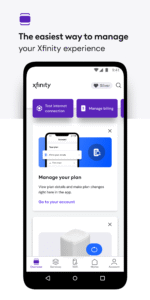
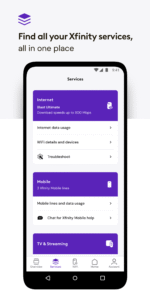
Easily manage all your services in one place with the Xfinity app. Plus discover the power of NOW.
NOW is a simple new way to get internet and mobile. It’s just what you want, and nothing you don’t. With all-in monthly pricing. Backed by Xfinity.
Xfinity customers also get:
• 24/7 real-time support anytime you need it.
• Tools to help you seamlessly activate your equipment and test your internet speed.
• Xfinity Rewards. Enjoy special perks, unique experiences, and product benefits just for being a customer.
Customers who rent our equipment get even more:
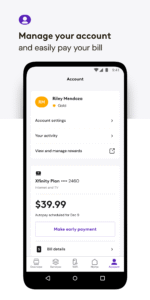
• Everything you need to manage your account, all in one place — pay your bill, view your plan details, change or upgrade your services, and more.
• Personalized tools and tips to help improve WiFi performance.
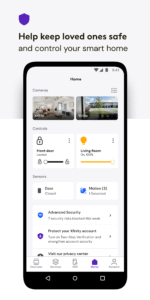
• Advanced Security to protect your devices and help keep loved ones safe online.
• Advanced Security on the go provides safe browsing and data protection to your mobile device whenever you’re connected to an unsecured WiFi network away from home. When you enable this feature, the app will occasionally run a VPN Service. The app will ask for additional runtime permissions for this feature.
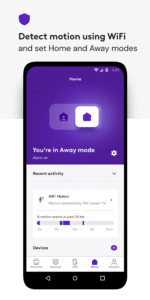
• Parental controls so you can set family-safe browsing and pause WiFi to any connected device.
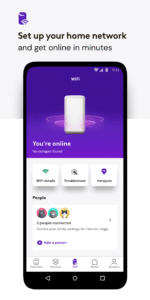
• Ultimate control with tools to help you set up your WiFi, assign user profiles, and get help improving the performance of every connected device.
Getting started is simple. All you need is your Xfinity ID and the password that you set up when you signed up for Xfinity.
Need help signing in?
• If you don’t have an Xfinity ID yet, create one here: xfinity.com/getstarted
• Look up your existing Xfinity ID: xfinity.com/id
• Or reset your Xfinity password: xfinity.com/password
Learn more about your options related to ‘California Civil Code §1798.135: Do Not Sell My Info’ at xfinity.com/privacy/manage-preference
Easily manage all your services in one place with the Xfinity app. Plus discover the power of NOW.
NOW is a simple new way to get internet and mobile. It’s just what you want, and nothing you don’t. With all-in monthly pricing. Backed by Xfinity.
Xfinity customers also get:
• 24/7 real-time support anytime you need it.
• Tools to help you seamlessly activate your equipment and test your internet speed.
• Xfinity Rewards. Enjoy special perks, unique experiences, and product benefits just for being a customer.
Customers who rent our equipment get even more:
• Everything you need to manage your account, all in one place — pay your bill, view your plan details, change or upgrade your services, and more.
• Personalized tools and tips to help improve WiFi performance.
• Advanced Security to protect your devices and help keep loved ones safe online.
• Advanced Security on the go provides safe browsing and data protection to your mobile device whenever you’re connected to an unsecured WiFi network away from home. When you enable this feature, the app will occasionally run a VPN Service. The app will ask for additional runtime permissions for this feature.
• Parental controls so you can set family-safe browsing and pause WiFi to any connected device.
• Ultimate control with tools to help you set up your WiFi, assign user profiles, and get help improving the performance of every connected device.
Getting started is simple. All you need is your Xfinity ID and the password that you set up when you signed up for Xfinity.
Need help signing in?
• If you don’t have an Xfinity ID yet, create one here: xfinity.com/getstarted
• Look up your existing Xfinity ID: xfinity.com/id
• Or reset your Xfinity password: xfinity.com/password
Learn more about your options related to ‘California Civil Code §1798.135: Do Not Sell My Info’ at xfinity.com/privacy/manage-preference
Download Xfinity APK
Fast, free and safe download.
APK Permissions 34
- android.permission.ACCESS_ADSERVICES_AD_ID
- android.permission.ACCESS_BACKGROUND_LOCATION
- android.permission.ACCESS_COARSE_LOCATION
- android.permission.ACCESS_FINE_LOCATION
- android.permission.ACCESS_NETWORK_STATE
- android.permission.ACCESS_WIFI_STATE
- android.permission.BLUETOOTH
- android.permission.BLUETOOTH_ADMIN
- android.permission.BLUETOOTH_CONNECT
- android.permission.BLUETOOTH_SCAN
- android.permission.BLUETOTH_SCAN
- android.permission.CAMERA
- android.permission.CHANGE_NETWORK_STATE
- android.permission.CHANGE_WIFI_MULTICAST_STATE
- android.permission.CHANGE_WIFI_STATE
- android.permission.FOREGROUND_SERVICE
- android.permission.FOREGROUND_SERVICE_SYSTEM_EXEMPTED
- android.permission.HIGH_SAMPLING_RATE_SENSORS
- android.permission.INTERNET
- android.permission.MODIFY_AUDIO_SETTINGS
- android.permission.POST_NOTIFICATIONS
- android.permission.READ_EXTERNAL_STORAGE
- android.permission.READ_PHONE_STATE
- android.permission.RECEIVE_BOOT_COMPLETED
- android.permission.RECORD_AUDIO
- android.permission.REORDER_TASKS
- android.permission.USE_BIOMETRIC
- android.permission.USE_FINGERPRINT
- android.permission.VIBRATE
- android.permission.WAKE_LOCK
- android.permission.WRITE_EXTERNAL_STORAGE
- com.google.android.c2dm.permission.RECEIVE
- com.google.android.finsky.permission.BIND_GET_INSTALL_REFERRER_SERVICE
- com.xfinity.digitalhome.DYNAMIC_RECEIVER_NOT_EXPORTED_PERMISSION
APK Verified
The cryptographic signature guarantees that the file is safe to install and was not tampered with in any way.
Similar in Productivity


Frequently Asked Questions about Xfinity APK
This is the universal variant — a single APK that contains native libraries for every CPU architecture. It installs on any Android device but is larger than per-architecture variants.
Yes — the APK's signature has been cryptographically verified against the publisher's signing key. The SHA-256 hash is shown in the File Information panel so you can independently confirm the file matches the original release.
Android 29 (API level 35) or newer. Older devices will refuse the install.
Install a free app like 'CPU-Z' or 'Droid Hardware Info' from the Play Store and look at the ABI / Instruction Set row. Most phones made after 2017 are arm64-v8a; if in doubt, download the universal variant.
All variants are functionally identical — same features, same version. They differ only in which CPU architectures the native code is compiled for, and (sometimes) which screen densities the included graphics target. Pick the one that matches your device for the smallest install size, or pick 'Universal' if you're unsure.