
This is the universal build of Inware 7.0.0-pre4. It contains native libraries for every CPU architecture (arm64-v8a, armeabi-v7a, x86, x86_64), so it installs on any Android device. The trade-off is size — it's larger than per-architecture variants. Pick this one if you're unsure which CPU your phone has, or if you plan to share the APK with multiple devices.
File size: 5.9 MB • Min Android: 26 • Target Android: 36 • Version code: 1070023 • Framework: Native (Java/Kotlin) • Permissions: 19
Screenshots
File Information
| Package Name | com.evo.inware |
|---|---|
| Version Name | 7.0.0-pre4 |
| Version Code | 1070023 |
| Architecture | Universal |
| Min Android Version | Android 26 (API 36) |
| Main Activity | com.evo.inware.MainActivity |
| Framework | Native (Java/Kotlin) |
| File Size | 5.93 MB |
| Signature (SHA1) | 82FE0B522D6EE6ED993BFA876E06C22CBC511F28 |
| File Hash (SHA256) | 423007b63368c5340c3663ce24751af077e1909222d5bcbb8e70bb890b834ac5 |
What's New
Inware 7.0.0-pre4 !
Advertisement
Remove ads, dark theme, and more with
Premium
🌍 Translations are back!
You can once again help translate Inware. Go to Settings > About to learn more.
🅰️ New look, new type
Google Sans Flex is now the primary font! For those who love system fonts, there’s a new option just for you.
🧩 Cleaner tiles
Fixed a bunch of awkward typography 🐛 in Dashboard tiles.
⚙️ Under the hood stuff
Performance improvements and bug fixes, because of course.
💭 New changelog format I suppose…
Show more
Show less
Advertisement
Remove ads, dark theme, and more with
Premium
🌍 Translations are back!
You can once again help translate Inware. Go to Settings > About to learn more.
🅰️ New look, new type
Google Sans Flex is now the primary font! For those who love system fonts, there’s a new option just for you.
🧩 Cleaner tiles
Fixed a bunch of awkward typography 🐛 in Dashboard tiles.
⚙️ Under the hood stuff
Performance improvements and bug fixes, because of course.
💭 New changelog format I suppose…
Show more
Show less
App Description
Get to know the specifications of your device with Inware.
Advertisement
Remove ads, dark theme, and more with
Premium
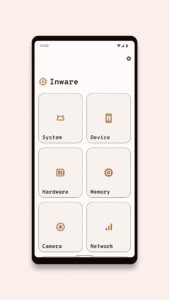
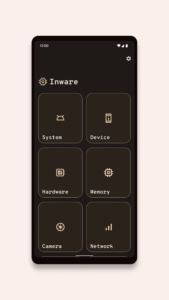
Since 2018, Inware has been constantly evolving and improving to offer you the best possible experience. Design is part of that experience. Because Inware uses Google's latest Material Design, you can enjoy a modern and beautiful interface while easily finding information about your device. On top of that, Inware is entirely free and contains no ads. It also relies on data coming directly from your own device.
Whether you're a developer or not, Inware can help you learn more about your device.
Available specifications
- Android-related information (current version, preloaded version, Treble support, Seamless updates support, active slot, etc.)
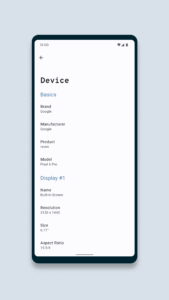
- Display information (name, resolution, size, aspect ratio, refresh rate, etc.)
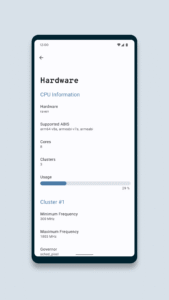
- Hardware information (CPU, RAM, GPU, etc.)
- Network & connectivity information (Wi-Fi, Bluetooth, etc.)
- Camera information (megapixels, apertures, OIS & EIS support, etc.)
- Battery information (capacity, current, voltage, temperature, etc.)
- Media DRM information (supported DRM, security level, vendor, version, etc.)
- And many more
Get in touch:
For any questions, contact mail[at]evowizz.dev.
Show more
Show less
Advertisement
Remove ads, dark theme, and more with
Premium
Since 2018, Inware has been constantly evolving and improving to offer you the best possible experience. Design is part of that experience. Because Inware uses Google's latest Material Design, you can enjoy a modern and beautiful interface while easily finding information about your device. On top of that, Inware is entirely free and contains no ads. It also relies on data coming directly from your own device.
Whether you're a developer or not, Inware can help you learn more about your device.
Available specifications
- Android-related information (current version, preloaded version, Treble support, Seamless updates support, active slot, etc.)
- Display information (name, resolution, size, aspect ratio, refresh rate, etc.)
- Hardware information (CPU, RAM, GPU, etc.)
- Network & connectivity information (Wi-Fi, Bluetooth, etc.)
- Camera information (megapixels, apertures, OIS & EIS support, etc.)
- Battery information (capacity, current, voltage, temperature, etc.)
- Media DRM information (supported DRM, security level, vendor, version, etc.)
- And many more
Get in touch:
For any questions, contact mail[at]evowizz.dev.
Show more
Show less
Download Inware APK
Fast, free and safe download.
APK Permissions 19
- android.permission.ACCESS_ADSERVICES_AD_ID
- android.permission.ACCESS_ADSERVICES_ATTRIBUTION
- android.permission.ACCESS_COARSE_LOCATION
- android.permission.ACCESS_FINE_LOCATION
- android.permission.ACCESS_NETWORK_STATE
- android.permission.ACCESS_WIFI_STATE
- android.permission.BLUETOOTH
- android.permission.BLUETOOTH_CONNECT
- android.permission.HIDE_OVERLAY_WINDOWS
- android.permission.INTERNET
- android.permission.POST_NOTIFICATIONS
- android.permission.READ_EXTERNAL_STORAGE
- android.permission.READ_PHONE_STATE
- android.permission.VIBRATE
- android.permission.WAKE_LOCK
- com.evo.inware.DYNAMIC_RECEIVER_NOT_EXPORTED_PERMISSION
- com.google.android.c2dm.permission.RECEIVE
- com.google.android.finsky.permission.BIND_GET_INSTALL_REFERRER_SERVICE
- com.google.android.providers.gsf.permission.READ_GSERVICES
APK Verified
The cryptographic signature guarantees that the file is safe to install and was not tampered with in any way.


Frequently Asked Questions about Inware APK
This is the universal variant — a single APK that contains native libraries for every CPU architecture. It installs on any Android device but is larger than per-architecture variants.
Yes — the APK's signature has been cryptographically verified against the publisher's signing key. The SHA-256 hash is shown in the File Information panel so you can independently confirm the file matches the original release.
Android 26 (API level 36) or newer. Older devices will refuse the install.
Install a free app like 'CPU-Z' or 'Droid Hardware Info' from the Play Store and look at the ABI / Instruction Set row. Most phones made after 2017 are arm64-v8a; if in doubt, download the universal variant.
All variants are functionally identical — same features, same version. They differ only in which CPU architectures the native code is compiled for, and (sometimes) which screen densities the included graphics target. Pick the one that matches your device for the smallest install size, or pick 'Universal' if you're unsure.