
This is the universal build of Tape Measure: Measuring Ruler 6.5.1. It contains native libraries for every CPU architecture (arm64-v8a, armeabi-v7a, x86, x86_64), so it installs on any Android device. The trade-off is size — it's larger than per-architecture variants. Pick this one if you're unsure which CPU your phone has, or if you plan to share the APK with multiple devices.
File size: 31.7 MB • Min Android: 26 • Target Android: 35 • Version code: 914 • Framework: Native (Java/Kotlin) • Permissions: 16
Screenshots
File Information
| Package Name | com.grymala.photoruler |
|---|---|
| Version Name | 6.5.1 |
| Version Code | 914 |
| Architecture | Universal |
| Min Android Version | Android 26 (API 35) |
| Main Activity | com.grymala.photoruler.help_activities.StartScreen |
| Framework | Native (Java/Kotlin) |
| File Size | 31.66 MB |
| Signature (SHA1) | 2ABE7DA2828CBB95DF62CDAB9774A87817A8F314 |
| File Hash (SHA256) | f33dcc9354f75270a2106af11852137358a7512b5ce8396663ff614bd8189e38 |
What's New
New version of Prime Ruler App is released and available to install!
A few changes in this update:
*bugs fixed;
*expanded the list of localizations;
*UI improvements;
*corrected measurements via Screen Ruler.
We are working on making your measurements easier. Thank you for trusting us!
A few changes in this update:
*bugs fixed;
*expanded the list of localizations;
*UI improvements;
*corrected measurements via Screen Ruler.
We are working on making your measurements easier. Thank you for trusting us!
App Description
ARCore Ruler app
- Powerful tape measure tool, which takes advantages of the use of Augmented Reality.
Please note that AR Ruler app works only on ARCore-supported devices.
Check device compatibility:
developers.google.com/ar/discover/
AR Ruler app uses augmented reality technology (AR) to tape measure the real world with your smartphone’s camera. Target aim on the detected plane and start to use ar tape measure tool:
1) Line - allows to tape measure linear sizes in cm, m, ft, yd, apply mm ruler or inch ruler.
2) Distance meter - allows to tape measure distance from device camera to a fixed point on the detected 3D plane.
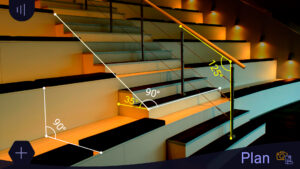
3) Angle - allows to tape measure corners on 3D planes.
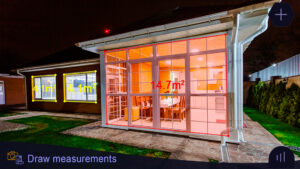
4) Area and Perimeter.
5) Volume – allows to tape measure size of 3D objects.
6) Path - allows to calculate the length of the path.
7) Height - allows to tape measure height relative to the recognized surface.
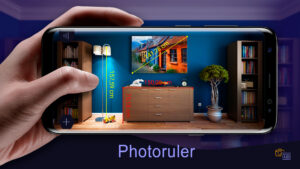
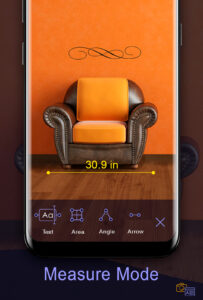
Photo Ruler app is designed to accurately tape measure the size of any object by either taking a picture of it or to measure it on the screen. Photo Ruler app allows you to measure things just as conveniently and precisely as with a traditional mm ruler or tape measure tool.
Ruler app is ALSO AVAILABLE FOR IPHONE:
itunes.apple.com/us/app/photo-ruler-measure-and-label/id1020133524?mt=8
How to use Ruler app:
Photo Ruler app:
Firstly, please ensure that the object you wish to tape measure and the object of known length (Base Item) are in the same picture. There is a predefined list of Base Items in the ruler app settings, including Debit/credit card and Quarter. Select the one you have. Use the Base Item which is closest in size to the object you wish to tape measure using Ruler app.
Secondly, ensure that the Base Item and the object you wish to tape measure using Ruler app are in the same plane and the ruler app camera is (or was) parallel to them. This is necessary to avoid image distortions caused by the ruler app camera perspective.
Align the Blue arrows against the Base item and Green arrows against the object you want to tape measure. The length of the measured object is shown on the Ruler app screen.
Ordinary mm ruler app:
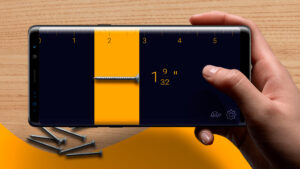
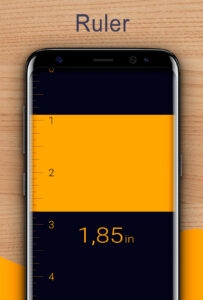
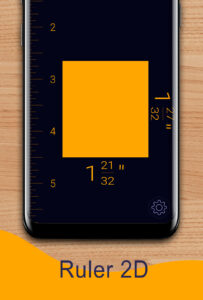
Use screen as a traditional mm ruler app. You can tape measure size of a small object by placing it on the device's screen and adjusting line limiters against the object. If you see that mm ruler app scale is visually stretched/ shrunken, you can reset mm ruler app calibration manually. On-screen mm ruler app can be calibrated using different Base Items, including Debit/credit card or coin. Choose between Imperial (inches) and Metric mm ruler (centimeters).
Accuracy of mm ruler app:
Given that you have accurately aligned markers, you will receive a measure that is as precise as when using a traditional mm ruler app or tape measure tool.
- Powerful tape measure tool, which takes advantages of the use of Augmented Reality.
Please note that AR Ruler app works only on ARCore-supported devices.
Check device compatibility:
developers.google.com/ar/discover/
AR Ruler app uses augmented reality technology (AR) to tape measure the real world with your smartphone’s camera. Target aim on the detected plane and start to use ar tape measure tool:
1) Line - allows to tape measure linear sizes in cm, m, ft, yd, apply mm ruler or inch ruler.
2) Distance meter - allows to tape measure distance from device camera to a fixed point on the detected 3D plane.
3) Angle - allows to tape measure corners on 3D planes.
4) Area and Perimeter.
5) Volume – allows to tape measure size of 3D objects.
6) Path - allows to calculate the length of the path.
7) Height - allows to tape measure height relative to the recognized surface.
Photo Ruler app is designed to accurately tape measure the size of any object by either taking a picture of it or to measure it on the screen. Photo Ruler app allows you to measure things just as conveniently and precisely as with a traditional mm ruler or tape measure tool.
Ruler app is ALSO AVAILABLE FOR IPHONE:
itunes.apple.com/us/app/photo-ruler-measure-and-label/id1020133524?mt=8
How to use Ruler app:
Photo Ruler app:
Firstly, please ensure that the object you wish to tape measure and the object of known length (Base Item) are in the same picture. There is a predefined list of Base Items in the ruler app settings, including Debit/credit card and Quarter. Select the one you have. Use the Base Item which is closest in size to the object you wish to tape measure using Ruler app.
Secondly, ensure that the Base Item and the object you wish to tape measure using Ruler app are in the same plane and the ruler app camera is (or was) parallel to them. This is necessary to avoid image distortions caused by the ruler app camera perspective.
Align the Blue arrows against the Base item and Green arrows against the object you want to tape measure. The length of the measured object is shown on the Ruler app screen.
Ordinary mm ruler app:
Use screen as a traditional mm ruler app. You can tape measure size of a small object by placing it on the device's screen and adjusting line limiters against the object. If you see that mm ruler app scale is visually stretched/ shrunken, you can reset mm ruler app calibration manually. On-screen mm ruler app can be calibrated using different Base Items, including Debit/credit card or coin. Choose between Imperial (inches) and Metric mm ruler (centimeters).
Accuracy of mm ruler app:
Given that you have accurately aligned markers, you will receive a measure that is as precise as when using a traditional mm ruler app or tape measure tool.
Download Tape Measure: Measuring Ruler APK
Fast, free and safe download.
APK Permissions 16
- android.permission.ACCESS_ADSERVICES_AD_ID
- android.permission.ACCESS_ADSERVICES_ATTRIBUTION
- android.permission.ACCESS_ADSERVICES_TOPICS
- android.permission.ACCESS_NETWORK_STATE
- android.permission.CAMERA
- android.permission.FOREGROUND_SERVICE
- android.permission.INTERNET
- android.permission.READ_EXTERNAL_STORAGE
- android.permission.READ_MEDIA_IMAGES
- android.permission.VIBRATE
- android.permission.WAKE_LOCK
- android.permission.WRITE_EXTERNAL_STORAGE
- com.android.vending.BILLING
- com.google.android.finsky.permission.BIND_GET_INSTALL_REFERRER_SERVICE
- com.google.android.gms.permission.AD_ID
- com.grymala.photoruler.DYNAMIC_RECEIVER_NOT_EXPORTED_PERMISSION
APK Verified
The cryptographic signature guarantees that the file is safe to install and was not tampered with in any way.
Similar in Tools


Frequently Asked Questions about Tape Measure: Measuring Ruler APK
This is the universal variant — a single APK that contains native libraries for every CPU architecture. It installs on any Android device but is larger than per-architecture variants.
Yes — the APK's signature has been cryptographically verified against the publisher's signing key. The SHA-256 hash is shown in the File Information panel so you can independently confirm the file matches the original release.
Android 26 (API level 35) or newer. Older devices will refuse the install.
Install a free app like 'CPU-Z' or 'Droid Hardware Info' from the Play Store and look at the ABI / Instruction Set row. Most phones made after 2017 are arm64-v8a; if in doubt, download the universal variant.
All variants are functionally identical — same features, same version. They differ only in which CPU architectures the native code is compiled for, and (sometimes) which screen densities the included graphics target. Pick the one that matches your device for the smallest install size, or pick 'Universal' if you're unsure.