
This is the universal build of ING Netherlands 2025.18.0. It contains native libraries for every CPU architecture (arm64-v8a, armeabi-v7a, x86, x86_64), so it installs on any Android device. The trade-off is size — it's larger than per-architecture variants. Pick this one if you're unsure which CPU your phone has, or if you plan to share the APK with multiple devices.
File size: 92.1 MB • Min Android: 26 • Target Android: 35 • Version code: 2024309650 • Framework: Native (Java/Kotlin) • Permissions: 22
Screenshots

File Information
| Package Name | com.ing.mobile |
|---|---|
| Version Name | 2025.18.0 |
| Version Code | 2024309650 |
| Architecture | Universal |
| Min Android Version | Android 26 (API 35) |
| Main Activity | com.ing.mobile.app.activities.SplashActivity |
| Framework | Native (Java/Kotlin) |
| File Size | 92.11 MB |
| Signature (SHA1) | F1A686ED66008896CA88D9A7797256E63BCAF455 |
| File Hash (SHA256) | 043e5efa98b03e622c4a6ff2ff332f0b775ed454edf0e6e9c77b7c97c853afc7 |
What's New
As we roll into September, we've rolled out a few small improvements in the app to make your experience even better. Just like autumn sneaks up on you, these updates are here quicker than you can say 'goodbye summer'.
App Description
Your bank, always at hand with the ING App
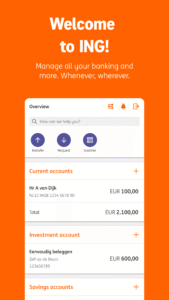
Manage your money easily and securely – anytime, anywhere. With the ING App, you handle all your banking needs for both personal and business accounts. From checking your balance to investing: everything in one app.
What you can do with the ING App:
• Fast and secure payments: confirm transactions with your mobile device.
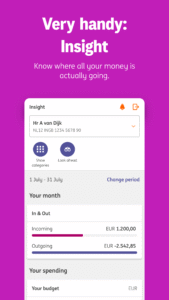
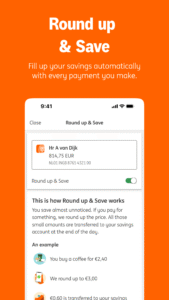
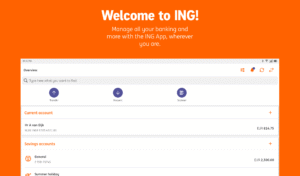
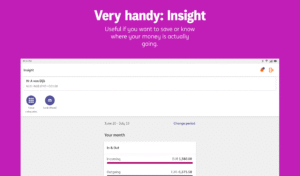
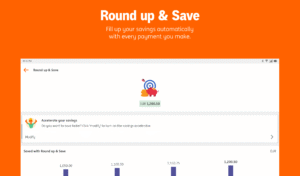
• Overview & control: check your balance, scheduled transfers and savings plans.
• Send payment requests: getting your money back is quick and easy.
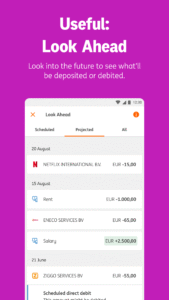
• Look ahead: view up to 35 days of upcoming debits and credits.
• Custom daily limit: set your own maximum amount per day.
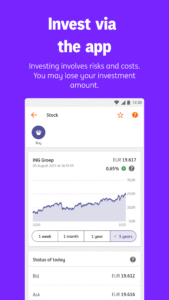
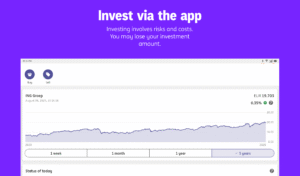
• All-in-one app: payments, savings, loans, investments, credit card and even your ING insurance.
Manage it yourself in the ING App
From blocking your card to updating your address – you can do it instantly in the ING App. No waiting, no paperwork.
Don’t have an ING account yet?
Easily open a new current account via the ING App. All you need is a valid ID.
What you need to activate the ING App:
• An ING current account
• A Mijn ING account
• A valid ID (passport, EU ID card, Dutch residence permit, Foreign Nationals ID or Dutch driver’s license)
Security first
• Your banking is done via a secure connection.
• No personal data is stored on your device.
• Always use the latest version of the ING App for optimal security and new features.
With the ING App, you’re in control. Download the app and experience the ease of mobile banking.
Manage your money easily and securely – anytime, anywhere. With the ING App, you handle all your banking needs for both personal and business accounts. From checking your balance to investing: everything in one app.
What you can do with the ING App:
• Fast and secure payments: confirm transactions with your mobile device.
• Overview & control: check your balance, scheduled transfers and savings plans.
• Send payment requests: getting your money back is quick and easy.
• Look ahead: view up to 35 days of upcoming debits and credits.
• Custom daily limit: set your own maximum amount per day.
• All-in-one app: payments, savings, loans, investments, credit card and even your ING insurance.
Manage it yourself in the ING App
From blocking your card to updating your address – you can do it instantly in the ING App. No waiting, no paperwork.
Don’t have an ING account yet?
Easily open a new current account via the ING App. All you need is a valid ID.
What you need to activate the ING App:
• An ING current account
• A Mijn ING account
• A valid ID (passport, EU ID card, Dutch residence permit, Foreign Nationals ID or Dutch driver’s license)
Security first
• Your banking is done via a secure connection.
• No personal data is stored on your device.
• Always use the latest version of the ING App for optimal security and new features.
With the ING App, you’re in control. Download the app and experience the ease of mobile banking.
Download ING Netherlands APK
Fast, free and safe download.
APK Permissions 22
- android.permission.ACCESS_NETWORK_STATE
- android.permission.CAMERA
- android.permission.CHANGE_NETWORK_STATE
- android.permission.DETECT_SCREEN_RECORDING
- android.permission.FOREGROUND_SERVICE
- android.permission.FOREGROUND_SERVICE_PHONE_CALL
- android.permission.INTERNET
- android.permission.MANAGE_OWN_CALLS
- android.permission.MODIFY_AUDIO_SETTINGS
- android.permission.NFC
- android.permission.POST_NOTIFICATIONS
- android.permission.QUERY_ALL_PACKAGES
- android.permission.READ_EXTERNAL_STORAGE
- android.permission.RECEIVE_BOOT_COMPLETED
- android.permission.RECORD_AUDIO
- android.permission.USE_BIOMETRIC
- android.permission.USE_FINGERPRINT
- android.permission.VIBRATE
- android.permission.WAKE_LOCK
- android.permission.WRITE_EXTERNAL_STORAGE
- com.google.android.c2dm.permission.RECEIVE
- com.ing.mobile.DYNAMIC_RECEIVER_NOT_EXPORTED_PERMISSION
APK Verified
The cryptographic signature guarantees that the file is safe to install and was not tampered with in any way.
Similar in Finance


More by ING Bank N.V.

Frequently Asked Questions about ING Netherlands APK
This is the universal variant — a single APK that contains native libraries for every CPU architecture. It installs on any Android device but is larger than per-architecture variants.
Yes — the APK's signature has been cryptographically verified against the publisher's signing key. The SHA-256 hash is shown in the File Information panel so you can independently confirm the file matches the original release.
Android 26 (API level 35) or newer. Older devices will refuse the install.
Install a free app like 'CPU-Z' or 'Droid Hardware Info' from the Play Store and look at the ABI / Instruction Set row. Most phones made after 2017 are arm64-v8a; if in doubt, download the universal variant.
All variants are functionally identical — same features, same version. They differ only in which CPU architectures the native code is compiled for, and (sometimes) which screen densities the included graphics target. Pick the one that matches your device for the smallest install size, or pick 'Universal' if you're unsure.