
Download Video Merger, Joiner, Collage APK 18.9.0 arm64-v8a · Android 26+
Download APK
Verified Safe
This is the arm64-v8a build of Video Merger, Joiner, Collage 18.9.0 — the modern 64-bit ARM build that runs on virtually every Android phone released since 2017. It's smaller and faster than the universal variant because Android only loads the native code your CPU actually needs. If your phone is from the last 8 years, this is the right pick.
File size: 48.1 MB • Min Android: 26 • Target Android: 36 • Version code: 2000103 • Framework: Native (Java/Kotlin) • Permissions: 30
Screenshots

File Information
| Package Name | com.video_joiner.video_merger |
|---|---|
| Version Name | 18.9.0 |
| Version Code | 2000103 |
| Architecture | arm64-v8a |
| Min Android Version | Android 26 (API 36) |
| Main Activity | com.video_joiner.video_merger.screens.splashScreen.SplashScreenActivity |
| Framework | Native (Java/Kotlin) |
| File Size | 48.08 MB |
| Signature (SHA1) | 1B46BC0C0C40E5B55BD9A1FE20C29E9C4122885B |
| File Hash (SHA256) | df824635e5c94252032964aa693afbb52d4dc7c8b167809e740d45f3bb8bfc5b |
What's New
- Fixed app crash issues to improve stability.
- Resolved various minor bugs and performance issues.
- Resolved various minor bugs and performance issues.
App Description
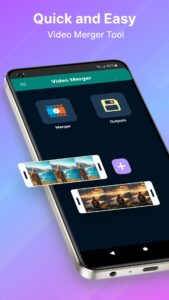
Video Merger, Joiner, Collage can merge or join any number of Videos together in one Video. It has advanced video editing features for any type of pro level editing like Cut, Trim, Crop etc. Also you can add audio, text, filters, stickers. For social media sharing, different types of video ratio is important - this app can be your ultimate solution.
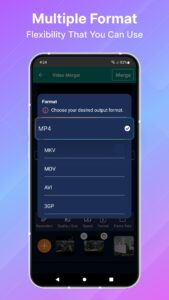
It supports all formats of videos as input. Some of the supported formats are mp4, mkv, 3gp, 3gpp, mov, flv, avi, mpg, mpeg, m4v, mpeg, vob, wmv, webm, mts, ts, m2ts etc. It can also convert the merged video to many formats. The supported merged output formats are mp4, mkv, mov, avi, 3gp etc.
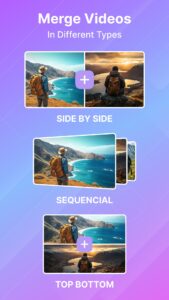
Using Video merger you can merge in three different ways. Those are:
- Side by side: Select two videos and the videos will be merged side by side format (Horizontal stack).
- Top Bottom: Select two videos and the videos will be merged top bottom format (Vertical stack).
- Sequential: Select unlimited videos and the videos will be merged one after another format.
This video merger Joiner application supports combining different format, bitrate, frame rate of videos into one video. It also scales different videos into one scale and merges them together. Also it merges or combines different resolution videos to one video.
The merged videos are also compressed together, maintaining original quality to smaller sized videos than all the original video sizes combined.
Also, if you are looking for a powerful video collage maker app to combine videos into one creative frame, this app is simple video collage software designed to help you effortlessly create eye-catching collages. Whether you're a content creator or just want to compile your best memories, this collage video editor offers a better experience.
KEY FEATURES
🎬 Merge/Join/Combine any number of videos together.
🎬 Video collage maker of any popular format.
🎬 By default compresses the video maintaining high quality.
🎬 Reduce video size, shrink video, save and clear device's storage space.
🎬 Converts the merged videos to MP4, 3GP, MKV,MOV, AVI formats. (Pro feature)
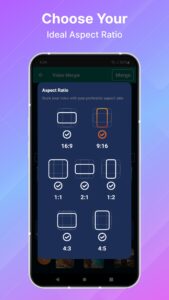
🎬 Change scaling to different aspect ratios for all input videos.
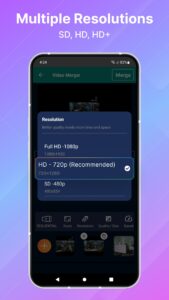
🎬 Change original video resolution to different resolutions.
🎬 MP4, MKV, AVI, 3GP, FLV, MTS, MPEG, MPG, WMV, M4V, MOV, VOB formats are supported as for merging videos.
🎬 Share Merged, compressed, converted and size reduced videos.
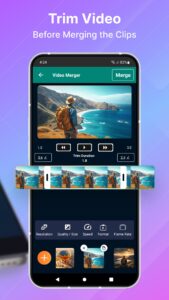
🎬 Simple Video editing features such as Cut, Trim, Crop & Split.
🎬 Advanced editing features for content creator like Ratio, Volume control, different effects & background change.
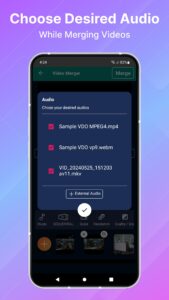
🎬 Add text, filters & audio to have an ultimate smart content.
This software uses source code of
FFmpeg
which is available
here.
The instruction to compile and build the library is in the readme file inside it.
It supports all formats of videos as input. Some of the supported formats are mp4, mkv, 3gp, 3gpp, mov, flv, avi, mpg, mpeg, m4v, mpeg, vob, wmv, webm, mts, ts, m2ts etc. It can also convert the merged video to many formats. The supported merged output formats are mp4, mkv, mov, avi, 3gp etc.
Using Video merger you can merge in three different ways. Those are:
- Side by side: Select two videos and the videos will be merged side by side format (Horizontal stack).
- Top Bottom: Select two videos and the videos will be merged top bottom format (Vertical stack).
- Sequential: Select unlimited videos and the videos will be merged one after another format.
This video merger Joiner application supports combining different format, bitrate, frame rate of videos into one video. It also scales different videos into one scale and merges them together. Also it merges or combines different resolution videos to one video.
The merged videos are also compressed together, maintaining original quality to smaller sized videos than all the original video sizes combined.
Also, if you are looking for a powerful video collage maker app to combine videos into one creative frame, this app is simple video collage software designed to help you effortlessly create eye-catching collages. Whether you're a content creator or just want to compile your best memories, this collage video editor offers a better experience.
KEY FEATURES
🎬 Merge/Join/Combine any number of videos together.
🎬 Video collage maker of any popular format.
🎬 By default compresses the video maintaining high quality.
🎬 Reduce video size, shrink video, save and clear device's storage space.
🎬 Converts the merged videos to MP4, 3GP, MKV,MOV, AVI formats. (Pro feature)
🎬 Change scaling to different aspect ratios for all input videos.
🎬 Change original video resolution to different resolutions.
🎬 MP4, MKV, AVI, 3GP, FLV, MTS, MPEG, MPG, WMV, M4V, MOV, VOB formats are supported as for merging videos.
🎬 Share Merged, compressed, converted and size reduced videos.
🎬 Simple Video editing features such as Cut, Trim, Crop & Split.
🎬 Advanced editing features for content creator like Ratio, Volume control, different effects & background change.
🎬 Add text, filters & audio to have an ultimate smart content.
This software uses source code of
FFmpeg
which is available
here.
The instruction to compile and build the library is in the readme file inside it.
Download Video Merger, Joiner, Collage APK
Fast, free and safe download.
APK Permissions 30
- android.permission.ACCESS_ADSERVICES_AD_ID
- android.permission.ACCESS_ADSERVICES_ATTRIBUTION
- android.permission.ACCESS_ADSERVICES_TOPICS
- android.permission.ACCESS_NETWORK_STATE
- android.permission.ACCESS_WIFI_STATE
- android.permission.FOREGROUND_SERVICE
- android.permission.FOREGROUND_SERVICE_DATA_SYNC
- android.permission.FOREGROUND_SERVICE_MEDIA_PROCESSING
- android.permission.INTERNET
- android.permission.POST_NOTIFICATION
- android.permission.POST_NOTIFICATIONS
- android.permission.READ_EXTERNAL_STORAGE
- android.permission.READ_MEDIA_AUDIO
- android.permission.READ_MEDIA_IMAGES
- android.permission.READ_MEDIA_VIDEO
- android.permission.READ_MEDIA_VISUAL_USER_SELECTED
- android.permission.RECEIVE_BOOT_COMPLETED
- android.permission.RECORD_AUDIO
- android.permission.REQUEST_IGNORE_BATTERY_OPTIMIZATIONS
- android.permission.VIBRATE
- android.permission.WAKE_LOCK
- android.permission.WRITE_EXTERNAL_STORAGE
- android.permission.WRITE_MEDIA_AUDIO
- android.permission.WRITE_MEDIA_IMAGES
- android.permission.WRITE_MEDIA_VIDEO
- com.android.vending.BILLING
- com.google.android.c2dm.permission.RECEIVE
- com.google.android.finsky.permission.BIND_GET_INSTALL_REFERRER_SERVICE
- com.google.android.gms.permission.AD_ID
- com.video_joiner.video_merger.DYNAMIC_RECEIVER_NOT_EXPORTED_PERMISSION
APK Verified
The cryptographic signature guarantees that the file is safe to install and was not tampered with in any way.
Similar in Video Players


More by Inverse AI

Frequently Asked Questions about Video Merger, Joiner, Collage APK
This variant is built for 64-bit ARM (most Android phones made since 2017). If your device's CPU matches, this is the smallest, fastest version to install.
Yes — the APK's signature has been cryptographically verified against the publisher's signing key. The SHA-256 hash is shown in the File Information panel so you can independently confirm the file matches the original release.
Android 26 (API level 36) or newer. Older devices will refuse the install.
Install a free app like 'CPU-Z' or 'Droid Hardware Info' from the Play Store and look at the ABI / Instruction Set row. Most phones made after 2017 are arm64-v8a; if in doubt, download the universal variant.
All variants are functionally identical — same features, same version. They differ only in which CPU architectures the native code is compiled for, and (sometimes) which screen densities the included graphics target. Pick the one that matches your device for the smallest install size, or pick 'Universal' if you're unsure.