
This is the universal build of AnyGo - GPS Emulator 4.2.9. It contains native libraries for every CPU architecture (arm64-v8a, armeabi-v7a, x86, x86_64), so it installs on any Android device. The trade-off is size — it's larger than per-architecture variants. Pick this one if you're unsure which CPU your phone has, or if you plan to share the APK with multiple devices.
File size: 24.8 MB • Min Android: 24 • Target Android: 35 • Version code: 429 • Framework: Native (Java/Kotlin) • Permissions: 21
Screenshots


File Information
| Package Name | com.luckydog.anygoapp |
|---|---|
| Version Name | 4.2.9 |
| Version Code | 429 |
| Architecture | Universal |
| Min Android Version | Android 24 (API 35) |
| Main Activity | com.luckydog.anygoapp.activity.WelcomeActivity |
| Framework | Native (Java/Kotlin) |
| File Size | 24.77 MB |
| Signature (SHA1) | BF45644D83C49A7709FC086A741869532222969F |
| File Hash (SHA256) | c2df574feed3bde85014390a77c1c7485a47dfb03fc8ecf862d14b037170c28e |
What's New
1. Fixed some bugs.
App Description
Want to explore the world without leaving your home? The premium AnyGo GPS Emulator is here to help!
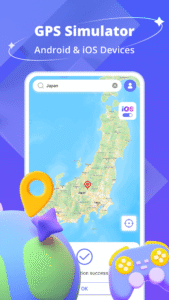
AnyGo is a professional GPS movement simulator designed for mobile AR games, app development, and privacy protection. Simulate your location in real-time with flexible controls and high stability—no root or jailbreak required.
⭐ Key Features:
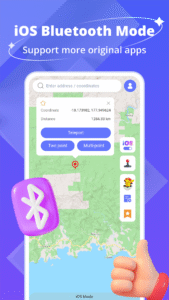
✨iOS Bluetooth Mode: Seamless GPS simulation on iPhone via Bluetooth.
✨Android Mode: Enhance the experience for Android gameplayers
✨Normal Mode: Protect your location privacy on social apps like WhatsApp, Facebook, or Snapchat.
🏆 Other Functions:
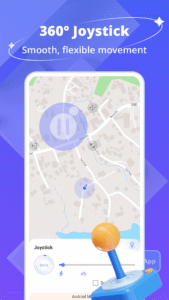
🚩GPS Joystick: Control movement in any direction with a 360° virtual joystick.
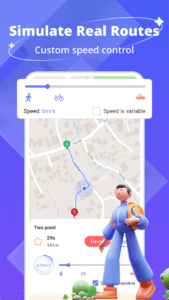
🚩Speed Control: Adjust movement speed to mimic walking, cycling, or driving.
🚩Route Planner: Generate natural routes between points.
🚩Favorite Locations: Save and teleport to commonly used spots with one tap.
As a premium location simulation tool, AnyGo meets all your needs! Simulating GPS movement with the AnyGo GPS emulator is easier than you think!
📢 Note: Reboot your device to restore the origin location.
⚠️ Disclaimer
This application protects people's actual GPS location from being tracked by others. AnyGo is built for safe, responsible use. Please comply with all platform and app policies.
AnyGo is a professional GPS movement simulator designed for mobile AR games, app development, and privacy protection. Simulate your location in real-time with flexible controls and high stability—no root or jailbreak required.
⭐ Key Features:
✨iOS Bluetooth Mode: Seamless GPS simulation on iPhone via Bluetooth.
✨Android Mode: Enhance the experience for Android gameplayers
✨Normal Mode: Protect your location privacy on social apps like WhatsApp, Facebook, or Snapchat.
🏆 Other Functions:
🚩GPS Joystick: Control movement in any direction with a 360° virtual joystick.
🚩Speed Control: Adjust movement speed to mimic walking, cycling, or driving.
🚩Route Planner: Generate natural routes between points.
🚩Favorite Locations: Save and teleport to commonly used spots with one tap.
As a premium location simulation tool, AnyGo meets all your needs! Simulating GPS movement with the AnyGo GPS emulator is easier than you think!
📢 Note: Reboot your device to restore the origin location.
⚠️ Disclaimer
This application protects people's actual GPS location from being tracked by others. AnyGo is built for safe, responsible use. Please comply with all platform and app policies.
Download AnyGo - GPS Emulator APK
Fast, free and safe download.
APK Permissions 21
- android.permission.ACCESS_ADSERVICES_AD_ID
- android.permission.ACCESS_ADSERVICES_ATTRIBUTION
- android.permission.ACCESS_COARSE_LOCATION
- android.permission.ACCESS_FINE_LOCATION
- android.permission.ACCESS_MOCK_LOCATION
- android.permission.ACCESS_NETWORK_STATE
- android.permission.BLUETOOTH
- android.permission.BLUETOOTH_ADMIN
- android.permission.BLUETOOTH_CONNECT
- android.permission.BLUETOOTH_SCAN
- android.permission.FOREGROUND_SERVICE
- android.permission.FOREGROUND_SERVICE_SPECIAL_USE
- android.permission.INTERNET
- android.permission.READ_EXTERNAL_STORAGE
- android.permission.SYSTEM_ALERT_WINDOW
- android.permission.WAKE_LOCK
- android.permission.WRITE_EXTERNAL_STORAGE
- com.android.vending.BILLING
- com.google.android.finsky.permission.BIND_GET_INSTALL_REFERRER_SERVICE
- com.google.android.gms.permission.AD_ID
- com.luckydog.anygoapp.DYNAMIC_RECEIVER_NOT_EXPORTED_PERMISSION
APK Verified
The cryptographic signature guarantees that the file is safe to install and was not tampered with in any way.
Similar in Tools


More by iToolab

Frequently Asked Questions about AnyGo - GPS Emulator APK
This is the universal variant — a single APK that contains native libraries for every CPU architecture. It installs on any Android device but is larger than per-architecture variants.
Yes — the APK's signature has been cryptographically verified against the publisher's signing key. The SHA-256 hash is shown in the File Information panel so you can independently confirm the file matches the original release.
Android 24 (API level 35) or newer. Older devices will refuse the install.
Install a free app like 'CPU-Z' or 'Droid Hardware Info' from the Play Store and look at the ABI / Instruction Set row. Most phones made after 2017 are arm64-v8a; if in doubt, download the universal variant.
All variants are functionally identical — same features, same version. They differ only in which CPU architectures the native code is compiled for, and (sometimes) which screen densities the included graphics target. Pick the one that matches your device for the smallest install size, or pick 'Universal' if you're unsure.