
This is the universal build of Image & Video Date Fixer 2.30.0. It contains native libraries for every CPU architecture (arm64-v8a, armeabi-v7a, x86, x86_64), so it installs on any Android device. The trade-off is size — it's larger than per-architecture variants. Pick this one if you're unsure which CPU your phone has, or if you plan to share the APK with multiple devices.
File size: 10.4 MB • Min Android: 28 • Target Android: 35 • Version code: 2300000 • Framework: Native (Java/Kotlin) • Permissions: 13
Screenshots
File Information
| Package Name | eu.duong.imagedatefixer |
|---|---|
| Version Name | 2.30.0 |
| Version Code | 2300000 |
| Architecture | Universal |
| Min Android Version | Android 28 (API 35) |
| Main Activity | eu.duong.imagedatefixer.activities.MainActivity |
| Framework | Native (Java/Kotlin) |
| File Size | 10.38 MB |
| Signature (SHA1) | 81A227058CB9E48167D3DFFBA30035C84A660026 |
| File Hash (SHA256) | e350327c81bf95c3403273087a1cb919ef4209258b35bb45bf1cb51cdad93f8c |
What's New
• Fixed video XMP data written in local time instead of UTC
• Added information for some chinese phone brands to rebuild the media storage
• Updated perl library to support 16KB pagesize
• Updated all libraries
• Fixed some translations
• Added information for some chinese phone brands to rebuild the media storage
• Updated perl library to support 16KB pagesize
• Updated all libraries
• Fixed some translations
App Description
Put your pictures and videos in your gallery back in the right order!
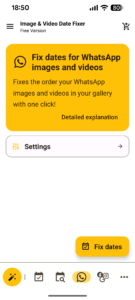
• Also works for images without EXIF metadata, e.g. WhatsApp images.
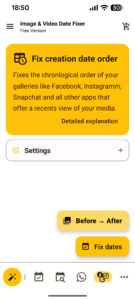
• It is also possible to correct the order in the built-in galleries of e.g. Instagram or Facebook.
Have you ever copied pictures from one smartphone to another?
Downloaded them from a cloud backup or copied them from a hard disk or memory card to your smartphone and then found your pictures and videos
completely mixed up in your gallery?
Image & Video Date Fixer was developed to solve exactly this problem!
Namely to put your valuable pictures and videos back in the correct chronological order.
➜ Why does the problem occur?
After copying the files to your smartphone, the file modification date of your pictures and videos is set to one and the same date, namely to the date on which the pictures were copied to your smartphone.
As the file modification date is used for sorting in galleries, the images now appear in random order.
➜ How can Image & Video Date Fixer correct this?
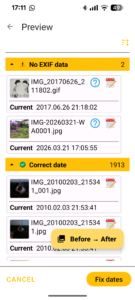
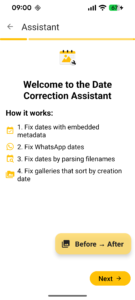
Cameras store metadata in images and videos, for images this metadata type is called EXIF, for videos quicktime.
This EXIF and qicktime metadata contains, for example, the camera model, GPS coordinates and the recording date.
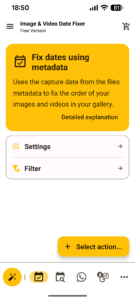
Image & Video Date Fixer can use this recording date to set the file modification date to the recording date.
This allows the gallery to display the images in the correct order again.
➜ What about images and videos without metadata?
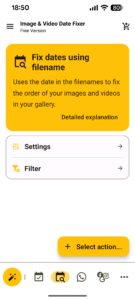
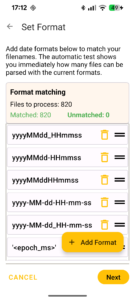
In the event that no metadata such as EXIF or quicktime is available, Image & Video Date Fixer can use the date from the file name, if available.
This applies to WhatsApp images, for example.
In addition to correcting the file modification date, EXIF or quicktime metadata is also saved for both images and videos.
➜ What else can Image & Video Date Fixer do?
Image & Video Date Fixer also offers the option of changing the date for multiple images as required.
The following options are available:
• Manual date input
• Set a date or time for selected files
• Increment the date by days, hours, minutes or seconds
• Applying a time difference
• Set EXIF or quicktime metadata based on file modification date
➜ Information about Instagram, Facebook, Twitter (X) and some other apps.
Some apps use the creation date to sort the images and unfortunately it is not technically possible to change the creation date.
Nevertheless, Image & Video Date Fixer can restore the order. To do this, Image & Video Date Fixer must temporarily move the images and videos
to another folder. There they are then sorted according to the date they were taken and then moved back to their original location.
This is done in chronological order, with the oldest image or video first and the newest last.
This means that although new creation dates are created with today's date, they are in the correct chronological order.
This allows Instagram, Facebook etc. to display the images and videos in the correct order.
💎 Free & Premium Options
With the free version, 50 files can be corrected per run.
If more files are to be corrected per run, the premium version must be purchased.
Correcting Facebook and Instagram galleries, which sort by creation date, is also only possible in the premium version.
---
❗Information regarding usage of android.permission.FOREGROUND_SERVICE:
Processing all your files can take several minutes, even hours, depening on your device, amount of images or storage you have selected.
To ensure all files are getting processed and the process is not getting interrupted, which could cause wrong results and media not showing in the gallery anymore, this permission is required to prevent the app getting killed by the system while your images are getting processed.
While the service is running a statusbar notification will be shown.
• Also works for images without EXIF metadata, e.g. WhatsApp images.
• It is also possible to correct the order in the built-in galleries of e.g. Instagram or Facebook.
Have you ever copied pictures from one smartphone to another?
Downloaded them from a cloud backup or copied them from a hard disk or memory card to your smartphone and then found your pictures and videos
completely mixed up in your gallery?
Image & Video Date Fixer was developed to solve exactly this problem!
Namely to put your valuable pictures and videos back in the correct chronological order.
➜ Why does the problem occur?
After copying the files to your smartphone, the file modification date of your pictures and videos is set to one and the same date, namely to the date on which the pictures were copied to your smartphone.
As the file modification date is used for sorting in galleries, the images now appear in random order.
➜ How can Image & Video Date Fixer correct this?
Cameras store metadata in images and videos, for images this metadata type is called EXIF, for videos quicktime.
This EXIF and qicktime metadata contains, for example, the camera model, GPS coordinates and the recording date.
Image & Video Date Fixer can use this recording date to set the file modification date to the recording date.
This allows the gallery to display the images in the correct order again.
➜ What about images and videos without metadata?
In the event that no metadata such as EXIF or quicktime is available, Image & Video Date Fixer can use the date from the file name, if available.
This applies to WhatsApp images, for example.
In addition to correcting the file modification date, EXIF or quicktime metadata is also saved for both images and videos.
➜ What else can Image & Video Date Fixer do?
Image & Video Date Fixer also offers the option of changing the date for multiple images as required.
The following options are available:
• Manual date input
• Set a date or time for selected files
• Increment the date by days, hours, minutes or seconds
• Applying a time difference
• Set EXIF or quicktime metadata based on file modification date
➜ Information about Instagram, Facebook, Twitter (X) and some other apps.
Some apps use the creation date to sort the images and unfortunately it is not technically possible to change the creation date.
Nevertheless, Image & Video Date Fixer can restore the order. To do this, Image & Video Date Fixer must temporarily move the images and videos
to another folder. There they are then sorted according to the date they were taken and then moved back to their original location.
This is done in chronological order, with the oldest image or video first and the newest last.
This means that although new creation dates are created with today's date, they are in the correct chronological order.
This allows Instagram, Facebook etc. to display the images and videos in the correct order.
💎 Free & Premium Options
With the free version, 50 files can be corrected per run.
If more files are to be corrected per run, the premium version must be purchased.
Correcting Facebook and Instagram galleries, which sort by creation date, is also only possible in the premium version.
---
❗Information regarding usage of android.permission.FOREGROUND_SERVICE:
Processing all your files can take several minutes, even hours, depening on your device, amount of images or storage you have selected.
To ensure all files are getting processed and the process is not getting interrupted, which could cause wrong results and media not showing in the gallery anymore, this permission is required to prevent the app getting killed by the system while your images are getting processed.
While the service is running a statusbar notification will be shown.
Download Image & Video Date Fixer APK
Fast, free and safe download.
APK Permissions 13
- android.permission.ACCESS_NETWORK_STATE
- android.permission.FOREGROUND_SERVICE
- android.permission.FOREGROUND_SERVICE_DATA_SYNC
- android.permission.INTERNET
- android.permission.MANAGE_EXTERNAL_STORAGE
- android.permission.POST_NOTIFICATIONS
- android.permission.READ_EXTERNAL_STORAGE
- android.permission.RECEIVE_BOOT_COMPLETED
- android.permission.VIBRATE
- android.permission.WAKE_LOCK
- android.permission.WRITE_EXTERNAL_STORAGE
- com.android.vending.BILLING
- eu.duong.imagedatefixer.DYNAMIC_RECEIVER_NOT_EXPORTED_PERMISSION
APK Verified
The cryptographic signature guarantees that the file is safe to install and was not tampered with in any way.
Similar in Tools


More by JD Android-Apps

Frequently Asked Questions about Image & Video Date Fixer APK
This is the universal variant — a single APK that contains native libraries for every CPU architecture. It installs on any Android device but is larger than per-architecture variants.
Yes — the APK's signature has been cryptographically verified against the publisher's signing key. The SHA-256 hash is shown in the File Information panel so you can independently confirm the file matches the original release.
Android 28 (API level 35) or newer. Older devices will refuse the install.
Install a free app like 'CPU-Z' or 'Droid Hardware Info' from the Play Store and look at the ABI / Instruction Set row. Most phones made after 2017 are arm64-v8a; if in doubt, download the universal variant.
All variants are functionally identical — same features, same version. They differ only in which CPU architectures the native code is compiled for, and (sometimes) which screen densities the included graphics target. Pick the one that matches your device for the smallest install size, or pick 'Universal' if you're unsure.